• Instructions to Ask a Question

    For any assistance, please click the "Ask a Question" button and select the Pabbly product for which you require support.

    We offer seven comprehensive applications designed to help you efficiently manage and grow your business:

    Our support team endeavors to respond within 24 business hours (Monday to Friday, 10:00 AM to 6:00 PM IST). We appreciate your understanding and patience.

  • Due to Holi celebrations, our team will have limited availability. While we’ll continue to monitor threads, responses may be slightly delayed.

handling null values

Your Workflow URL
https://connect.pabbly.com/workflow/mapping/IjU3NjcwNTZhMDYzNzA0MzU1MjZjNTUzMCI_3D_pc
Your Task History ID
IjU3NjcwNTZhMDYzNzA0MzU1MjZjNTUzMCI_3D_pc#
Consent to Access & Modify
I authorize Pabbly Support to log in to my account and make changes to the specified workflow for troubleshooting.
I am facing a problem in using null values in my workflow. I have created a step no 3 in the workflow to check if a customer has ordered for a second product at the time of placing the order. The field I have used is 'items 1 id' which is only available if there is a second item in the order. If there is no second item, this field does not appear in the response received by pabbly and the result of set no 3 should be '0'. However, insted of returning '0' step no 3 returns the value from the last succesfully run , i.e, 'multiple'
So my requirement is that if there is no second order, the result of step 3 should be '0' and if there is a second order the result should be 'multiple'
How do I solve this?
 

Hrishabh.pabbly

Member
Staff member
Hi @virsingh77 ,

Thank you for sharing the webhook response format.

Since your data is coming in a flattened structure (e.g., Items 0 Id, Items 1 Id, etc.), the correct way to handle this is by using a Router instead of directly checking the field in a Set step.

Please follow these steps:

  1. Add a Router after the webhook trigger.
  2. Create Path 1 with the condition:
    Items 1 Id → Exists
    → In this path, set the value as "multiple".
  3. Keep the Default Path (no condition).
    → In this path, set the value as "0".
This way:

  • If a second product exists, it will return "multiple".
  • If there is only one product and Items 1 Id is not present, it will correctly return "0".
This approach prevents from reusing the previous execution value.
 
But if Items 1 Id does not exist for an order, in path 1 the 'select label' field resets to blank. Next order if Items 1 id is there, the filter doesn't work because the 'select label' field was rest to blank in the previous order.
My requirement is:
if the customer orders for more than 1 product i need to tag it as 'multiple'
the way to identify if the customer has placed order for more than 1 product is if the field 'Items 1 Id' gets created
if the field 'Items 1 Id' is not created that means its a single product order
How do I accomplish this?

My workflow url is https://connect.pabbly.com/workflow/mapping/IjU3NjcwNTZhMDYzNzA0MzU1MjZjNTUzMCI_3D_pc
 

Preeti Paryani

Well-known member
Staff member
Hi @virsingh77,

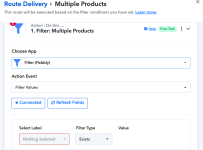
You can handle this by using the Filter with the “Exists” condition, as shown in the screenshot.

Map Items 1 Id in the Select Label field and set the Filter Type → Exists. If this key exists in the response, it means the order contains multiple products. If it does not exist, it means it is a single product order.

You do not need to worry about the label appearing blank in the builder. The filter will still check whether the key exists in the incoming response.

So:

  • Items 1 Id exists → Multiple product order
  • Items 1 Id does not exist → Single product order
You can test this once, and it should work as expected.
 
The label does appear blank in the builder and the filter will still check whether the key exists in the incoming response. Have attached the screenshot to show thatthe label goes blank if in a previous request Items 1 Id was not populated
 

Attachments

  • Screenshot 2026-03-06 at 4.37.26 PM.png
    Screenshot 2026-03-06 at 4.37.26 PM.png
    56.3 KB · Views: 10
The problem is once i receive a single product order, the key for the multi product order disappears and the filter does not work properly work for a multi product order. and going ahead for any multi product order the filter gives the wrong output till the time i do not go an manually update the key again. also pls ignore the errors caused by the time conversion steps, I'm not referring to them. they do not affect how the filter performs.
So to recap the issue:
1. I update the key for a multi product order using 'Items Id 1' field, it works fine
2. The moment there is a single product order, the key goes blank as now the field 'Items Id 1' doesn't exist
3. And going ahead if i receive a multi product order again, the filter will not identify it since the key has disappeared.

Similary, once the key goes blank the filter for single product order also stops working. So the problem is that the key disappears
 
Last edited:
There is also another issue. I have made another workflow as a fallback to capture orders that are not captured by the workflow 'Ecwid to Sheets', this worflow is called 'Clone- Ecwid to sheets' (url: https://connect.pabbly.com/workflow/mapping/IjU3NjcwNTZmMDYzNzA0MzE1MjZjNTUzMTUxMzIi_pc).
In the cloned workflow I have removed the router to filter single and multi product orders.
In that workflow an order with id ZC23X has been captured (Task History ID - IjU3NjUwNTY0MDYzMDA0MzY1MjZkNTUzMzUxMzA1MTYzNTQzNDBmMzAi_pc)
Wheras, in the original worflow, the same order has been missed. Why is that?
 

ArshilAhmad

Well-known member
Staff member
The problem is once i receive a single product order, the key for the multi product order disappears and the filter does not work properly work for a multi product order. and going ahead for any multi product order the filter gives the wrong output till the time i do not go an manually update the key again. also pls ignore the errors caused by the time conversion steps, I'm not referring to them. they do not affect how the filter performs.
So to recap the issue:
1. I update the key for a multi product order using 'Items Id 1' field, it works fine
2. The moment there is a single product order, the key goes blank as now the field 'Items Id 1' doesn't exist
3. And going ahead if i receive a multi product order again, the filter will not identify it since the key has disappeared.

Similary, once the key goes blank the filter for single product order also stops working. So the problem is that the key disappears
As mentioned previously, it does not matter if the keys appear blank in the setup. During workflow execution, the filter conditions are recognized correctly.
For example, in this task, when a multi-product item was captured in your Ecwid trigger step, the Multiple Productsroute executed correctly, even though the keys currently appear blank in your workflow setup.
Task History ID - IjU3NjUwNTY0MDYzMDA0MzY1MjY4NTUzNjUxMzM1MTZhNTQzNzBmMzci_pc

1772911117966.png
1772911088442.png


In this task, a single-item order was captured in your trigger step, so the Single Product route was executed.

Task History ID - IjU3NjUwNTY0MDYzMDA0MzY1MjY4NTUzYzUxMzI1MTY0NTQzNDBmMzUi_pc

1772911331731.png


1772911459451.png


====================================================
If you notice a specific task where the conditions were not met, please share the Task History ID of that particular task. In your response, you shared the URL of the complete Task History instead of the specific task.

Thanks & Regards,
Arshil Ahmad
Customer Support Associate
🌐 Pabbly.com
👉Rate your support
 

ArshilAhmad

Well-known member
Staff member
There is also another issue. I have made another workflow as a fallback to capture orders that are not captured by the workflow 'Ecwid to Sheets', this worflow is called 'Clone- Ecwid to sheets' (url: https://connect.pabbly.com/workflow/mapping/IjU3NjcwNTZmMDYzNzA0MzE1MjZjNTUzMTUxMzIi_pc).
In the cloned workflow I have removed the router to filter single and multi product orders.
In that workflow an order with id ZC23X has been captured (Task History ID - IjU3NjUwNTY0MDYzMDA0MzY1MjZkNTUzMzUxMzA1MTYzNTQzNDBmMzAi_pc)
Wheras, in the original worflow, the same order has been missed. Why is that?
This order has triggered the original workflow as well.
Task History ID - IjU3NjUwNTY0MDYzMDA0MzY1MjZkNTUzMDUxM2I1MTY3NTQzODBmMzAi_pc

1772912157120.png


Thanks & Regards,
Arshil Ahmad
Customer Support Associate
🌐 Pabbly.com
👉Rate your support
 
Even though task ids IjU3NjUwNTY0MDYzMDA0MzY1MjZiNTUzYzUxMzE1MTYyNTQzMTBmMzci_pc and IjU3NjUwNTY0MDYzMDA0MzY1MjZiNTUzZDUxMzU1MTYzNTQzNTBmMzYi_pc are from different workflows, they belong to the same Ecwid order id FRIAB and have been executed at very different times- 00:27:48 vs 00:43:04
What is the reason for the same, because the trigger for a new Ecwid is checked every 10 minutes but the gap between both tasks is more than 15 minutes
 

ArshilAhmad

Well-known member
Staff member
Even though task ids IjU3NjUwNTY0MDYzMDA0MzY1MjZiNTUzYzUxMzE1MTYyNTQzMTBmMzci_pc and IjU3NjUwNTY0MDYzMDA0MzY1MjZiNTUzZDUxMzU1MTYzNTQzNTBmMzYi_pc are from different workflows, they belong to the same Ecwid order id FRIAB and have been executed at very different times- 00:27:48 vs 00:43:04
What is the reason for the same, because the trigger for a new Ecwid is checked every 10 minutes but the gap between both tasks is more than 15 minutes
Polling-based triggers can show such discrepancies in trigger time. Even if the trigger interval is set to 10 minutes, it may take longer due to queue processing.

Our team is reviewing the current polling system to ensure that these discrepancies do not occur in the future, but it will take some time.

Thanks & Regards,
Arshil Ahmad
Customer Support Associate
🌐 Pabbly.com
👉Rate your support
 
Top