400 error on Wordpress User -> Google Sheets
Status: Closed · Asked by thebakersjunction on · 0 views
How do i resolve this error?
Step Name: Google Sheets > Add New Row
Connection Name: Wordpress User to Google Sheet
Task Error Detail:
{
"error > code": 400,
"error > message": "Invalid JSON payload received. Unknown name \"\": Root element must be a message.",
"error > status": "INVALID_ARGUMENT",
"error > details > 0 > @type": "type.googleapis.com/google.rpc.BadRequest",
"error > details > 0 > fieldViolations > 0 > description": "Invalid JSON payload received. Unknown name \"\": Root element must be a message."
}
Hey @thebakersjunction !
Kindly check on the image below-
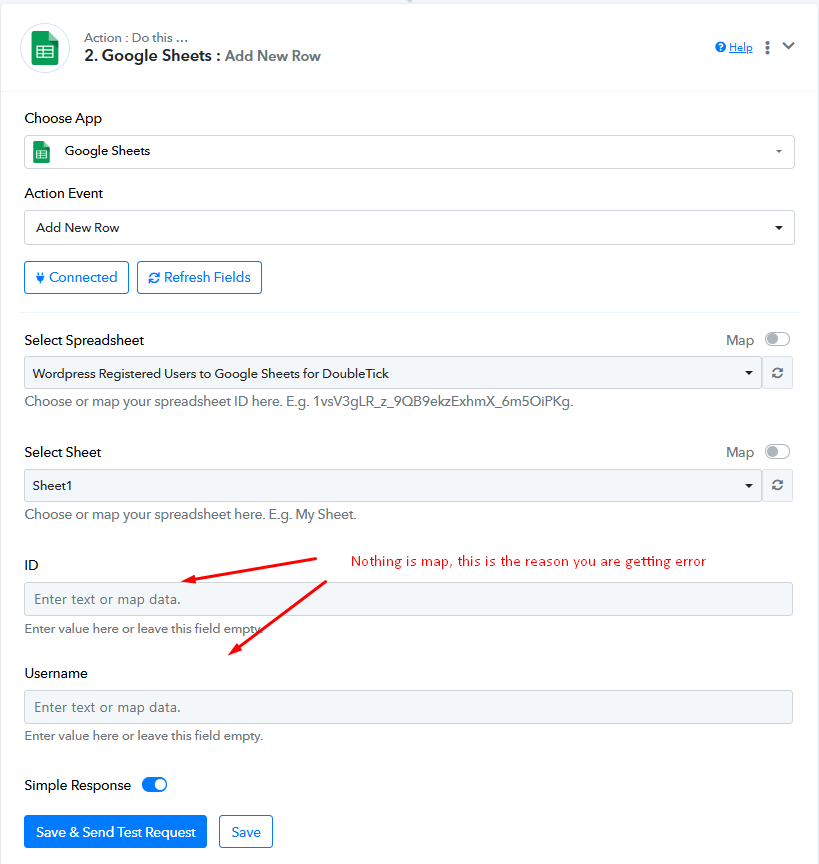
Do check on this video tutorial on how to map data inside Google Sheet from trigger response-
youtube.com/watch?v=ykXKE2748fA
This will work for you further.