About Google Sheets Automation
Status: Closed · Asked by Garral on · 0 views
Hello. I am currently running a task in Integrately.com that consists of sending an email with gmail when a row is added to a google sheet. Rows are automatically added from Typeform with its own integration, and the task runs immediately.
When I try to run that same task in Pabbly I have seemed to understand that the task will only run every hour, because the google sheet will update automatically.
Is my interpretation correct? (my understanding of English is limited)
If so, are there any plans to develop this task in a more operational way? Thanks!
Hey @Garral
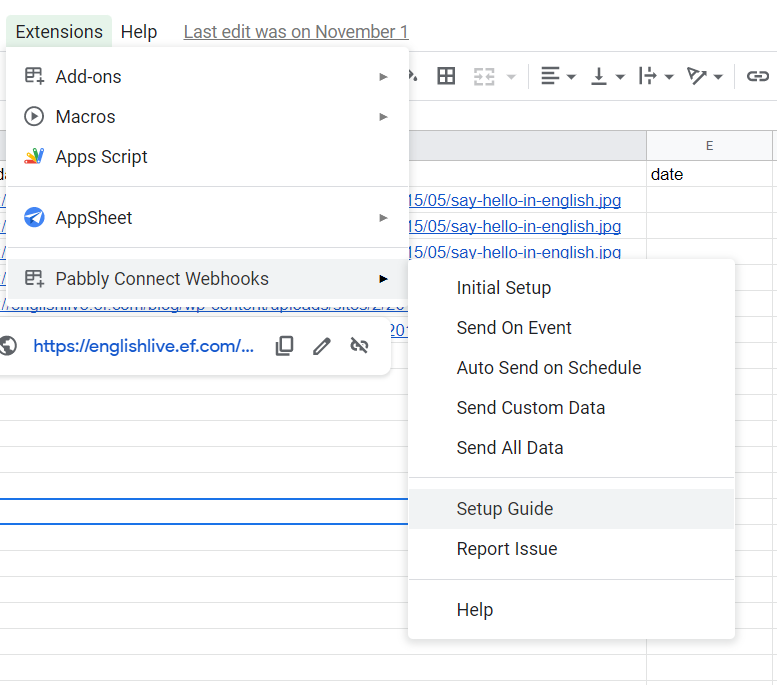
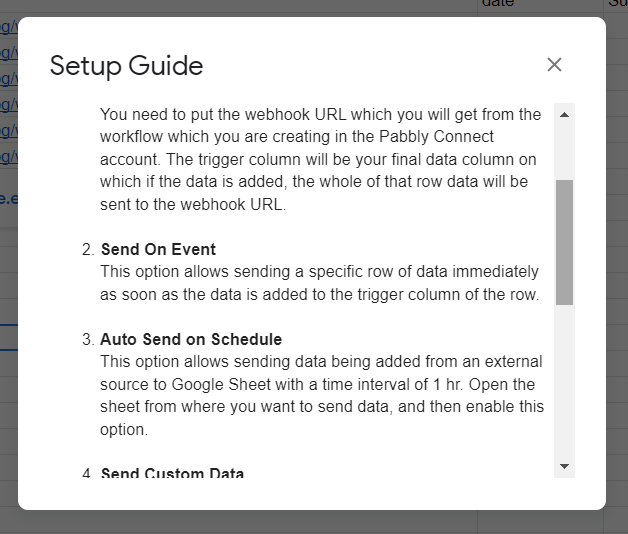
It seems like the data is being added from an external source(3rd party application) to Google Sheet with a time interval of 1 hr. Open the sheet from where you want to send data.
Further, you can check out the same in the setup guide in the Pabbly Connects' add-on.
Hi, maybe I didn't get the question right, but you haven't answered.
My specific question is: If the data goes from typeform to google sheets, will the task of sending a gmail email every time a row is added be executed immediately, or will it be done every hour? Thanks
Hey @Garral
If a row was being forwarded from Google Sheets, once it comes to your workflow it will be executed immediately and it will send the mail. Then only the next row will come after and follow the same steps.
So the process will be executed immediately and one after another.
Will the sending of google sheet to the workflow be immediate?
Hey @Garral
If the data is being added from an external source(3rd party application) to Google Sheet then you are also required to check the "Auto Send on Schedule" option which will forward the data to your workflow with a time interval of 1 hr. Open the sheet from where you want to send data, and then you can enable this option.