active campaign link click integration
Status: Open · Asked by javiermarcon on · 0 views
Hello, I regularly send one time campaigns with active campaign and each campaign has a link. I need to add a tag to the users that have clicked the link of at least 5 campaigns sent, that have a certain keyword in the campaign title. How can I do it?
1) How do I track if the link of a campaign with certain keyword in its title was clicked?
2) How do I set a counter in a Google spreadsheet? I.e. if the email is present in the spreadsheet column A, sum 1 to same row in column B and if it is not present, add it in column A and add 1 in same row of column B
3) how do I check periodically (i.e. every 2 weeks) if the mentioned spreadsheet has changed to trigger results when a row has 5 or more in column B ?
Hello, I regularly send one time campaigns with active campaign and each campaign has a link. I need to add a tag to the users that have clicked the link of at least 5 campaigns sent, that have a certain keyword in the campaign title. How can I do it?
1) How do I track if the link of a campaign with certain keyword in its title was clicked?
I will need to discuss the possibility of this with my team members.
2) How do I set a counter in a Google spreadsheet? I.e. if the email is present in the spreadsheet column A, sum 1 to same row in column B and if it is not present, add it in column A and add 1 in same row of column B
- Could you please share your Google Sheets for me to understand your use case?
- Also, please confirm what do you mean when you say 'sum 1 to the same row in column B'?
- Is there a value present in column B to which you want to add 1?
- Or do you want the counter value to be updated in column B?
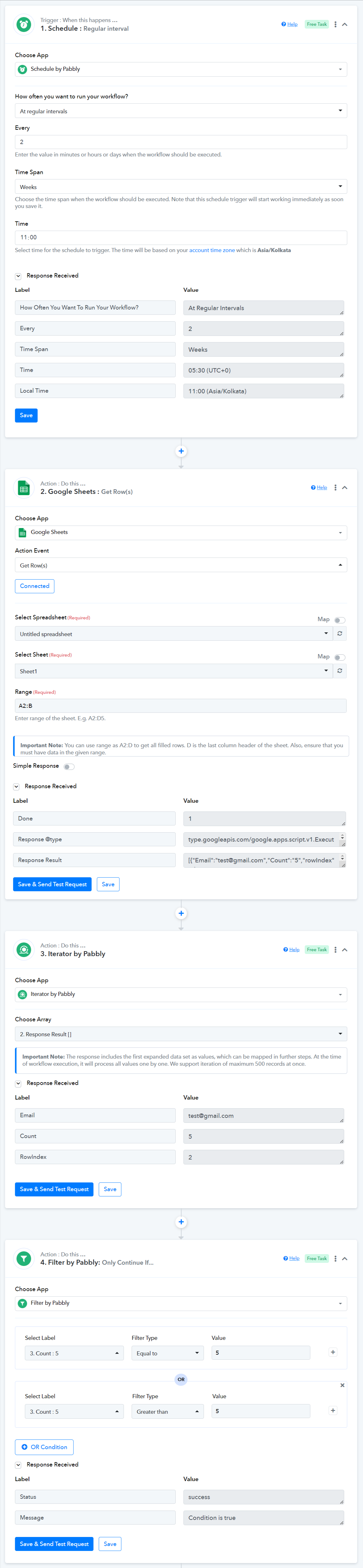
3) how do I check periodically (i.e. every 2 weeks) if the mentioned spreadsheet has changed to trigger results when a row has 5 or more in column B ?
This Scheduler will trigger every 2 weeks, fetch the entire data in your Google Sheets, process it one row at a time, and trigger a result for each row containing a value of 5 or more.
Thank you ArshilAhmad. I don't have the spreadsheet created yet, but I thought it could be done with the counter value to be updated in column B.
Hello, I regularly send one time campaigns with active campaign and each campaign has a link. I need to add a tag to the users that have clicked the link of at least 5 campaigns sent, that have a certain keyword in the campaign title. How can I do it?
1) How do I track if the link of a campaign with certain keyword in its title was clicked?
In ActiveCampaign, there is no such endpoint to capture click counts of a particular user; therefore, this use case is not possible.
2) How do I set a counter in a Google spreadsheet? I.e. if the email is present in the spreadsheet column A, sum 1 to same row in column B and if it is not present, add it in column A and add 1 in same row of column B
This use case is also not achievable.