

ActiveCampaing Tag Removed

Hi.

In this action: ActiveCampaign: remove a tag from contact.

Where I Have to say who is the contact?
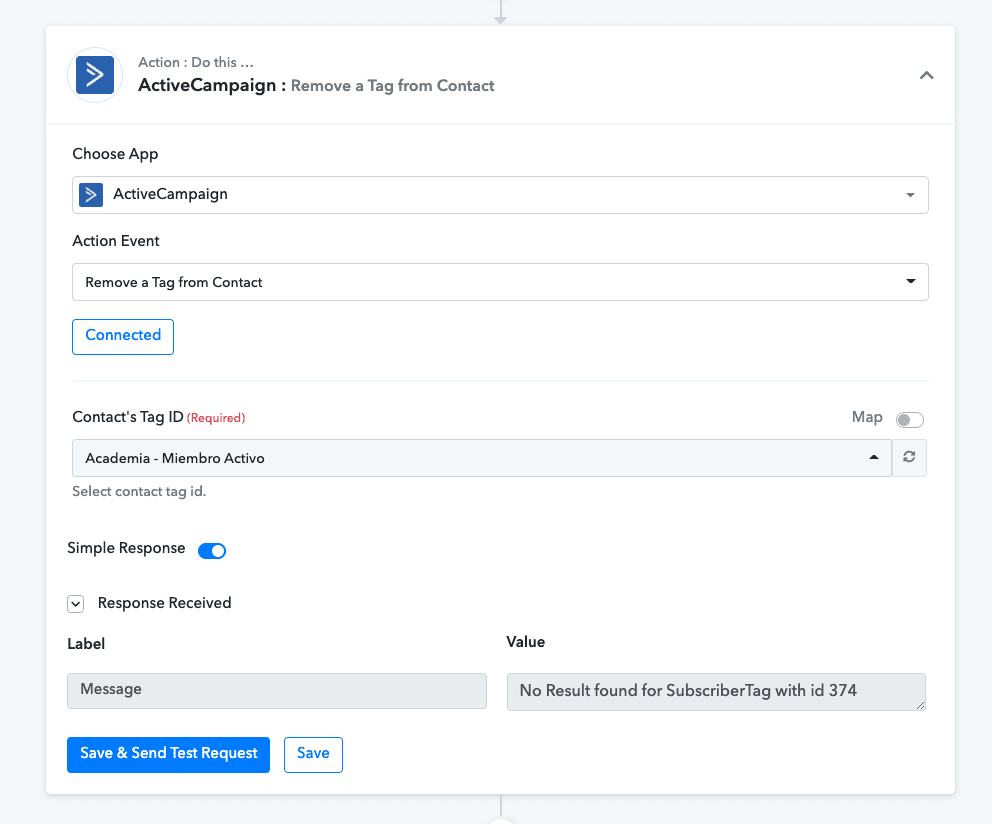
Screenshot on 2021-12-02 at 10-36-30.png


Thanks,
 
P

Pabbly13

Guest
Hey @Hormigas !

We have updated the action event "Active Campaign : Remove a Tag from Contact" and made the previous one as "Deprecated"

Now, what you will be required to do is , you can follow the below mentioned images-

  • You will add the below mentioned action event for retrieving the tag first-

View attachment 5862
View attachment 5863

  • After the tag, you will then need to use it for getting the tag name which is existing in your Active Campaign account-
  • You will need to add the Tag Id from the above mentioned image to below as shown in the step-

View attachment 5864
View attachment 5865

  • Now, you will mapping the Contact ID by switching on the map button and entering the Contact ID and then you will be doing the same for the Contact's Tag ID by switching on the map button and adding the the Contact's Tag ID from the above mentioned images-

View attachment 5866

  • And finally clicking on "Save & Send Test Request", it will provide you with the removing of the tag for the users whose payment data will be coming in from the Stripe trigger step.
Do these changes and check if it works for you.

Best Regards.
 
Top