Add column on Monday.com board, now Pabbly not working
Status: Open · Asked by Advance plants on · 0 views
Hi,
Would adding a column on Monday.com board mean that the Pabbly webhook would stop working?
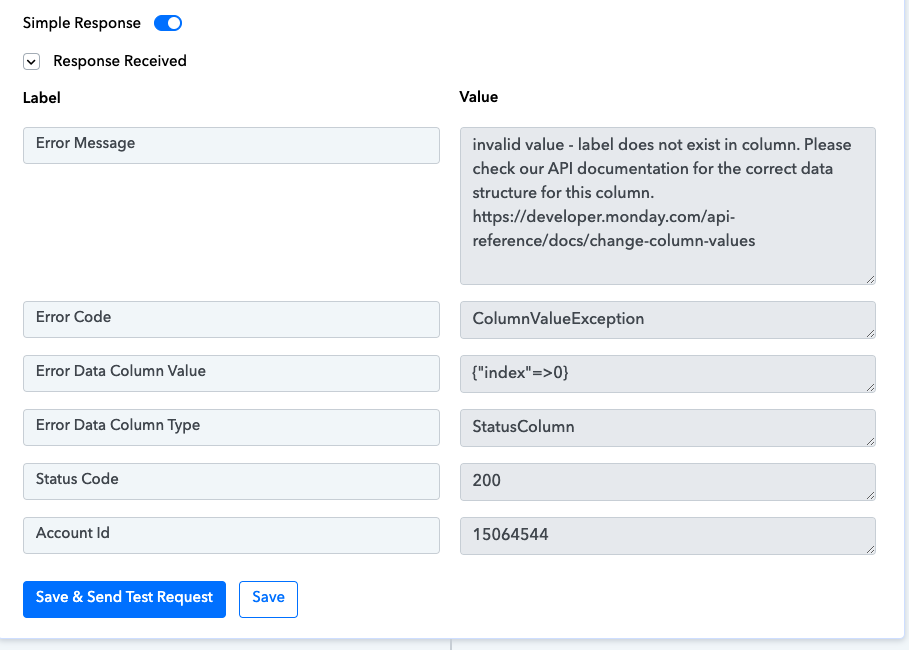
When I try and map the location, it gives this error.
Attachments

Hi @Advance plants,
You cannot directly map the name of the location; instead, you would have to map the ID associated with a particular location. For example, the ID associated with Brisbane is 105, so you would have to map 105 instead of 'Brisbane'.
https://drive.google.com/file/d/1V_FY8rUIm04fObYFwGBrLyBdKOGbV7bi/view?usp=sharing
Since you won't be receiving the ID directly from the trigger step, you can add a Lookup Table into your workflow. This table will serve as a repository of the IDs associated with the locations, and when provided with the name of a location, it will automatically retrieve the corresponding ID.
Ok, I understand.
The form used to work without a Lookup. I would like try and get it working again without the look up.
When a client fills out the form, the location is a drop down menu. For some reason, the location is not changing on Monday.com, even when the client chooses a different location. How do I get the data on Monday.com to accurately represent what the client selects.
If we change the layout/columns on Monday.com, do we need to Re-Capture the Webhook Response?
Ok, I understand.
The form used to work without a Lookup. I would like try and get it working again without the look up.
The issue you are encountering is not related to the form response. You cannot make your workflow work without a Lookup table; you won't be able to pass dynamic location without the Lookup table.
When a client fills out the form, the location is a drop down menu. For some reason, the location is not changing on Monday.com, even when the client chooses a different location. How do I get the data on Monday.com to accurately represent what the client selects.
It's not changing because you have selected the location, which will remain constant.

You are supposed to map the IDs associated with a Location in its designated place. You can use the Lookup Table to map the ID associated with a particular location. I have added a lookup table to your workflow; you can add other locations and their corresponding IDs in the same Lookup Table.
If we change the layout/columns on Monday.com, do we need to Re-Capture the Webhook Response?
No, you don't have to Re-Capture Webhook Response.
Thank you for explaining all of that. Unfortunately, now the form on our website doesn't work at all. I will have to ask our tech support to fix this issue.