Add or update row in Google Sheets
Status: Closed · Asked by Lars on · 0 views
Hi, can't find how to add a step in Connect that will either add a new row if unique key isn't already in an existing row, or update an existing row if key is found. Doable, right?
And I'm retrieving the data from another Google sheet (not that it should matter, I suppose).
Thanks,
Lars.
Hey @Lars
You can use the Lookup function in the Google sheet to search the content in it. Then you can use the Router and add the conditions in Router 1 if the unique Key exists then update the row.
In Router 2 if the unique key does not exist then you can add a new row in the Google sheet.
Please let me know if you have any questions or comments.
Hej, thanks, I suspected that that would be the answer - and had hoped for a simplified similar to for example Mailerlite integration, where the actions is add/update depending on whether the subscriber exists or not.
Hey @LarsYou can use the Lookup function in the Google sheet to search the content in it. Then you can use the Router and add the conditions in Router 1 if the unique Key exists then update the row.
In Router 2 if the unique key does not exist then you can add a new row in the Google sheet.
Please let me know if you have any questions or comments.
Strange - I'm now populating the router and attempting to add new row in sheet, but the selection of columns from the first step doesn't display all the columns. What I'm doing is trigger action when row is added or updated in sheet 1, lookup key value from that row in sheet 2, if key is matched then update else add new row copying data from sheet 1.
Hey @Lars
Could you please add the required Google Sheets and let me know to check the details? As of now, you haven't added the details to check it further. Further, you have added the router's if condition wrongly, kindly manually type the value in the Value column.
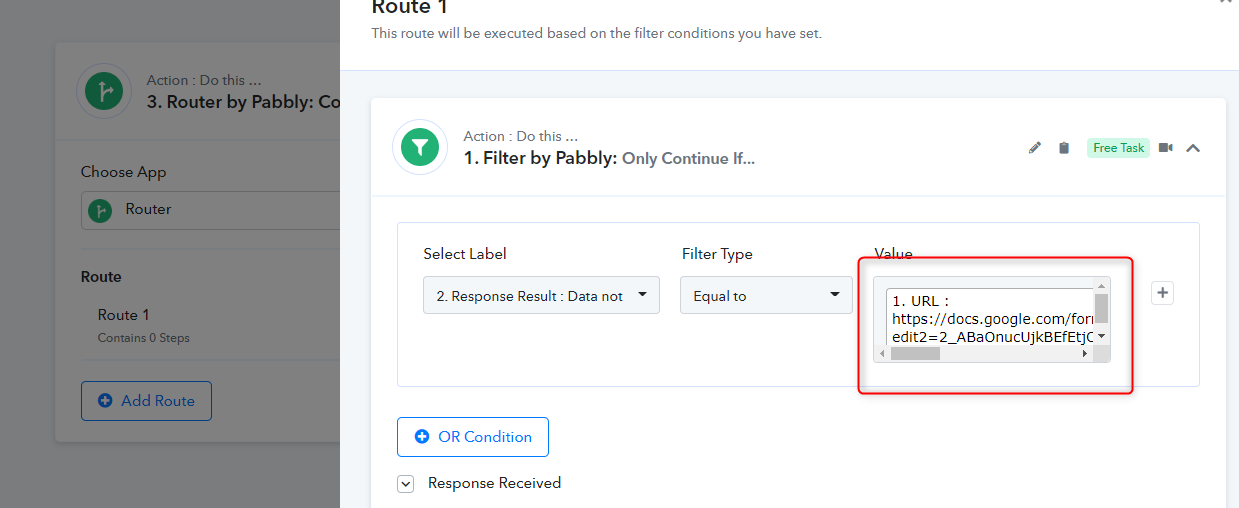
Hey @LarsCould you please add the required Google Sheets and let me know to check the details? As of now, you haven't added the details to check it further. Further, you have added the router's if condition wrongly, kindly manually type the value in the Value column.
I'm fiddling some more with this now, will get back to you if needed.
But I don't understand what you're saynig about adding a manula value in the Value column - the whole point here is to check if a preceding lookup step in a Google sheet find the value in the URL filekd, and if not, then create it, so I really don't see how to enter a static value and achieve this?
Hey @Lars
Usually, we suggest all the users keep the value field as a manual field. However, in your case, you are filtering the URL values so you can continue with adding URL in the filter condition.
Strangely, although setup, test send and submit all returned success messages, this automation isn't triggering. I've emailed your support about this, no reply yet.
Hey @Lars
We will reply back on the ticket and let you know about it. Kindly do a follow up on the ticket so that we will prioritize it.
Hi, starting to narrow this down a bit. It appears that the trigger does appear to fire as intended, but the router at the end of the workflow returns false for both conditions.
What I’m trying to achieve is that once triggered, perform a lookup in another sheet for a unique value in the new/updated row in the current sheet. The lookup returns either a row number or 0, if I’ve understood correctly, and I’ve set the router up to create a new row if 0 is the returned value, otherwise update the row at the returned row number. But it isn’t working with the way I’ve set it up and so I really need som clever input here on what I’ve done wrong.
Hey @Lars
Could you please once check the router condition again as you are checking it Rowindex:97=0 every time, because of which you are not getting the data in the Google sheet?
Kindly share the google sheet on admin@pabbly.com and also mention this thread id.
https://forum.pabbly.com/threads/add-or-update-row-in-google-sheets.10166/
Hey @LarsCould you please once check the router condition again as you are checking it Rowindex:97=0 every time, because of which you are not getting the data in the Google sheet?
Kindly share the google sheet on [EMAIL]admin@pabbly.com[/EMAIL] and also mention this thread id.
https://forum.pabbly.com/threads/add-or-update-row-in-google-sheets.10166/
I shared the sheet as instructed last Sunday, and of course I'm not checking literals! Before the router comes a Google sheet lookup which return either a row number of key already exists, or zero if it doesn't. QUESTION: Does it return zero or som other value of the row doesn't exist? Can't find documentation or video regarding this.
And yes, I've followed up twice now, and still no reply. As a paying customer, I'm currently less than happy.
Hey @Lars
We have made some changes in the Router>> Filter condition and check if the value you are searching for via the Lookup function exists in the Google Sheet then update the records and if the value does not exist then it will create a new record in the Google sheet.
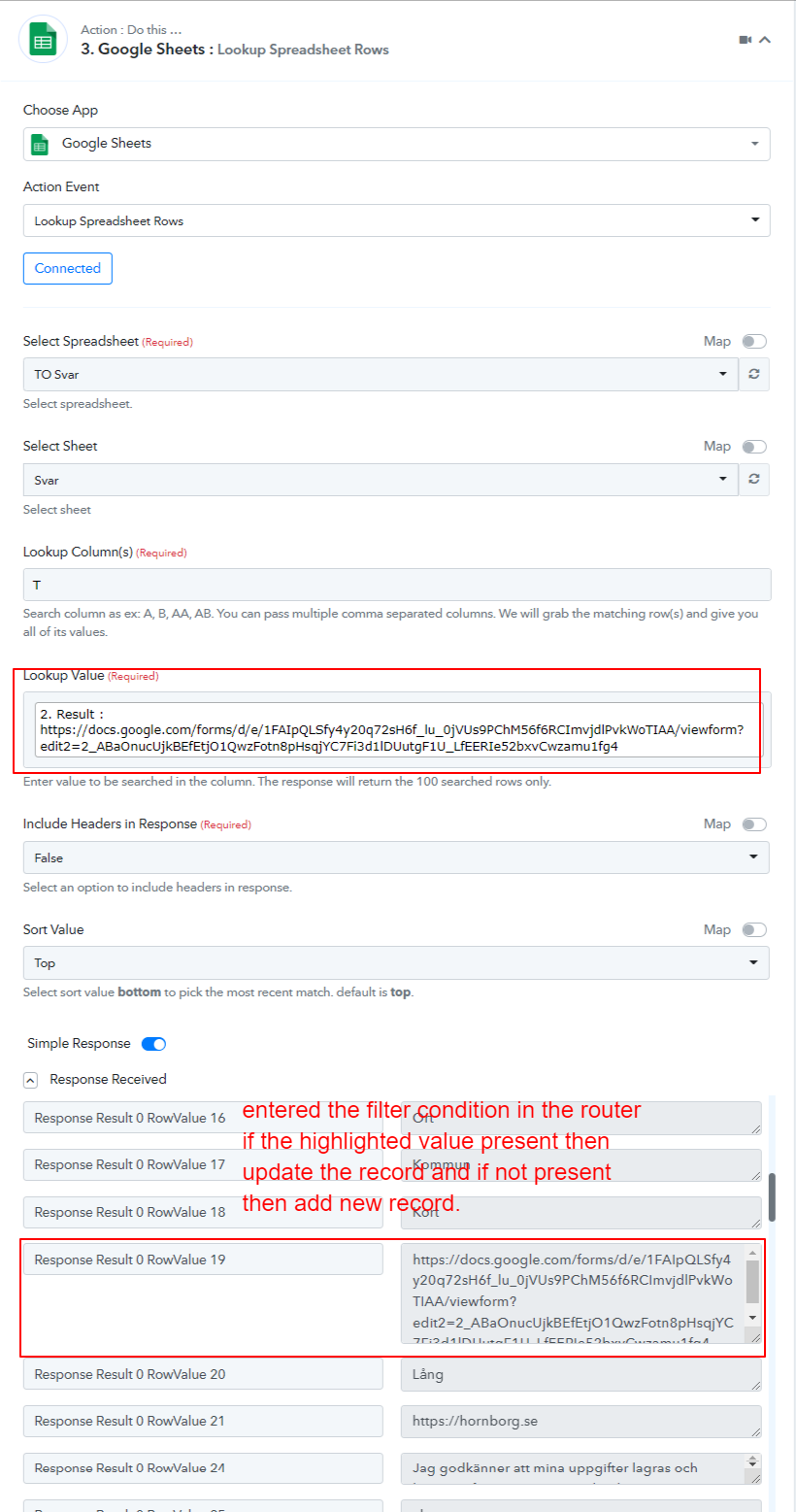
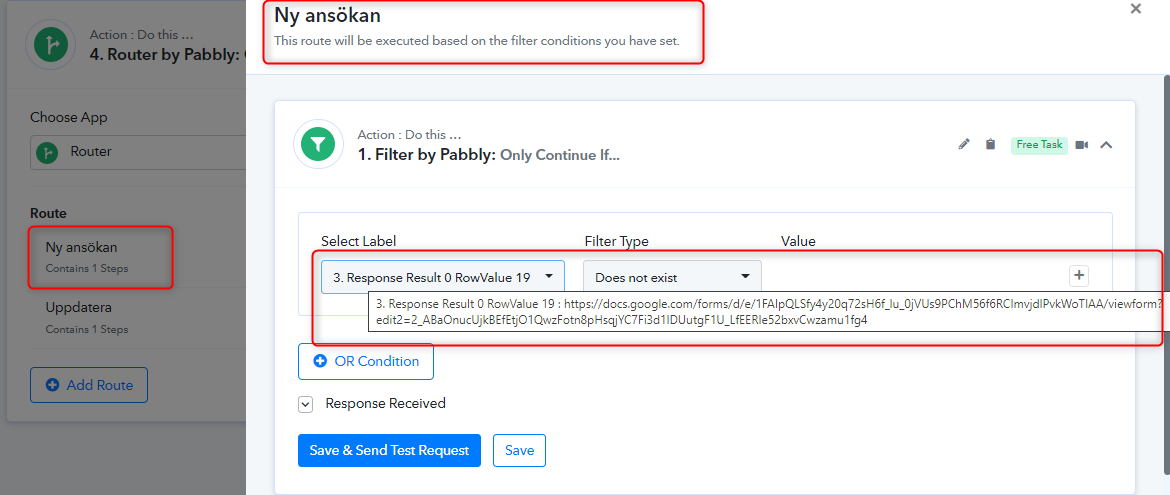
Kindly check the scenario and let me know if it helps.
Thanks
Kunal