amicici
Member
Hi, in order to optimize costs for external accounts like rebrandly.
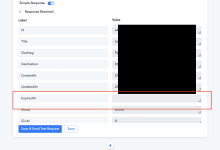
Could you kindly insert the ExpiredAt parameter in the creation phase of the short link in addition to the basic data in order to create a timed link?
I say this because in the response phase the Pabbly system shows us the possibility that today it is not possible to populate, thus creating a timed link.
Could you kindly insert the ExpiredAt parameter in the creation phase of the short link in addition to the basic data in order to create a timed link?
I say this because in the response phase the Pabbly system shows us the possibility that today it is not possible to populate, thus creating a timed link.