Airtable number field doesn't accept numbers
Status: Closed · Asked by school on · 0 views
I'm trying to update a record in Airtable. The field is in number type, but doesn't accept number.
The error message is:
error > type INVALID_VALUE_FOR_COLUMN
error > message Field "search past 30d" cannot accept the provided value
How to correct this?
I'm trying to update a record in Airtable. The field is in number type, but doesn't accept number.The error message is:
error > type INVALID_VALUE_FOR_COLUMN
error > message Field "search past 30d" cannot accept the provided valueHow to correct this?
Can you please provide the screenshot of the module and response here?
I'm having a similar issue trying to copy data from Google Sheets to an Airtable number field. The number appears fine in Google Sheets. It is mapped in Airtable: Create Record, but the number is changed. If for example the number in Google Sheets is 72,309.25, it gets copied to my Airtable Base as 72. When I change the Airtable field from a "Number Field" to a "Single Line Text" field, the complete number appears. Leaving it as text is useless to me because I need to include this number in a formula to do other things in other fields.
Hey @Roberto
Could you please share the name of the workflow along with the registered email address with Pabbly?
Hey @Roberto
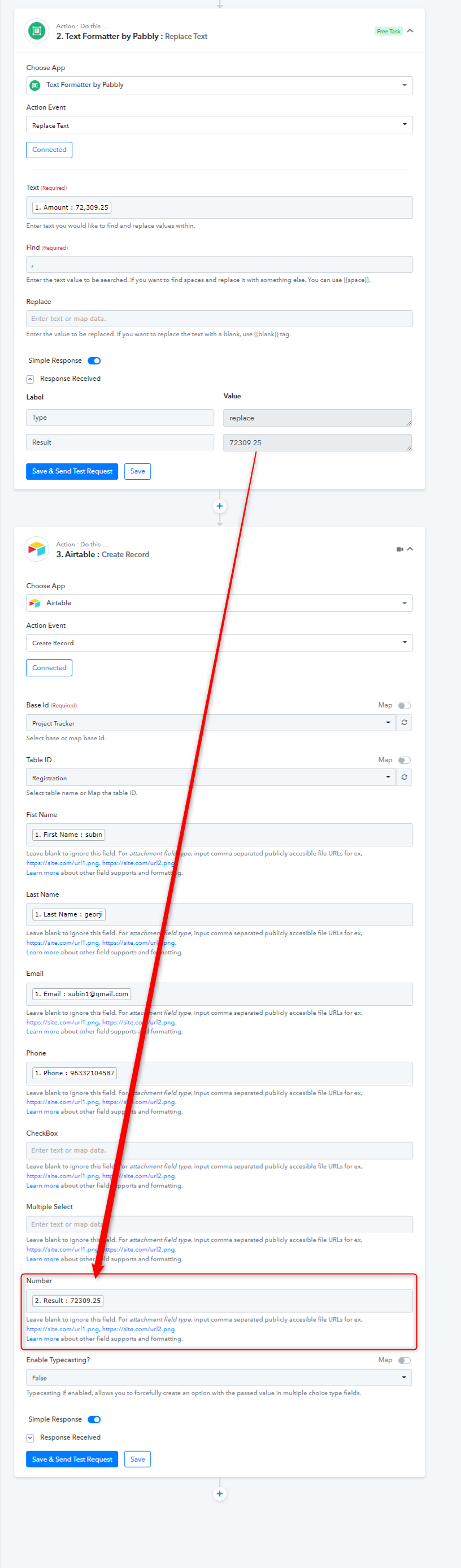
If you are using the number field in your Airtable action step then you need to pass the amount in the following manner.
E.g. - 79500.12