Automatic entries data not sending from Google Sheet to WhatsApp Cloud APi
Status: Closed · Asked by itspathanofficial on · 0 views
I have checked everything and everything is literally working fine when I am manually doing entries in google sheet and sending them to WhatsApp but I when I am doing it via any data entry software the new raw is not sending automatically, I have to delete the last value and add it again to trigger the pabbly connect.
Is there anyone available who can help me with it why this is not working on my side?
Hey @itspathanofficial
If you are entering the data through any third-party software in your Google Sheets then please note that you have to enable the Auto send on Schedule should be enable. Also note that data will be send after an interval of 1 hour to from the Google sheets to the workflow.
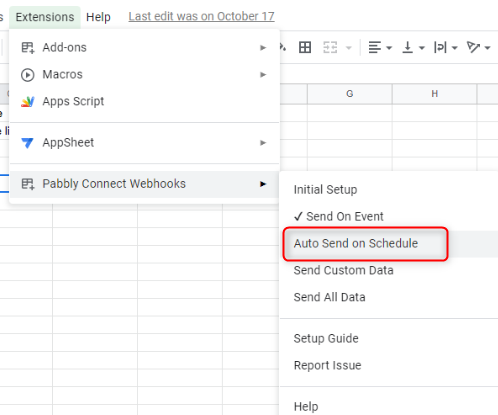
Also we have noticed that you have used the Google Forms inplace of Google Sheets. Please let me know if you have changed it.
Thanks
Kunal
I am using Pabbly to Write a Record to Sheets and it is NOT firing / sending data to the webhook
Hey @realestatebroker
Can you share the workflow URL once with us, so that we can look into it and can guide you accordingly?
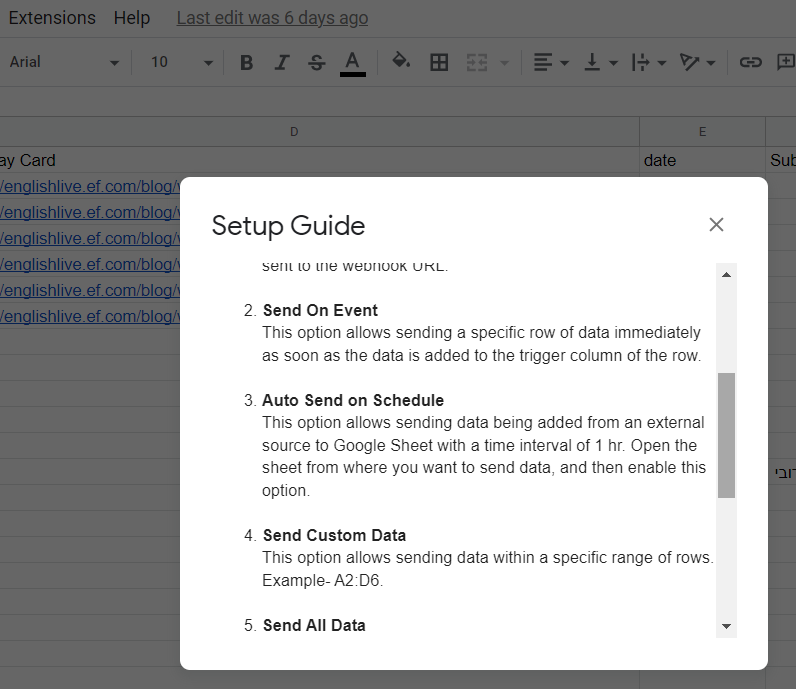
Further, you can only use "Send On Event" when setting up Google Sheets if the data is coming from a Google application or if you manually enter it. If the data is coming from a third-party application, however, you may need to choose "Auto Send On Schedule" or "Send on Schedule," which will forward the data in exactly one hour.
Additionally, make sure the data is filled up to your trigger column.
Hey @realestatebroker
Can you share the workflow URL once with us, so that we can look into it and can guide you accordingly?