Brilliant Directories - updating lead data after a delay
Status: Closed · Asked by Anna Shannon on · 0 views
I have been using Pabbly to trigger an email auto-response (feedback survey) 3 weeks after a lead is received on my Brilliant Directories site. Works well, but when there is a spam /bot lead, the members get confused why I've asked them for feedback, which is fair enough - as its not a real lead.
So I want to make an adjustment so the feedback email only sends 3 weeks later if the lead is still logged as 'matched' in the system at that point. So effectively, need pabbly to refresh the lead details 3 weeks later, then if condition x is met (lead still 'matched' - which is classifed as lead status '2' in the data) it will send the email. If I've marked the lead 'Bad lead' in BD the lead status changes to 7 so I thought if I reimport lead data then add a condition if Status=2 then send the email.
I have been playing around with this as I can see 'Update lead' as an option, but can't get it to work. Have also tried 'get lead'. How do you get it to reimport the data after a delayed period of time?
Hi @ms_akasha,
Your workflow appears to be set up correctly. You have added "Get Lead" after the Delay, which should give you the updated lead status (refreshed data). Based on your Task History, I can see that Message 0 Lead Matches Lead Status is not getting changed to 7; rather, Message 0 Status is getting updated to 7.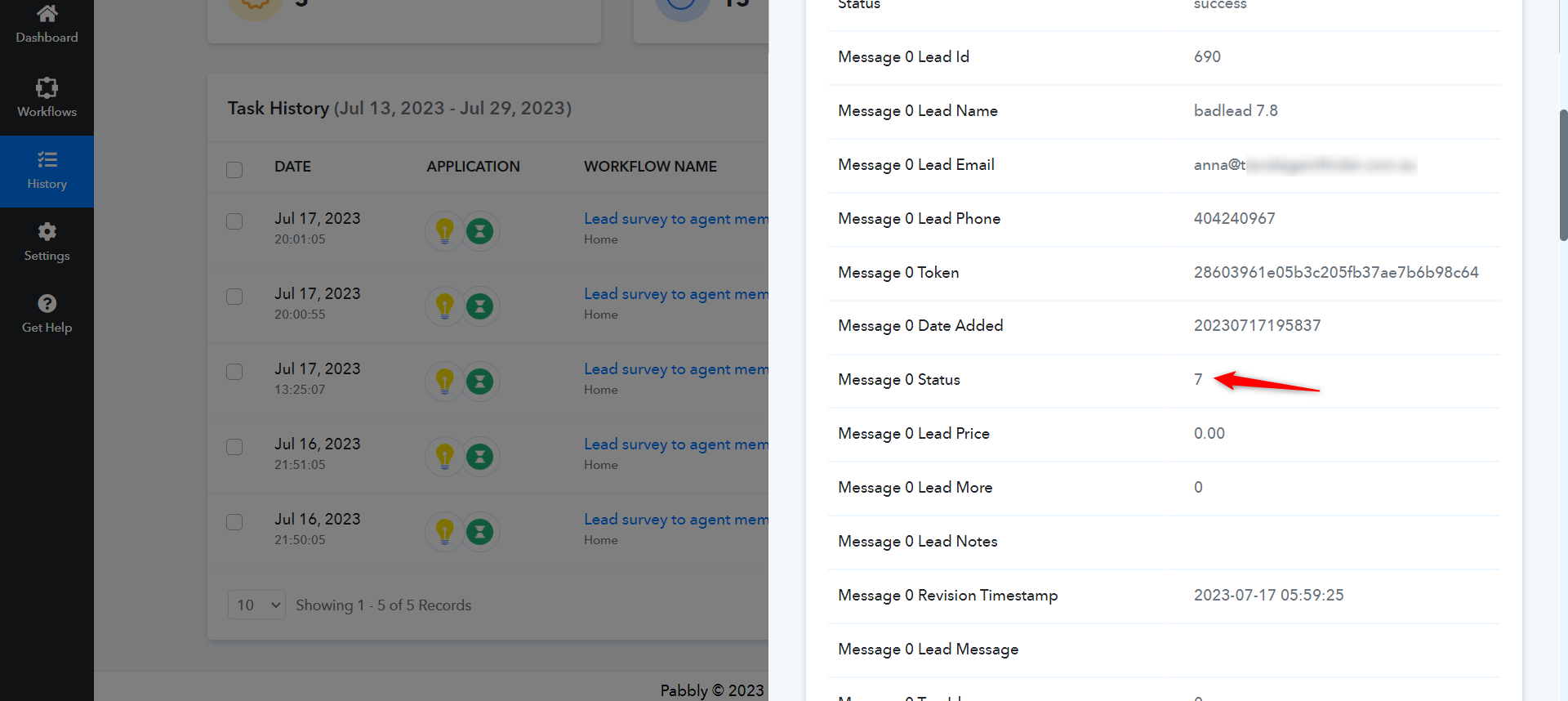
Thank you, I think I have it working correctly now. Really appreciate your help!