Bug (believe auto re-execution). Two Workflows have gone rogue
Status: Closed · Asked by Mathew Kulkewycz on · 0 views
1. [FluentForms #8 TDS/S/B] RFI received TDS no inspection > Airtable, Encharge, Plutio, SalesFlare
1. [FluentForms #10 RFQ] > Airtable, Plutio & SalesFlare
Both connected to Fluent Forms, have only had '2' valid triggers but these two workflows have gone rogue and continue to run say every 10 minutes.
I checked 'auto-rexecution', was set to '3 attempts' only.
Sadly had to disable these workflow and cease using Pabbly until I get to the bottom of this.
This issue has consumed half of my credits already. Lucky I caught it, but rather annoyed.
Looking for answers, thanks.
Hey @Mmmk
Upon looking into your issue it appears that your workflows executed multiple times because the 're-execution' option was enabled for three iterations. Also, re-execution happens for failed steps only, and the errors in your workflow is dur to incorrect mapping.
Specifically, "Enquiry Date" step is not mapped properly. We would suggest you to map "Date UpdatedAt" response, instead of "submission updated_at".
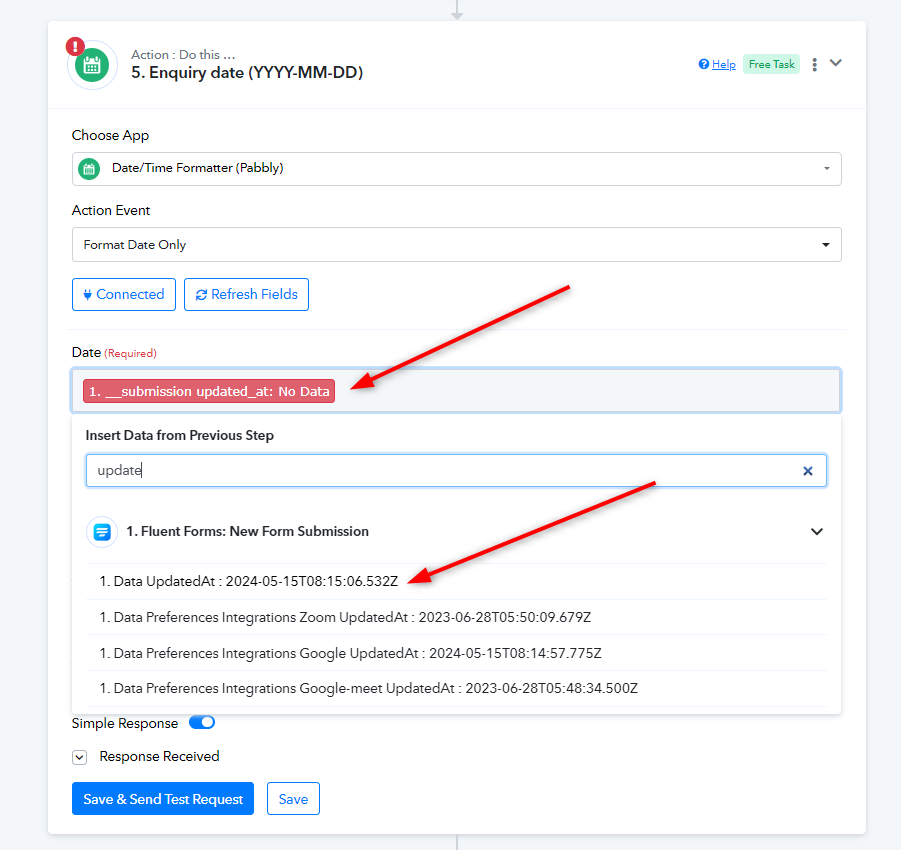
We recommend a few steps for smoother workflow execution:
1. Please turn off re-execution for your workflows.
2. Disable "Ignore Error" for the steps where it is enabled.
3. Make a test entry and ensure all fields are properly mapped.
Additionally, we have restored your tasks for now. Let us know if you encounter any issues afterward.
Thanks. Will turn off ‘re-execution’.
So I understand, if the ‘set of re-executions’ is set for a set amount of times when does it know when to stop?
And what would create an invite loop of re-execution, irrespective of set retries (as in my case)?
I can only assume that, as in my case, because of mapping errors it kept (and would have retried indefinitely, no?
Hey @Mmmk
The Re-Execution feature is designed to run when a task fails. If enabled, it will attempt to execute the workflow again.
Further the re-execution is not a loop, but a chain reaction. Since it was was set to three times, each failed step was retried three times, consuming your tasks.
Please follow the steps mentioned above and let us know if they work for you.