Calendly and Wati Integration
Status: Open · Asked by Rajesh Tiruveedhula on · 0 views
Hi,
I want to send a reminder messages to my client showing the date, time and the zoom login link. how do I add these custom parameters?
Hi @Rajesh Tiruveedhula,
I have added some steps to your workflow. Please check out the screenshot I shared below; it shows how you can add custom parameters.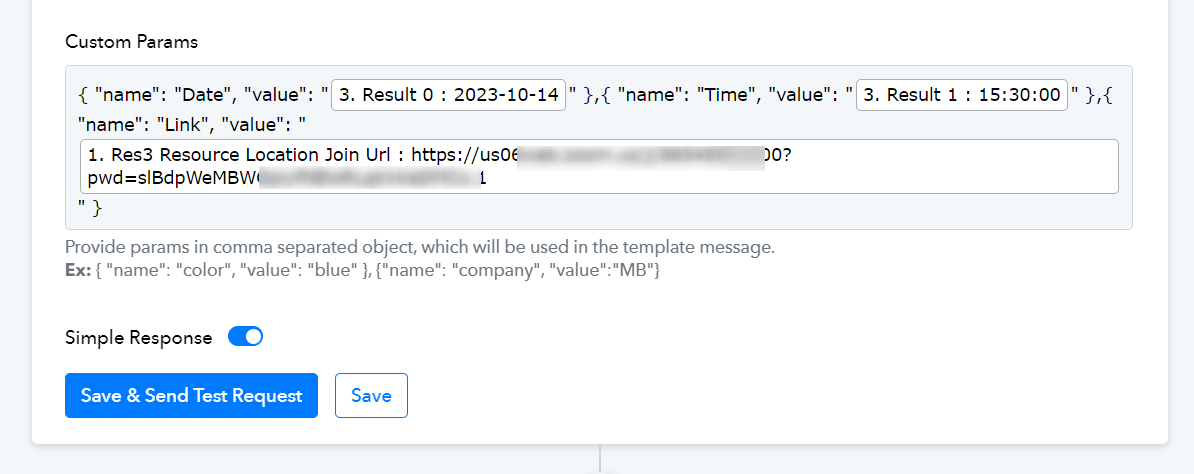
Hi @Rajesh Tiruveedhula,I have added some steps to your workflow. Please check out the screenshot I shared below; it shows how you can add custom parameters.
Thanks, when I try to add these values dynamically the time and date formats are being showed in a different time zone. I mean I don’t see, 3. Result 0: for the date and 3. Result 1: for the time at all. Can you check and reset these please.
Thanks, when I try to add these values dynamically the time and date formats are being showed in a different time zone. I mean I don’t see, 3. Result 0: for the date and 3. Result 1: for the time at all. Can you check and reset these please.
I mean I really don’t see only date value and only time values but I see them together as res start time as date+ time
Could you please share a screenshot of how the date and time appear in the WhatsApp message?
Could you please share a screenshot of how the date and time appear in the WhatsApp message?
I'm getting it in UTC format. Screenshot attached for your reference.
Attachments

I'm getting it in UTC format. Screenshot attached for your reference.
Yes, you will receive the time from Calendly in UTC format. You are using a Date/Time Formatter to correct the time zone, which is the correct approach.