CallRail Tracking Integration
Status: Closed · Asked by Jay W@HyperLeads on · 0 views
Hi, I currently use CallRail for my phone call tracking for a number of landing pages I have.
I'd like for each number to fill out a row in my Google Sheet (separate tab for each site).
How can I go about doing this?
Hey @jmw01
As of now, CallRail action event and its integration is not available on the platform.
But you can post the request to add the integration here - https://pabbly.hellonext.co/b/Update-Existing-Application
Our Integration team will look into and add it accordingly.
I'm confused, as this was advertised on the website: https://www.pabbly.com/connect/integrations/callrail/
I essentially just need the call details to flow into my Google Sheet.
Hey @jmw01
As we can see from your account, you have already designed the workflow for the same. Kindly let us know at what part you are unable to automate.
So, that we can guide you accordingly.
Hey @jmw01As we can see from your account, you have already designed the workflow for the same. Kindly let us know at what part you are unable to automate.
So, that we can guide you accordingly.
I cannot designate a specific call number / company to the sheet.
As such, I want that specific number’s phone calls flow into that tab. However, I cannot see anywhere to select the phone number I want.
Hey @jmw01
Seems like you haven't previously mapped the related data in the Google Sheets action step and because of that you are unable to process your automaton.
Though we have mapped the related data to your Google Sheets' action step and it should work now.
Kindly give it a try and let us know.
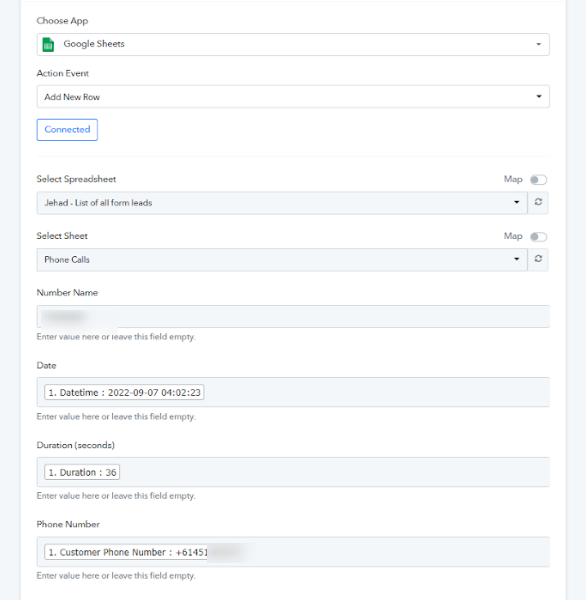
Hi there, currently it is pulling every single number from my dashboard into the Sheet. Is there a way we can specify one single tracking number to only flow through?
Hey @jmw01
You can try the Filter action step in your workflow before the Google Sheets action step to only process the workflow for tour single tracking number.
Hey @jmw01You can try the Filter action step in your workflow before the Google Sheets action step to only process the workflow for tour single tracking number.
Thank you! I will give this a go!
Thanks, it is all working now :) I only have one issue now - the date and time is not coming up for my local timezone (Australia), even though I have this set up in the settings. Am I missing something here?
You can use the "DateTime Formatter" action step after the trigger event to convert the DateTime coming from the trigger response.