Can I set an automatic re Execution of workflow based on error message?
Status: Closed · Asked by RoCrow on · 0 views
I have a several workflows that connect to a Google Sheet.
Often, I get the error message:
[TABLE]
[TR]
[TD]Response not received in 15 seconds[/TD]
[/TR]
[/TABLE]
If I re-execute those partially failed tasks they invariably work the second time.
1) Is there a way I can set an automatic retry to partially failed tasks?
2) Can I set a filter to that? (i.e. "only retry partially failed tasks containing the error message Response not received in 15 seconds")
3) Can I set a cap on number of retries? (e.g. 2 retries)
4) Bonus: can I set a filter for the app integration too? (i.e. only for Google Sheets steps with the error message Response not received in 15 seconds)
I know that Integromat have options 1 and 3 already (they may have 2 and 4, I've not checked). And that in Pabbly I can filter partially failed tasks by the error message (i.e. #2 above), so we're close(ish!).
Is it possible with Pabbly? (if not, can it be made to be?!)
I have a several workflows that connect to a Google Sheet.Often, I get the error message:
[TABLE]
[TR]
[TD]Response not received in 15 seconds[/TD]
[/TR]
[/TABLE]If I re-execute those partially failed tasks they invariably work the second time.
1) Is there a way I can set an automatic retry to partially failed tasks?
2) Can I set a filter to that? (i.e. "only retry partially failed tasks containing the error message Response not received in 15 seconds")
3) Can I set a cap on number of retries? (e.g. 2 retries)
4) Bonus: can I set a filter for the app integration too? (i.e. only for Google Sheets steps with the error message Response not received in 15 seconds)I know that Integromat have options 1 and 3 already (they may have 2 and 4, I've not checked). And that in Pabbly I can filter partially failed tasks by the error message (i.e. #2 above), so we're close(ish!).
Is it possible with Pabbly? (if not, can it be made to be?!)
Thanks for sharing your questions. Unfortunately, we don't have a workaround for this currently. We are already aware of all these scenarios and in near future, you will surely opt for managing the errors along with auto-execution features as well in case some error occurs.
Once again thanks for sharing all your valuable feedback and it's our pleasure to serve customers like you. ?
Thanks for sharing your questions. Unfortunately, we don't have a workaround for this currently. We are already aware of all these scenarios and in near future, you will surely opt for managing the errors along with auto-execution features as well in case some error occurs.Once again thanks for sharing all your valuable feedback and it's our pleasure to serve customers like you. ?
Thanks a lot for that and the kind words; it's truly a pleasure to both use Pabbly Connect and share feedback and suggestions - because you're team is so responsive, helpful and proactive! :) It makes it a win-win :)
Great to hear you're working on some new features to enable better management of this side of things!
I look forward to using them in due course :)
Thanks for sharing your questions. Unfortunately, we don't have a workaround for this currently. We are already aware of all these scenarios and in near future, you will surely opt for managing the errors along with auto-execution features as well in case some error occurs.Once again thanks for sharing all your valuable feedback and it's our pleasure to serve customers like you. ?
I too am experiencing this issue with failed / partially failed workflows.
Is there a way we can trigger re-excecution via an api call?
Hey @itsbrian
Is there a way we can trigger re-excecution via an api call?
You can rather re-execute the previously failed tasks from the history section of your workflow.
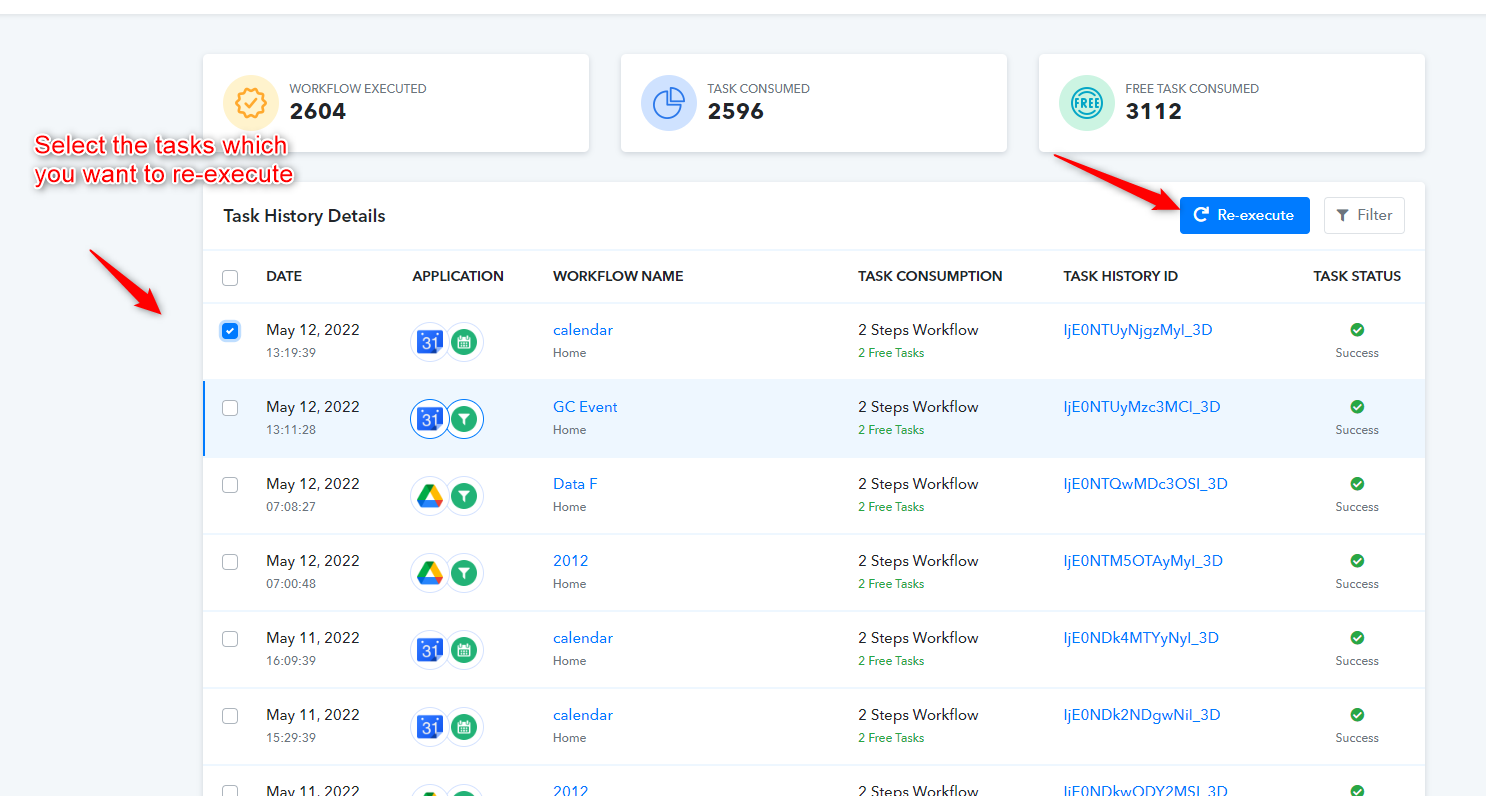
Hey @itsbrianYou can rather re-execute the previously failed tasks from the history section of your workflow.
Thanks for that. When I use that feature, does it re-execute the whole workflow (e.g. all 8 steps of an 8 step workflow, so I use up 8 tasks) or just the step that failed in the first place (so it only uses 1 task)?
Hey @RoCrow
When I use that feature, does it re-execute the whole workflow (e.g. all 8 steps of an 8 step workflow, so I use up 8 tasks) or just the step that failed in the first place (so it only uses 1 task)?
Re-executing the task will run all the action steps at once.
Hey @RoCrowRe-executing the task will run all the action steps at once.
Thanks. Would be good if it would just re-execute the failed step. No point in wasting resources / task credits repeating steps that have already been successeful?
Hey @RoCrow
As of now, it is not possible to only re-execute the failed task from the previously executed tasks. Though we have forwarded your request to our tech team and if possible we will try to add that feature in our future updates.
Thanks for understanding!!
Hey @RoCrowAs of now, it is not possible to only re-execute the failed task from the previously executed tasks. Though we have forwarded your request to our tech team and if possible we will try to add that feature in our future updates.
Thanks for understanding!!
+1 for only re-executing failed tasks, not the whole workflow. I guess it should be possible - the workflow has all the data it needs.
Hey @wibbler
As of now the re-executing the failed task is not available on the platform. Though we have forwarded your query to the tech team and we will try to implement the same in our future updates.