Can Pabbly Connect Send Pinterest Conversions API Lead Events?
Status: Open · Asked by Joy Milner on · 0 views
Hello Pabbly Support,
I'm trying to integrate the Pinterest Conversions API using Pabbly Connect.
My setup is:
- Website: Systeme.io
- Trigger: A user submits the 5 Hidden Blocks opt-in form. ( will use also in future offer not just 5 hidden blocks)
- Goal: Send a Lead conversion event to Pinterest to improve Event Quality and customer matching.
- The Pinterest Tag is already installed and the browser Lead event is working correctly.
My question is:
Is it possible to implement the Pinterest Conversions API using only Pabbly Connect?
If yes, could you please provide the correct setup, including:
- HTTP Method
- Endpoint URL
- Required Headers
- JSON request body
- Required Pinterest fields (such as event_name, event_time, action_source, user_data, external_id, etc.)
- How to map Systeme.io form fields to the API request
I've tried using the Execute API Request action but I'm not sure how to configure the payload correctly.
Thank you for your assistance.
Hello Joy,
Thank you for reaching out.
Yes, it is possible to use the Execute API Request action in Pabbly Connect to interact with the Pinterest Conversions API.
For the required configuration—such as the HTTP method, endpoint URL, headers, request body, and mandatory fields—we recommend referring to the official Pinterest Conversions API documentation, as these details are defined and maintained by Pinterest.
If you're facing any difficulty configuring the API request in Pabbly Connect, please share:
The Pinterest API documentation link for the specific endpoint you're trying to execute.
The workflow URL where you're implementing the Execute API Request action.
Once we have these details, we'll review your configuration and assist you accordingly.
Thanks and Regards,Preeti Paryani
Customer Success Associate,
Pabbly.com
Hello Preeti,
Thank you for your response.
Here is the official Pinterest Conversions API documentation for the endpoint I'm trying to use:
https://developers.pinterest.com/docs/track-conversions/track-conversions-in-the-api/
Endpoint I'm trying to execute:
POST https://api.pinterest.com/v5/ad_accounts/{ad_account_id}/events
Here is my Pabbly Connect workflow URL:
or
https://connect.pabbly.com/v2/app/workflow/mapping/IjU3NjcwNTY5MDYzZTA0Mzc1MjZiNTUzNDUxMzMi_pc
My goal is to send a Lead event from Systeme.io to Pinterest using the Execute API Request action to improve Pinterest Event Quality and customer matching.
I would appreciate it if you could review my workflow and let me know if my Execute API Request configuration is correct or if any changes are needed.
Thank you for your assistance.
Hello Joy,
Thank you for sharing the API documentation and your workflow details.
After reviewing your configuration, we recommend importing the following cURL request directly into the Execute API Request action instead of configuring each parameter manually.
You can do this by clicking the Import cURL icon in the top-right corner of the API Request step, pasting the cURL below, and saving it. This will automatically populate the request method, endpoint, headers, and JSON body in the correct format.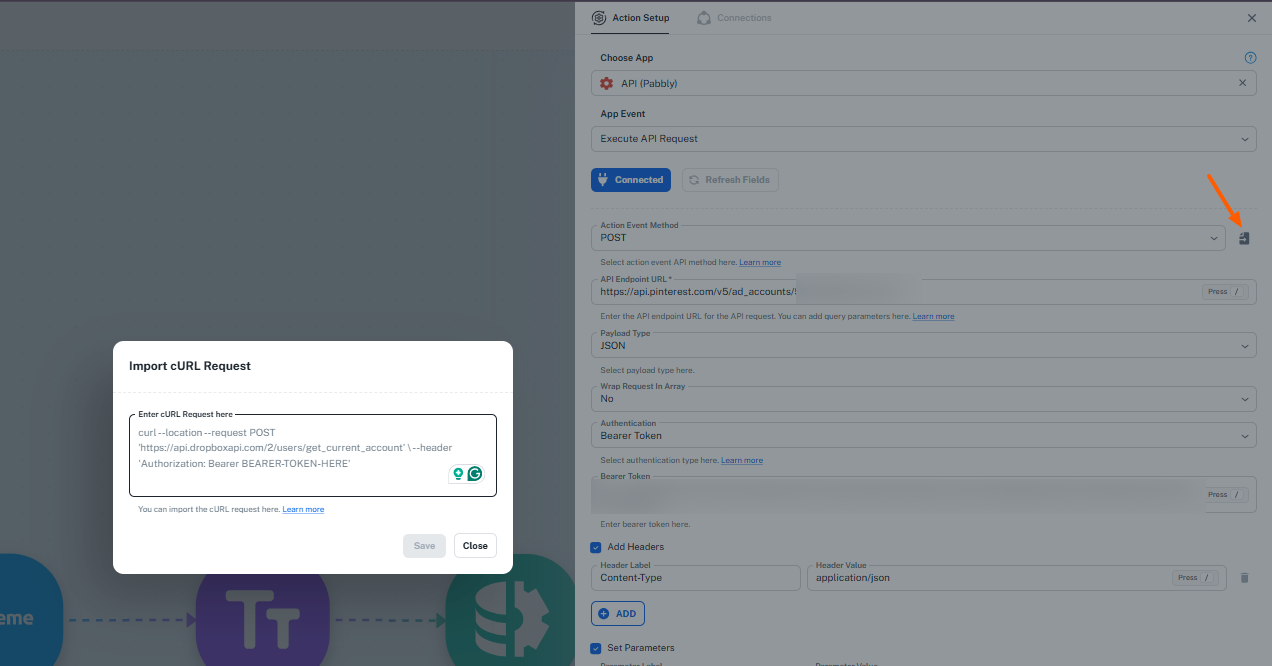
curl --request POST \
--url "https://api.pinterest.com/v5/ad_accounts/549769202716/events" \
--header "Authorization: Bearer YOUR_CONVERSION_ACCESS_TOKEN" \
--header "Content-Type: application/json" \
--header "Accept: application/json" \
--data '{
"data": [
{
"event_name": "lead",
"action_source": "web",
"event_time": 1722410100,
"event_source_url": "https://pagesbignificiant.net/5hiddenblocksthankyoupage",
"event_id": "lead-1722410100",
"opt_out": false,
"user_data": {
"em": [
"8eecda11185e0a18d7de2caeb549db7c0f3a337d332db002c5349ab45d73de772ad"
]
}
}
]
}'
Once imported, replace the sample values (such as the access token, event time, event ID, email hash, etc.) with the appropriate mapped values from your workflow and test the request again.
If you still encounter any errors after importing the cURL request, please share the complete response from the Execute API Request step, and we'll be happy to assist you further.
Thanks and Regards,Preeti Paryani
Customer Success Associate,
Pabbly.com
Thank you very much Preeti, please do not close this ticket yet. I'll get back for the update once I did it.
Hey Joy,
Sure, take your time and let us know how it goes.
Thanks and Regards,Preeti Paryani
Customer Success Associate,
Pabbly.com