Can we wait till one hour then check the value in another google sheets and then send emails (Cart Abandondent users from Instamojo)
Status: Closed · Asked by rachnanaisha on · 0 views
I want to create a workflow like this:
Instamojo Cart Abandant users (pending payment or failed payment) >> Add to Google Sheets >> Wait for 1 Hour >> Check the email (unique) in another google sheets (paid customers) >> if the value is there do nothing but if the value is not there then send an email to complete the purchase
Please tell me how is it possible.
Thanks in advance
Rachna
I want to create a workflow like this:Instamojo Cart Abandant users (pending payment or failed payment) >> Add to Google Sheets >> Wait for 1 Hour >> Check the email (unique) in another google sheets (paid customers) >> if the value is there do nothing but if the value is not there then send an email to complete the purchase
Please tell me how is it possible.
Thanks in advance
Rachna
You can make use of Delay step to wait for an hour as shown in the screenshot:
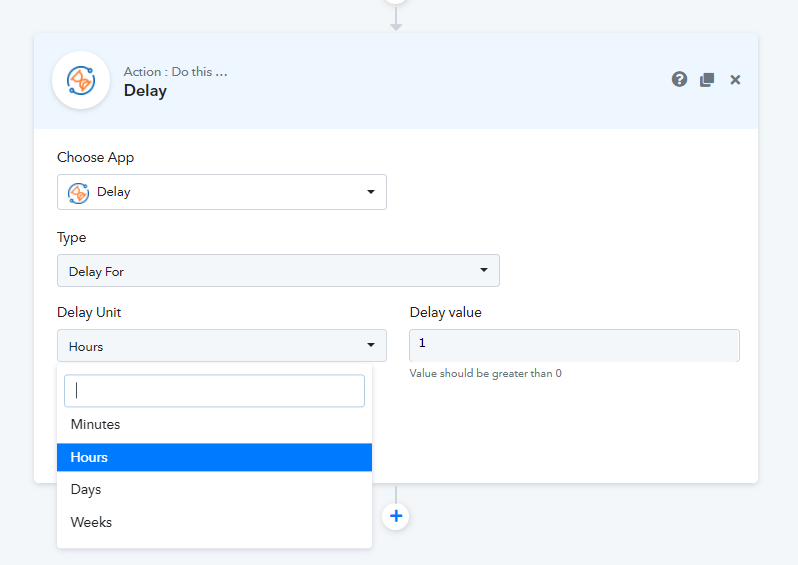
Then, you can use Google Sheets - Lookup Spreadsheet Row(s) step to find the email in your google sheet and then, use Router step to set your condition if Google Sheets - Lookup Spreadsheet Row(s) has a row index in response or not and then on that basis you can send the email else, do different thing.
I hope you find this helpful.
Thanks a lot for your reply. I was not aware of this.
One more query
Whenever I select trigger event while choosing Instamojo there is only one option: New Sales or successful payment is created but I want a trigger for failed payment or pending payments.
So that I can track my failed or pending payments as they are super hot prospects who want to buy my product.
Please help me with this.
Thanks in advance
Thanks a lot for your reply. I was not aware of this.One more query
Whenever I select trigger event while choosing Instamojo there is only one option: New Sales or successful payment is created but I want a trigger for failed payment or pending payments.
So that I can track my failed or pending payments as they are super hot prospects who want to buy my product.
Please help me with this.
Thanks in advance
You need to use the filter condition just below the Instamojo trigger step, so that you can filter the desired condition from the incoming data.
You need to use the filter condition just below the Instamojo trigger step, so that you can filter the desired condition from the incoming data.
But sir the problem is that there is no trigger for pending payment or failed payment as pabbly connect only collects the data from Instamojo for successful payment and not for failed or pending payment.
I want to request a trigger for failed payment or pending payment in instamojo
I hope now you understand my problem
Thanks in advance
But sir the problem is that there is no trigger for pending payment or failed payment as pabbly connect only collects the data from Instamojo for successful payment and not for failed or pending payment.I want to request a trigger for failed payment or pending payment in instamojo
I hope now you understand my problem
Thanks in advance
I just confirmed with my team, the trigger will work for New Sales only
For Links in instamojo pabbly connect collects data for both successful and failed payments
For Links in instamojo pabbly connect collects data for both successful and failed payments
Can You show me how? Please
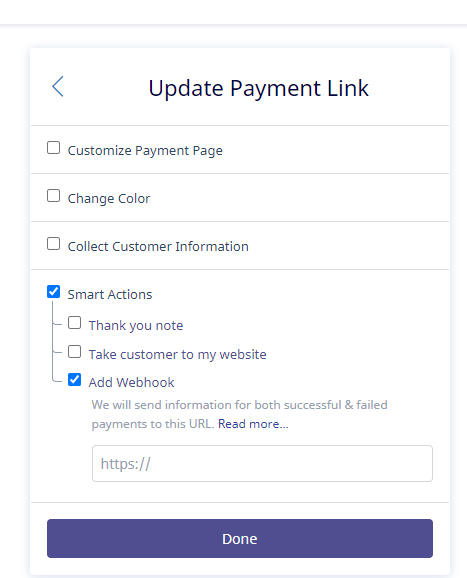
Use Payment Links - > Smart Link
You can make use of Delay step to wait for an hour as shown in the screenshot:
Then, you can use Google Sheets - Lookup Spreadsheet Row(s) step to find the email in your google sheet and then, use Router step to set your condition if Google Sheets - Lookup Spreadsheet Row(s) has a row index in response or not and then on that basis you can send the email else, do different thing.
I hope you find this helpful.
I have tried using router after lookup using row index response, but if the response is not there, router condition is automatically changed to timestamp and still continue the workflow. Can you please help me in this.
I have tried using router after lookup using row index response, but if the response is not there, router condition is automatically changed to timestamp and still continue the workflow. Can you please help me in this.
You need to use different condition,
Row Index Returned(row found) -> Is Exist
Row Index Not Returned(no row found) -> Does Not Exist