Can't Get Pabbly Webhook to Hear When A GSheets Row is Updated
Status: Closed · Asked by Popcorn Trailer // Team on · 0 views
If the row is being updated by another action script command and not manually typed into, the trigger won't activate because it only triggers when cells are manually edited by a user.
In this case, I got ChatGTP to write an Appsscript for the OnChange option to detect changes made by scripts or formulas. The script works but still only manual edits. Pabbly still doesn't hear the trigger.
function onChange(e) {
var spreadsheet = SpreadsheetApp.getActiveSpreadsheet();
var editedRange = spreadsheet.getActiveRange();
if (editedRange) {
var sheet = editedRange.getSheet();
// Check if the edited range is in column G
if (editedRange.getColumn() == 6) {
var editedValue = editedRange.getValue();
// Trigger the webhook if the value is not empty
if (editedValue !== "N/A") {
var headers = sheet.getRange(1, 1, 1, sheet.getLastColumn()).getValues()[0];
// Get the row index of the edited range
var rowIndex = editedRange.getRow();
var rowData = sheet.getRange(rowIndex, 1, 1, sheet.getLastColumn()).getValues()[0];
// Create an object to hold the column headers and values
var payload = {
"rowData": {}
};
for (var i = 0; i < headers.length; i++) {
payload.rowData[headers] = rowData;
}
// Add the edited column and value to the payload
payload["editedRange"] = editedRange.getA1Notation();
payload["editedValue"] = editedValue;
// Trigger the webhook
var url = "Your Webhook Here";
var options = {
"method": "POST",
"contentType": "application/json",
"payload": JSON.stringify(payload)
};
UrlFetchApp.fetch(url, options);
}
}
}
}
How do I get Pabbly to hear changes being made to cells from Gsheets scripts?
Hey @Anistatik
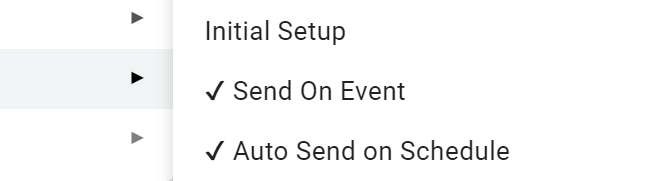
If you are utilizing Formula and Appscript in Google Sheets and find that they are not functioning properly to automatically forward data to the workflow, we advise our users to consider using the "Auto Send on Schedule" option when passing data from a 3rd party.
Alternatively, if data is being passed manually, it is recommended to choose the "Send On Event" option.
Hello,
Thanks for the reply. I"ve tried your solution a few different ways. I've tried with the Pabbly plugin only with Auto Send on Schedule checked.
I have the plugin setup to trigger when column G receives new data.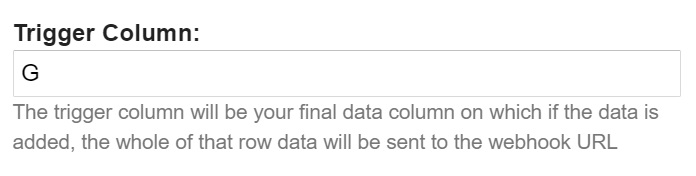
The issue still remains that it only activates Pabbly webhook when the cell is manually typed in.
However, I need Pabbly to reconiize when my client dashboard links are being generated in column G. This generation automatically occurs from a Google script.
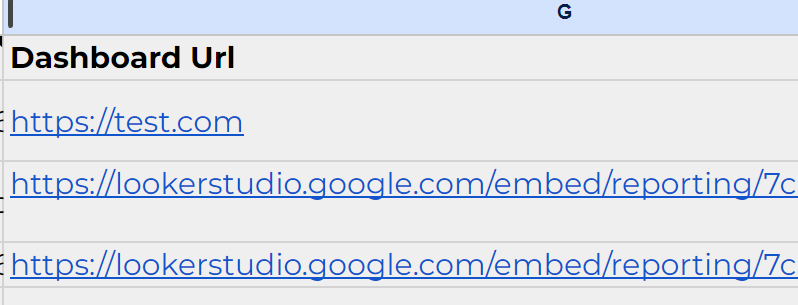
Is there another workaround? Perhaps a simulation of typing in the cell? I'm unsure.
The issue still remains that it only activates Pabbly webhook when the cell is manually typed in.
If you manually update the trigger columns, it will function as expected. However, if you attempt to update the trigger columns from a third-party application, it will not work.
Hi, check this out please. let me know if you need help in this, (https://github.com/MuaazBinAamir/GoogleSheetsScripts/blob/main/PabblyWebhookSendOnChange1minuteInterval)
this script is modified version of this one (https://forum.pabbly.com/threads/google-sheets-1-minute-trigger.12927/)
it is currently configured to check for changes (automatic or manual both changes) after every 10 seconds
Hi, check this out please. let me know if you need help in this, (https://github.com/MuaazBinAamir/Go...main/PabblyWebhookSendOnChange1minuteInterval)this script is modified version of this one (https://forum.pabbly.com/threads/google-sheets-1-minute-trigger.12927/)
it is currently configured to check for changes (automatic or manual both changes) after every 10 seconds
That's great! Could you also let us know if it will trigger the row regardless of only passing data in the trigger column?
That's great! Could you also let us know if it will trigger the row regardless of only passing data in the trigger column?
It will detect any change in table, as it is storing the state of whole table after each check, so any change in table data will get detected