Capture change in any column in a Google Sheet?
Status: Closed · Asked by Lars on · 0 views
Slogging along here, learning by trial and error. The latest challenge I've run into now is the New or updated row function for Google Sheets. The sheet I'm tracking is output from Google forms. Since I need to specify a trigger column, I can only track that column, but I need to trigger the workflow as soon as any column is updated. Is there a way to do this?
I know that formulas etc aren't currently supported as triggers, and I think I've read somewhere that both manual entry and form submissions count as events that will trigger when the Event option is enabled. But now whe I clicked help in the configuation dialogue it said that only manual entry trigger the Event listener. Dores this mean that the only way to capture forms data is via the Auto Send on Schedule option?
Also, what happens when both Event and Auto Send are enabled?
Thanks,
Lars.
Hey @Lars
If you are getting the data in your Google Sheets from the Google Forms application, so in that case, you simply need to check the option of "Send On Event" and by enabling the option the data can be forwarded in instantly. Else, you can simply use "Send On Event" & "Auto Send on Schedule" to send the row data when you are adding the data from 3rdparty application to the sheet.
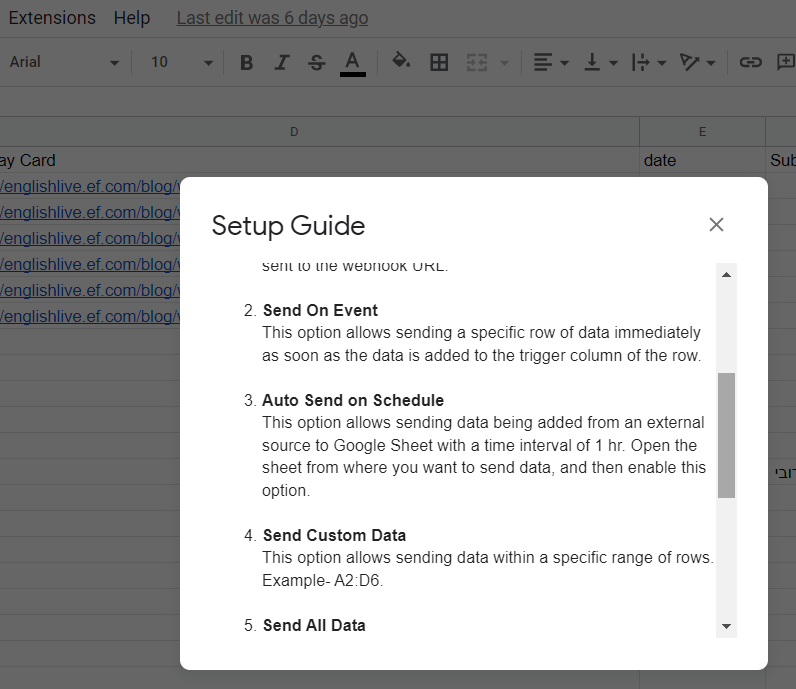
You can also refer to the following video tutorial on the same-
(Watch the first part of the video)
Ok, thanks. I have both enabled but what you're saying is that I should only have Send on event since data is coming from a Google form?
The video isn't useful for this case because I can't use the Forms integration since it only handles new submissions, not updates. Instead, I need to capture the forms data in the associated Google sheet and take it from there.
Best,
Lars.
Hey @Lars
Yes, if you update any of the cell values from the row except the triggering column it will not trigger a workflow, but if you also update the triggering column it will forward the data to the workflow.
Hey @LarsYes, if you update any of the cell values from the row except the triggering column it will not trigger a workflow, but if you also update the triggering column it will forward the data to the workflow.
Looks like this was a response ti my original question aboce, and not really helpful since the need remains to trigger based on changes in any column in an updated forms answer. Is there a solution to this requirement?
Hey @Lars
I am afraid to say that currently, there is no other workaround available to process the updated row from Google Sheets.
Hey @LarsI am afraid to say that currently, there is no other workaround available to process the updated row from Google Sheets.
Ok, but the trigger should still fire when a new or updated timestamp is logged vid google forms entry to the google sheet, right?
Hey @Lars
Ok, but the trigger should still fire when a new or updated timestamp is logged vid google forms entry to the google sheet, right?
If the triggering column gets updated manually then only it will process the workflow.
Hey @LarsIf the triggering column gets updated manually then only it will process the workflow.
And a forms submission that updates the row counts as manual, right?
Hey @Lars
The Forms submissions will be counted as a new row in the Google Sheets, not as an updated row.
Ok, så even though an existing forms response is updated, it's counted as a new row? Well, not a problem for me - and I still have the problem that the workflow is not being triggered.
Hey @Lars
Could you please record a video on how you have configured the Google Forms trigger?
Hey @Lars
Seems like you haven't done the Initial Setup correctly, please refer to the following video tutorial and try accordingly.
(Watch the first part of the video)
Hey @LarsSeems like you haven't done the Initial Setup correctly, please refer to the following video tutorial and try accordingly.
(Watch the first part of the video)
What makes you think that? I've done exactly this.
As we can see from your shared video you haven't sent the data(Send Test) to capture the webhook response.
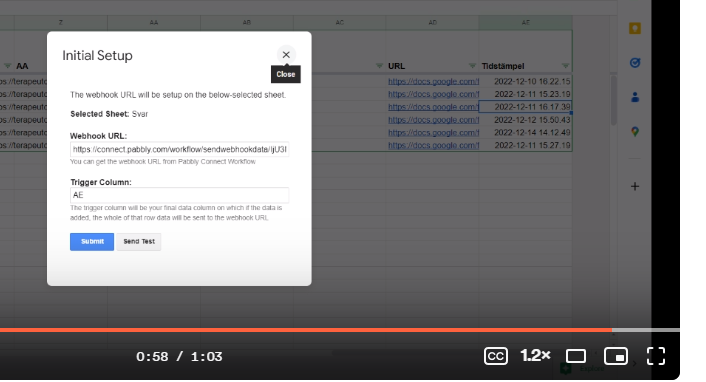
As we can see from your shared video you haven't sent the data(Send Test) to capture the webhook response.
Oh, ok, I understand the misunderstanding now. Yes, test data sent and received. When I recorded the screen I re-did the dialogues, just didn't send the test data again.
Hey @Lars
As we can see from your workflow, your workflow now receives the data from the Google Sheets correctly.
Kindly give it a try and let us know if that works accordingly.
Indeed it does! All good - the problem was ind the router conditions, not in the trigger. Thanks :)