Capture SMS Consent in Klaviyo
Status: Closed · Asked by Ritu Raj Shandilya on · 0 views
I'm sending Manychat Data to Klaviyo via Pabbly Webhook - All the data is being passed successfully but it's not subscribing to the SMS Consent.
It's asking for the SMS Consent Timestamp and Pabbly Connect is not offering any such option to map the data to make it work - I'm open to your feedback & the solution...!!
Here are some resources that might help:-
1. https://community.klaviyo.com/lists-segments-and-profiles-35/sms-consent-timestamp-via-csv-3092
2. https://developers.klaviyo.com/en/docs/acceptable_date_and_timestamp_formats_for_profile_and_event_properties#:~:text=When%20adding%20an%20event%20or,mmmmmm%20
3. https://community.klaviyo.com/sms-73/sms-consent-timestamp-and-age-gated-dob-properties-not-showing-10766
Hey @riturajshandilyaofficial !
Can you please confirm if you are looking for a field by the name "SMS Consent Timestamp" in the Klaviyo action event "Add/Update Subscriber to List"?
So accordingly we can check it with the tech team if possible or not.
Hey @Subin,
Although the phone number is passed successfully, It's still asking for SMS Consent inside Klaviyo and Manychat takes care of it when it asks for the Phone Number as they opt-in the user automatically inside Manychat.
Now when I'm passing the data from Manychat to Pabbly via Google Sheets and then to Klaviyo - It's not subscribing to the SMS part and There is no opt-in consent option inside Pabbly where I'm sharing it with Klaviyo that we already have user consent and so we can't map the data too...!!
In the article above, it says you've to pass SMS Consent Timestamp and I'm also passing it through custom properties but still, it's not working. There is no such field available inside Pabbly with the name "SMS Consent Timestamp" from where we can map the data.
Lmk if this part can be fixed or not. I look forward to hearing from you.
Thanks
Ritu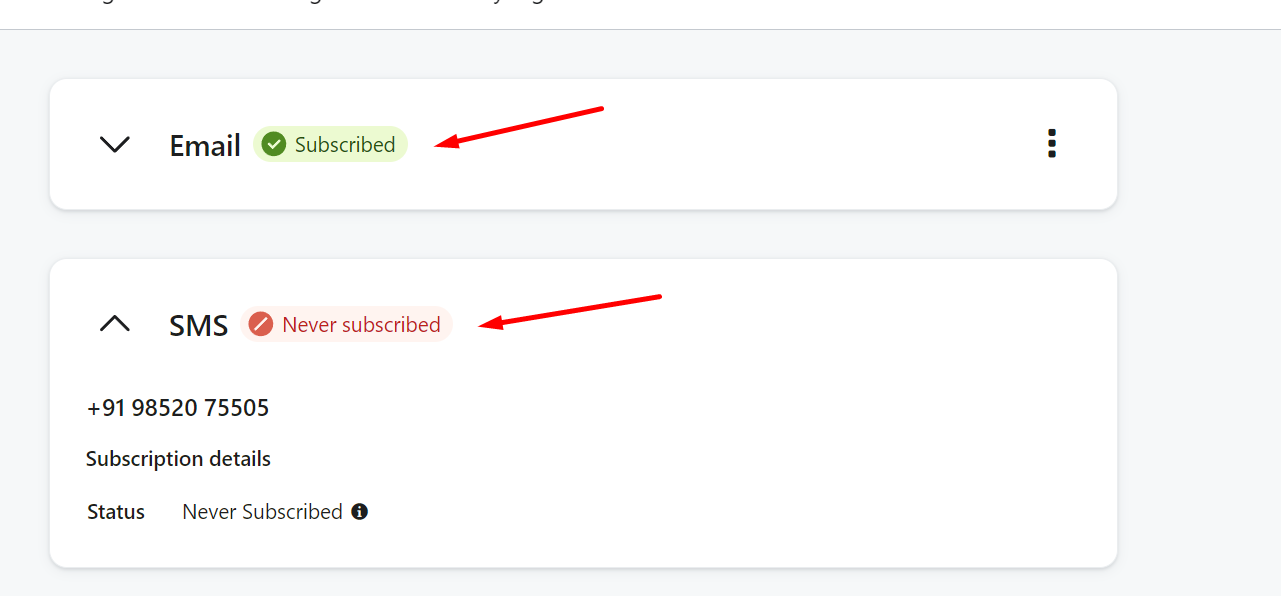
I encountered one more issue with pabbly that even I'm not passing the phone number now. It's automatically fetching phone numbers inside Klaviyo and I don't know why because now we've decided not to push the phone number but still it's pushing. I tried changing the API Keys too but it didn't worked...!!
Hey @riturajshandilyaofficial !
Kindly use Klaviyo V2 and inside it use the steps as shown below-
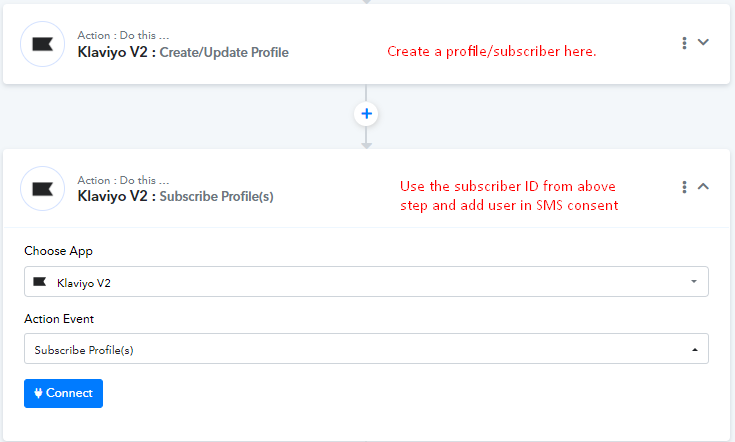
Do check on this and let us know if this work for you.
Hey @riturajshandilyaofficial !Kindly use Klaviyo V2 and inside it use the steps as shown below-
Do check on this and let us know if this work for you.
I'm also using the steps above, but in the Subscribe Profile it is requiring a phone number, but I do not have one and we are not subscribing them to SMS. I'd rather not just put in a fake phone number. Can this field be left blank somehow?
Hey @karilynae !
In "Klaviyo V2: Subscrive Profile", the Phone Number field is not a required field from our end-
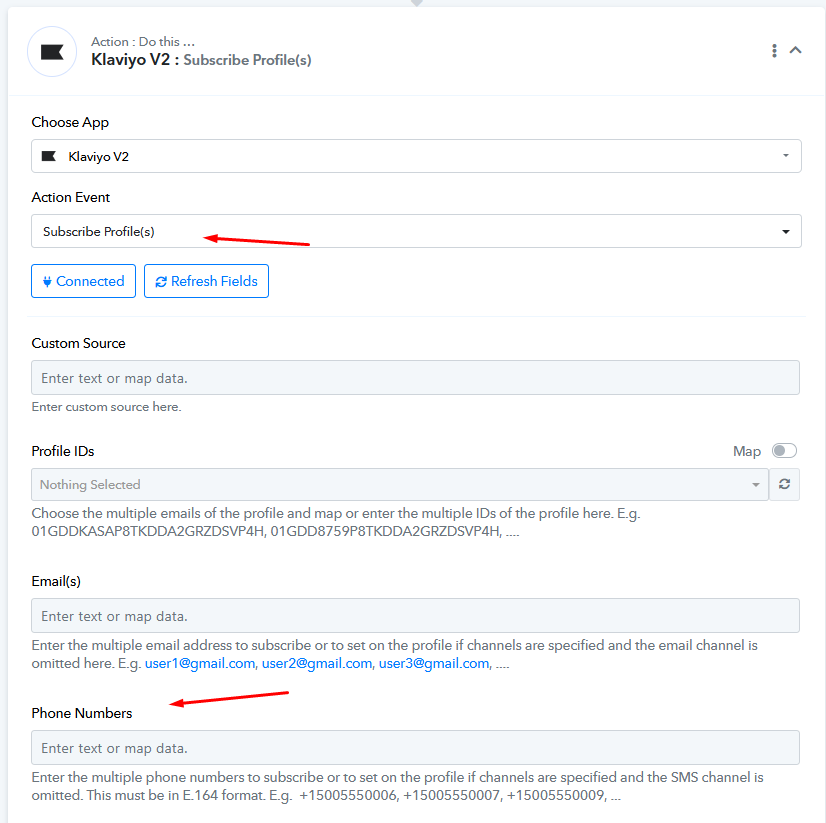
Can you let us know where is it showing as required?
Hope, to hear from you soon.
If I leave the phone number field blank, this is the error I receive.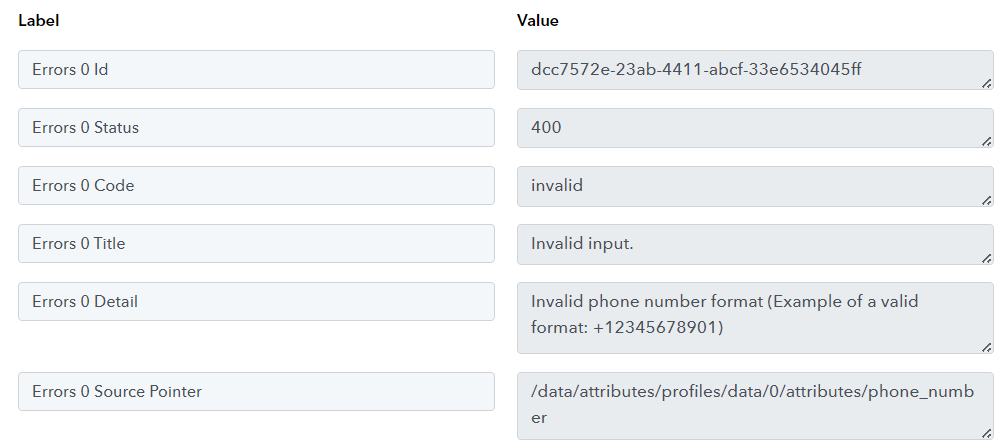
Hey @karilynae !
Kindly provide us with the workflow URL in which you have tried the setup?
Furthermore, we would like to ask for your permission to edit the workflow to add a few steps and do 2-3 test submissions to check on the concern.
Hope, to hear from you soon.
Workflow = https://connect.pabbly.com/workflow/mapping/IjU3NjUwNTY5MDYzMTA0MzI1MjY1NTUzNjUxMzQi_pc
Yes, feel free to edit.
There is a Subscribe Profile action in each of the 4 routes, you can test any one of them.
If i put a fake phone number in like +12345678901 then it works fine.
Thank you!
Hey @karilynae !
Kindly refresh the Klaviyo steps and check further by leaving the Phone fields as blank.
It will work for you now as we have made some updates to it.
Thank you! Its working now!