• Instructions to Ask a Question

    For any assistance, please click the "Ask a Question" button and select the Pabbly product for which you require support.

    We offer seven comprehensive applications designed to help you efficiently manage and grow your business:

    Our support team endeavors to respond within 24 business hours (Monday to Friday, 10:00 AM to 6:00 PM IST). We appreciate your understanding and patience.

    🖤 BLACK FRIDAY DEALS ARE NOW LIVE! 🖤

    🔥 Enjoy an exclusive 10% discount on our LTD Plan — first-time ever offer!

    🚀 Unlock the Pabbly Plus Unlimited Yearly Plan and get unlimited access to every Pabbly application at a truly unbeatable Black Friday price.

    👉 Grab the Black Friday Offer

Catalogue connecting issue

Grant Account Access for Support
  1. I authorize the Pabbly Support Team to access my account for troubleshooting purposes.
WhatsApp Number
9302195939
Email Address
[email protected]
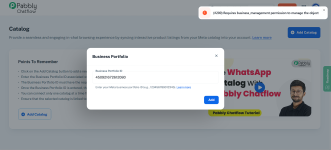
Created a catalogue. trying to connect it with chatflow with meta business portfolio ID. but error showing. please help.
 

Attachments

  • Screenshot 2025-12-01 134030.png
    Screenshot 2025-12-01 134030.png
    388.7 KB · Views: 5

Soumya Tripathi

Member
Staff member
Hello @icce.org.in
Could you please let us know whether, while connecting the number in the WhatsApp Connection Mode, you selected “Connect with Catalog”?
If not, please follow the steps below:

On the dashboard, click Add WhatsApp Number, then select the WhatsApp Connect option. Click Next, and under WhatsApp Connection Mode, choose Connect with Catalog.

After that, proceed with the steps — add the same WhatsApp number again and continue by clicking Next → Next → Finish to complete the connection.

Please note: You do not need to delete the number from Chatflow.
You simply need to add the same number again and go through the steps so the required permissions for using the Catalog option are granted.

If you need any further help, feel free to let us know.

1764582560211.png
 
Top