Chain json results as string
Status: Open · Asked by phil on · 0 views
A module return a json payload with a X number of results, like
values > 0 > 0 Apple
values > 1 > 0 Orange
values > 2 > 0 Pear
and I need to generate a multi-line string like
Apple
Orange
Pear
Which is the best way?
A module return a json payload with a X number of results, likevalues > 0 > 0 Apple
values > 1 > 0 Orange
values > 2 > 0 Pearand I need to generate a multi-line string like
Apple
Orange
PearWhich is the best way?
Do you have fix amount of results every time or do they keep on changing?
Keep changing, otherwise it would be easy ;)
Keep changing, otherwise it would be easy ;)
Can you change your incoming payload from the source?
Add a new key will All the values in it?
Otherwise, I am out of ideas. Maybe someone else can pitch in.
A module return a json payload with a X number of results, likevalues > 0 > 0 Apple
values > 1 > 0 Orange
values > 2 > 0 Pearand I need to generate a multi-line string like
Apple
Orange
PearWhich is the best way?
Can you try to get the above data not as a simplified response and then, pass the value array to JSON extractor to get the values as shown below:
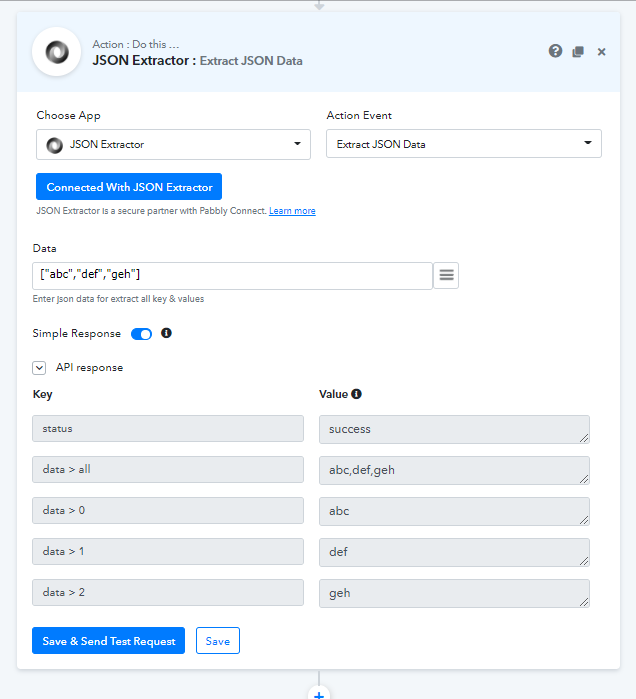
And then you can replace comma from the data > all with
in the next step using Text Formatter - Replace Text action to get the desired values.
Yes it's troublesome.
Please consider adding a variable module in PC, that allows iterations.
That would make operation more simple and wouldn't need multiple steps.
This would be easy like
foreach ($module_result as $value) {
$value = $value & "\n";
}
return $value
I will check the Naveen solution
In my case Naveer solutionwon't work.
I get the values from the Google Sheet module
https://punto-rosso.d.pr/kerPi6
so I cannot use the Json extractor to get all values
In my case Naveer solutionwon't work.
I get the values from the Google Sheet modulehttps://punto-rosso.d.pr/kerPi6
so I cannot use the Json extractor to get all values
Hey Phil,
Just turn of the simple response and send the test request in the Google Sheet step, you will get the values as an array and map the same in the JSON extractor field, you will get the response with comma separated values
If I turn off the simple response on the Google Sheet step the Json extractor don't deliver the ALL value
If I turn off the simple response on the Google Sheet step the Json extractor don't deliver the ALL value
Could you please share your Workflow URL, I need to check that.
I have created a simpler one, for you to test
https://connect.pabbly.com/workflow/mapping/IjMxMTU0Ig_3D_3D
I have created a simpler one, for you to testhttps://connect.pabbly.com/workflow/mapping/IjMxMTU0Ig_3D_3D
Thanks for sharing the workflow.
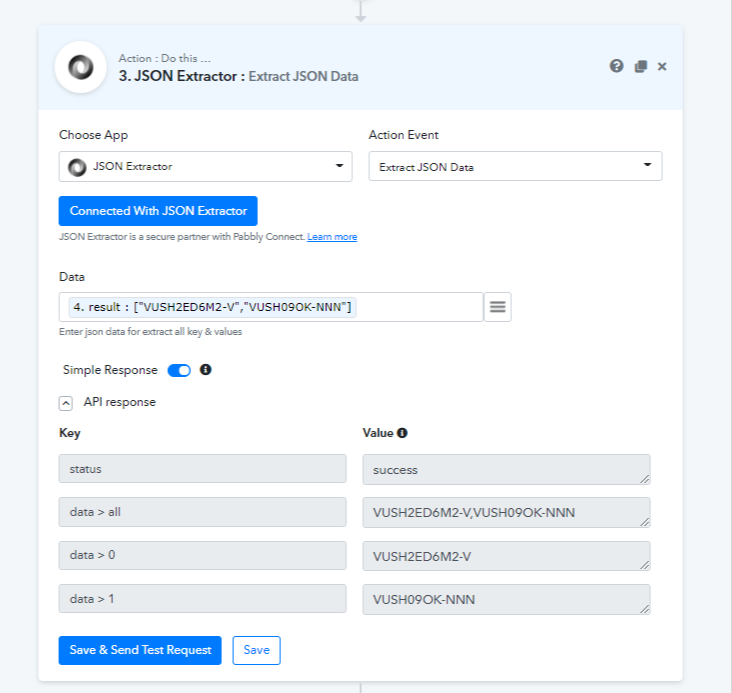
I can see, there are nested square brackets causing the problem, but, I have made some changes to make it work.
I have added a couple of Text Formatters - Replace Text to replace [" and "] with " (double quotes) to get the final array like ["val1","val2"].
Please check the attachment and your workflow. Now, you can get the comma separated values.
I hope you find it helpful.
Attachments
Thanks for your help, Naveen.
That's the same solution I am using in my workflow, but doesn't look a bit....weird?
Especially when you have different logical mappings, it looks like a maze in a jungle ;)
A text filter, that allows only certain characters to go trough (ex. A-Z, 0-9), would be a great help.
Not perfect, but "clean", at least.
By the way, if you use multiple Text Replace module, you won't even need the json extractor.
Simply replace all ", [ and ] and you get a value1,value2 string
By the way, if you use multiple Text Replace module, you won't even need the json extractor.
Simply replace all ", [ and ] and you get a value1,value2 string
I can understand, unfortunately, multiple replacements in a single step are not possible. For now, you can use the Text Replace step one by one for doing the same.
Ok, noted. Thanks for your help.