ChatGPT Rate Limit
Status: Open · Asked by John Gibson - PCOS Body Transformation Expert on · 0 views
What are some ideas on this issue?
Here is my use case. I have a workflow that is triggered once per month to create some ideas for my next month's email marketing plan. Towards the beginning of the workflow, a message is sent to OpenAI, which returns dates and the type of email to be sent each day. I then split that response, which produces about 20 results I can Iterate. After the Iterator I use the Router by Pabbly based on the email type. Each route (6 Total) has another OpenAI message.
When I run this Workflow, it routinely stops because I hit the OpenAI rate limit for my organization. I know that I can set the Auto Re-Execution settings but after 5 manual re-executions for failed and skipped steps. I still have 5 messages that failed due to the rate limit.
What are some ideas out there on how to stagger the messages being sent? I've thought about delay timers, but saw somewhere that a delay timer after an iterator or router sometimes causes problems. But maybe I am wrong.
Hi @kotakeio,
Having an Iterator and a Delay in the same workflow may cause some issues. I recommend that you add a Data Forwarder in each of your routes immediately after the Filter condition. Create six different workflows and forward data from each route to these workflows.
You can then simply add a Delay after the trigger step (the one that will capture data from the Data Forwarder), and place all your other steps after this Delay. This will save you from having an Iterator and a Delay in the same workflow.
Hello @kotakeio,
Instead of using pabbly connect's Delay action, you can use code - javascript action like this to have a delay of 20 seconds.
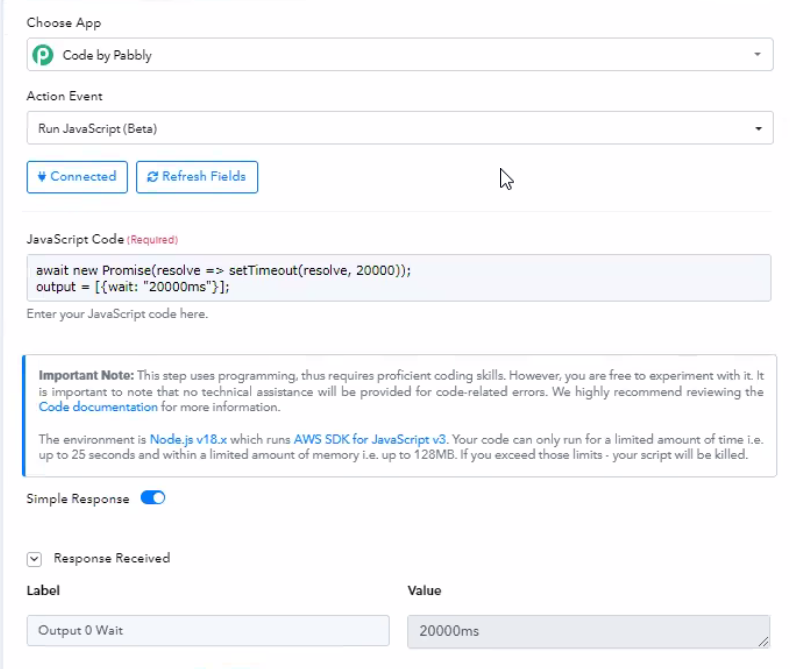
Here is the code-
await new Promise(resolve => setTimeout(resolve, 20000));
output = [{wait: "20000ms"}];
Contact me - https://www.facebook.com/himeshsoni07
Email - [EMAIL][email hidden][/EMAIL]
@Himesh I'll give that a try. Thanks for the idea.