ClickUp Issues
Status: Closed · Asked by AskYVi on · 0 views
There are a few things that are bothersome with the ClickUp Integration:
Why do I have to assign a tag?? (I don't even use tags)
Why do I have to choose a priority? (Again, I don't use priority ever)
Also, Why is assignee required too??? (in my case I don't need an assignee and it just pollutes my ClickUp)
There are a few things that are bothersome with the ClickUp Integration:
Why do I have to assign a tag?? (I don't even use tags)
Why do I have to choose a priority? (Again, I don't use priority ever)
Also, Why is assignee required too??? (in my case I don't need an assignee and it just pollutes my ClickUp)
Could you please tell us the concerned action name of the ClickUp integration. I will check the possibilities in their API.
Looks like tags are not required anymore - it doesn't show required and I tested it without a tag and worked like a charm.
Priority doesn't have an empty field - so that we could ignore the priority flag.
Same with assignee - just an empty field there would be great
I know both of these are possible in other tools, so the API should allow for it
I am also having trouble choosing the right status as it seems to pull in all statuses and I don't know which is the right status for that space
The automation is
YouTube New Video in Channel
to
ClickUp Create task with Custom Field
I renamed that specific status to be able to find it, and it doesn't show.
So something is not pulling in right
We are checking on your concern and will update in a while.
Looks like tags are not required anymore - it doesn't show required and I tested it without a tag and worked like a charm.Priority doesn't have an empty field - so that we could ignore the priority flag.
Same with assignee - just an empty field there would be great
I know both of these are possible in other tools, so the API should allow for itI am also having trouble choosing the right status as it seems to pull in all statuses and I don't know which is the right status for that space
The automation is
YouTube New Video in Channel
to
ClickUp Create task with Custom Field
We have made the required changes in the action. As far as the statuses listing in the field is concerned, I would like to inform you that, the API allows to pull only the space associated statuses there, but you can input your own status manually.
For more information, please refer this thread link: https://forum.pabbly.com/threads/clickup-status-not-updating.205/#post-802
your link shows as: You do not have permission to view this page or perform this action.
and see loom for issue walkthrough
https://www.loom.com/share/b210a4f385384fffbd722c7b201e0995
your link shows as: You do not have permission to view this page or perform this action.and see loom for issue walkthrough
https://www.loom.com/share/b210a4f385384fffbd722c7b201e0995
Thanks for sharing the video, let us review this and will also check your workflow once. we will get back to you.
Any update?I was ready to record a YouTube video on this...
If you can't do it in gonna have to feature zapier.
Please map the field in this way in ClickUp "Create Task with Custom Field" action event. This should work out.
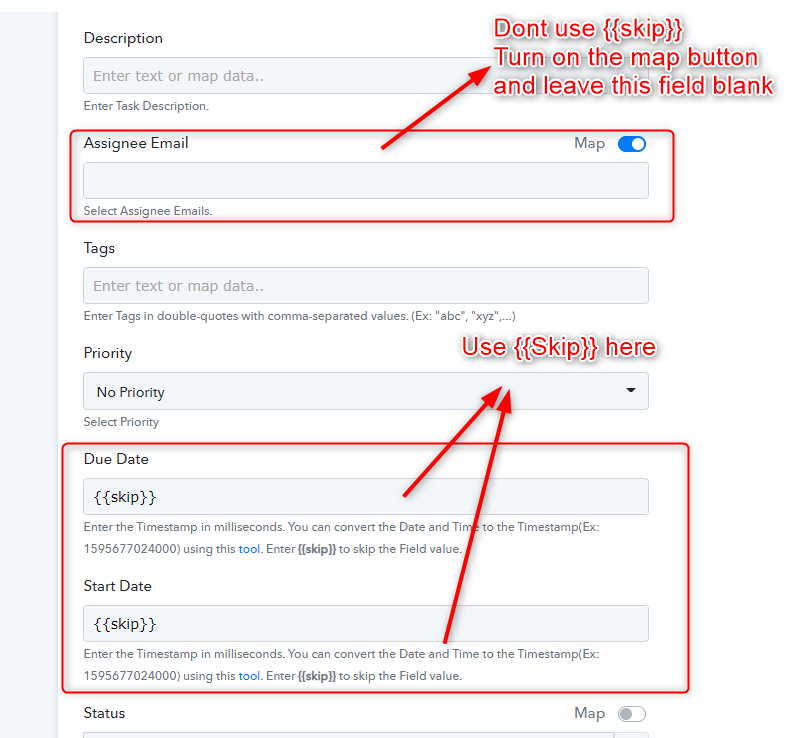
Please map the field in this way in ClickUp "Create Task with Custom Field" action event. This should work out.
is this still how to make custom fields work because my custom fields are still not coming into clickup
Hey @ashantirae12
We have answered the same query of yours on your other thread, please check that out.
https://forum.pabbly.com/threads/cognito-form-to-clickup-task-custom-field-not-working.2944/
Thanks