ClickUp - Task Template
Status: Closed · Asked by Cynthia427 on · 0 views
Found 2 little bugs for ClickUp, when you are trying to create a task from a template. 1st issue is that you need the List ID instead of the List Name, second issues is that pabbly only gives you 25 seconds to run the automation but, when i ran the same automation in postman, it took me around 40 seconds and I have a small list of tasks, which means that anyone with a larger list of tasks will take a lot more than 40 seconds, maybe 90seconds. here is a loom video https://www.loom.com/share/1bd7b8f7c32e4e68890d1a9e3438d9c4
Hey @Cynthia427
Actually, when the map button is turned off, you get a dropdown to choose the "Name". And when the map button is on, the "ID" should be entered.
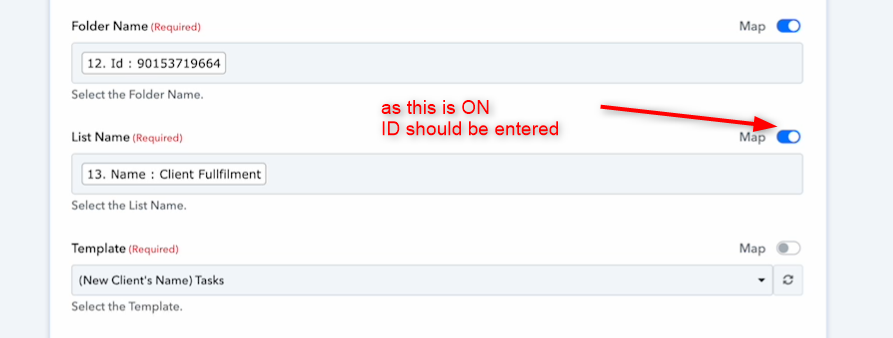
Further, you can resolve the issue related to timeout by following the instructions mentioned in this thread here - https://forum.pabbly.com/threads/pabbly-connect-timeout-limit-error-response-not-received-in-25-seconds.855/
Kindly let us know if it works for you.
Hey @Cynthia427,
For 25 seconds problem, you can request your API on cloudflare plateform and using pabbly API call and you can receive response data with the help of webhook.
If you are still not able to solve this on your own feel free to DM me and we can do a free zoom call. FYI I'm not from Pabbly Connect team, just a freelancer who helps other Pabbly users.
Contact me - https://www.facebook.com/himeshsoni07
Email - [EMAIL][email hidden][/EMAIL]