Create and Send Invoices to Customers on Google Sheets via Stripe
Status: Closed · Asked by calvinyoon on · 0 views
I have a google sheets which has the customer's name, email, product, and the cost of the product in my google sheet
On the very right column, I have a checkbox that I'd like to click to have the respective invoice generated and sent to the customer's email
When I try to create invoices for each customer on the list "You can only apply an 'application_fee' when the request is attempting a direct payment on behalf of another account (using an OAuth key or the Stripe-Account header) or destination payment (using `transfer_data[destination]`)." - what does this mean?
Hey @calvinyoon
Could you please share the name of the workflow in which you have faced such an issue and also elaborate on your use case once. So that we can look into it and assist you accordingly.
The workflow name is "Automate Stripe"
As I mentioned, I have the 5 columns (name, email, product, cost, and checkbox icon).
Each customer has expressed interest in a product (but not paid) so I have written the product and respective cost in the google sheet.
At the click of the checkbox, I want Stripe to create the respective invoices (with the different costs) and send the each invoice to the respective customer.
This way, on the customer side they can just make the payment for the product via the invoice.
Hey @calvinyoon
Kindly allow us some time, we are currently looking into it.
Hey @calvinyoon
Currently, you can not use the checkbox field in the triggering column of your Google Sheets. Since it can only take a text field to run your automation.
But that test passed in Pabbly because the output of a checkbox is "TRUE"
The question I asked was why do I get this message regarding Stripe
"You can only apply an 'application_fee' when the request is attempting a direct payment on behalf of another account (using an OAuth key or the Stripe-Account header) or destination payment (using `transfer_data[destination]`)."
Hey @calvinyoon
Please allow us some time, we are currently looking into it.
When you include an application fee amount in the request, Stripe expects that you will be charging a customer on behalf of a connected account. The application fee is the amount that should go to your platform account, as your fee for the service you provide.
Stripe throws this error if it believes that the account being paid is the platform account, and therefore it makes no sense to process a separate application fee to the same account.
The solution is to double check the account you are making payment to is not your platform account, or not include the application fee if the charge is going to your platform.
This is what I got about the application fee amount parameter from the Stripe Create an Invoice API docs: https://stripe.com/docs/api/invoices/create
application_fee_amount (optional):
A fee in cents that will be applied to the invoice and transferred to the application owner’s Stripe account. The request must be made with an OAuth key or the Stripe-Account header in order to take an application fee. For more information, see the application fees documentation.
Then how can I set my automation to send the following invoices?
For example
[TABLE]
[TR]
[TD]Customer[/TD]
[TD]Email[/TD]
[TD]Product[/TD]
[TD]Cost[/TD]
[TD]Send Invoice[/TD]
[/TR]
[TR]
[TD]Customer A[/TD]
[TD][email hidden][/TD]
[TD]Product#1[/TD]
[TD]100[/TD]
[TD][X][/TD]
[/TR]
[TR]
[TD]Customer B[/TD]
[TD][email hidden][/TD]
[TD]Product#2[/TD]
[TD]50[/TD]
[TD][X][/TD]
[/TR]
[/TABLE]
I'm able to get Stripe to create the customers.
Where I'm stuck is how to set the default Payment Method ID and Default Payment Source ID.
I just want the invoice to be sent to their respective emails so they can manually input their credit card
As per their documentation and parameter help texts: It must belong to the customer associated with the invoice.
You can get these details using Retrieve Customer by Email action as shown below:
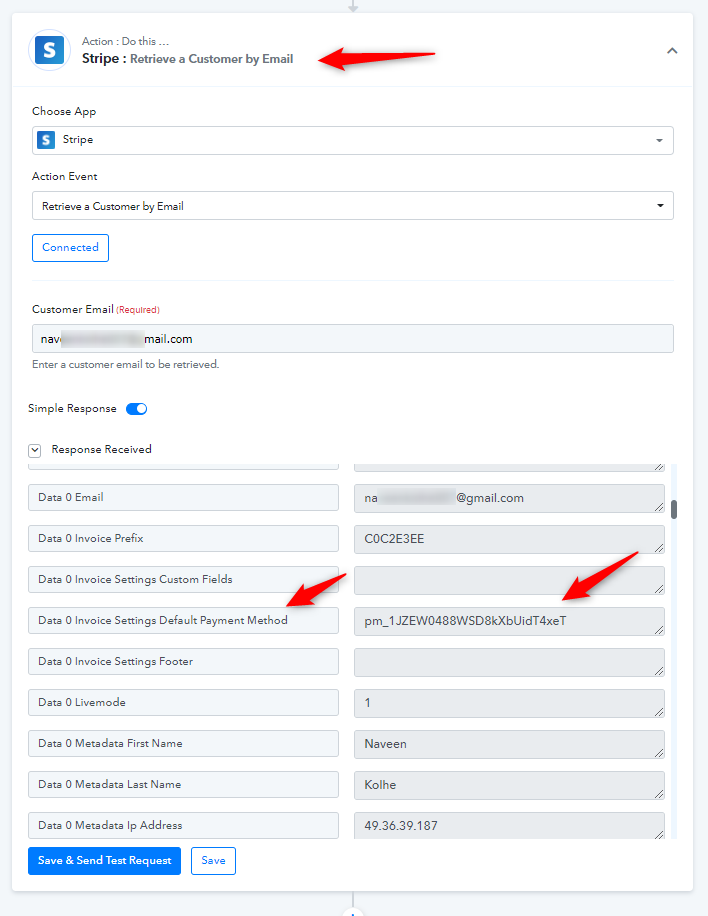
I hope you find the above information helpful.
Yes, this is taking me a little bit closer thank you.
I'm curious why the Default Payment Method is empty for me.
How do we get this field populated?
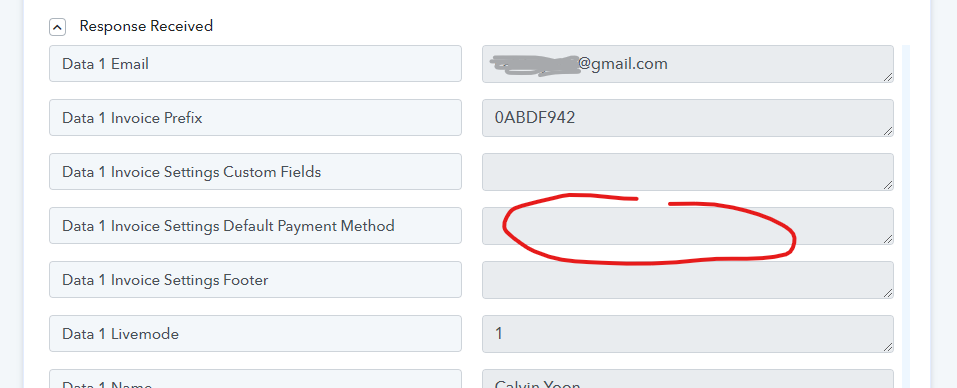
Yes, this is taking me a little bit closer thank you.I'm curious why the Default Payment Method is empty for me.
How do we get this field populated?
This needs to be checked from your Stripe account settings and relevant customer setting.
Stripe customer support has no idea what this issue is.
Would you know?
They should know about this.
You can get some help from here: https://stripe.com/docs/invoicing/customize