Create event in Plutio

Tjeps

Member
Create event is already available in the Plutio API but not in Pabbly when setting up a task. Ideally, I would create an event in Plutio when an event is created in Outlook 365. Because that would give me a perfect view on my day in Plutio.
 

Hermes

Active member
Hi Tjeps,

If you feel comfortable with this, you can achieve it by this option:
Tool: Plutio
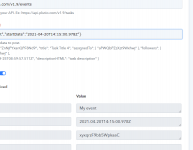
Action: Custom api request (post)
URL: https://api.plutio.com/v1.9/events
Raw JSON: {"title":"My event","startDate":"2021-04-20T14:15:00.978Z"}

Events have many fields you can add. https://docs.plutio.com/#event
Like participants, projectID, startDate, endDate, descrriptionPlain. This way you can select the fields you need and it will be usable for many connectors (pabbly users, lol).
 

Attachments

  • screenshot-connect.pabbly.com-2021.09.15-13_36_04.png
    screenshot-connect.pabbly.com-2021.09.15-13_36_04.png
    58.5 KB · Views: 205

Tjeps

Member
Pabbly says ok.
But if I create an event in Outlook, there is no Event in Plutio. Might that be because Plutio only shows 'My events'?
So, the raw json should look like:
{"title":"My event","assignedTo": [ "aPWQbPZzXzt9Wxhwj" ], "startDate":"2021-04-20T14:15:00.978Z"} ?

If that is the case, I am curious how to find the correct version of aPWQbPZzXzt9Wxhwj as that is an example but not 'me' in Plutio, I assume
 

Attachments

  • 1632323660487.png
    1632323660487.png
    31.3 KB · Views: 170

Hermes

Active member
Hi @Tjeps, activate my link for my demo (its Hermes here) and I will help you. But if you go to contacts, you will see the URL. After this: plutio.com/contacts/people/ you will find that id of that contact. If you need more contacts, use [ "aPWQbPZzXzt9Wxhwj" , "aPWQbPZzXzt9Wxhwj"]
 

Hermes

Active member
This is the json we used:
{
"title": "2. Subject : Hermes Test5",
"descriptionPlain" : "2. BodyPreview : ",
"participants": [ "contactID" ],
"startDate": "5. Result : 2021-09-24T17:00:00.978Z",
"endDate": "6. Result : 2021-09-24T17:30:00.987Z"
}
 
Top