Create folder Google drive fails - works when testing but not in Live
Status: Closed · Asked by Clairre on · 0 views
I have created a flow that whenever I create a new lead in an Ora.pm list (workflow), then a new folder inside a subfolder is created on Google drive with the name of the lead.
Whenever I press "test" inside Pabbly it works and the nre folder is created as specified. But once I exit Pabbly and then create a new lead, absolutely nothing happens on Google drive. No new subfolder.
So works in testing mode when manually pressing "test" inside Pabbly, but not without me pressing the "test" button.
Please advice TIA
Hey @Clairre
We checked the history for this workflow and found that you have successfully added the subfolder inside Google Drive. Could you please add the Search Folder step in the Workflow and then try to again create a subfolder in your Google Drive?
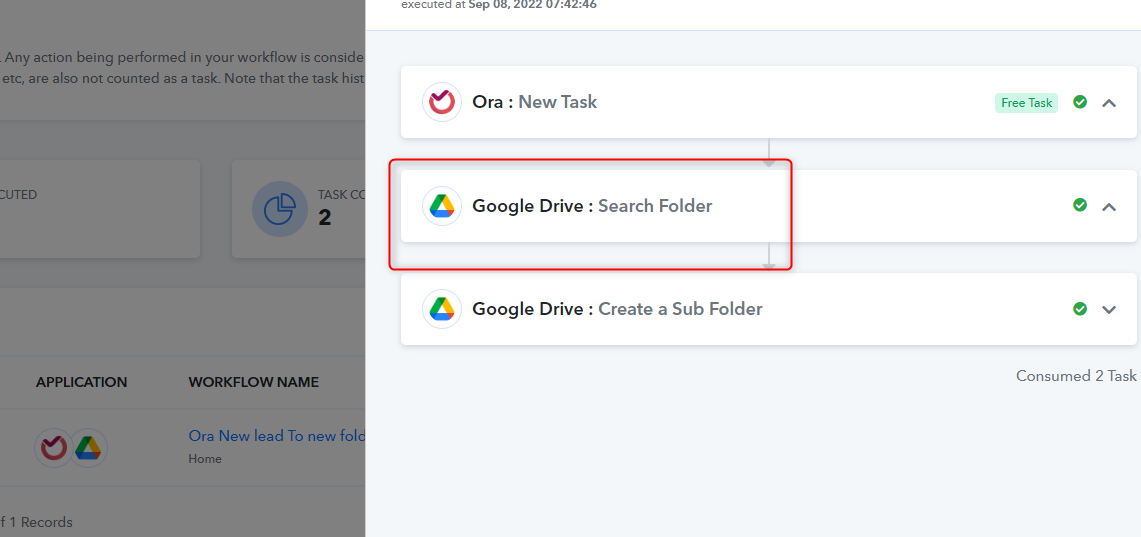
Hi - and thx for being so quick to respond
I already tried to add that middle step, and while I could search, it never created the new folder, inside the sub-sub-sub folder, even if I used the "seach folder" as middle step (and hence I deleted that automation).
I have now solved the issue by simply creating a webhook instead, moved the main folder up to root (to where new contacts are to be created), and then each submission creates a subfolder with the ID inside the main folder without any issue.
Would be nice though, to be able to create a new folder inside the sub sub sub folder, so as to keep hierachuy, but it is not that important :-)
Hey @Clairre
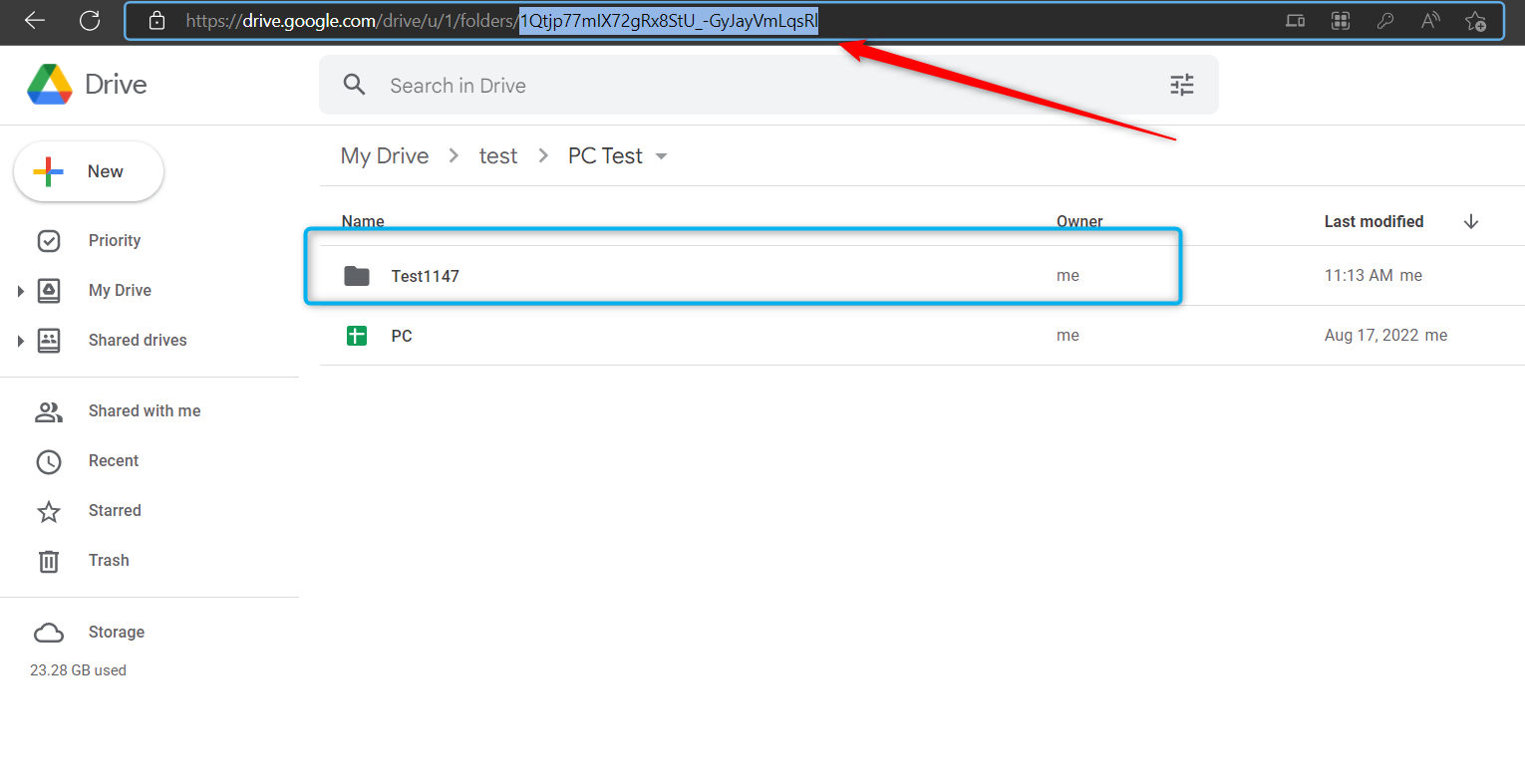
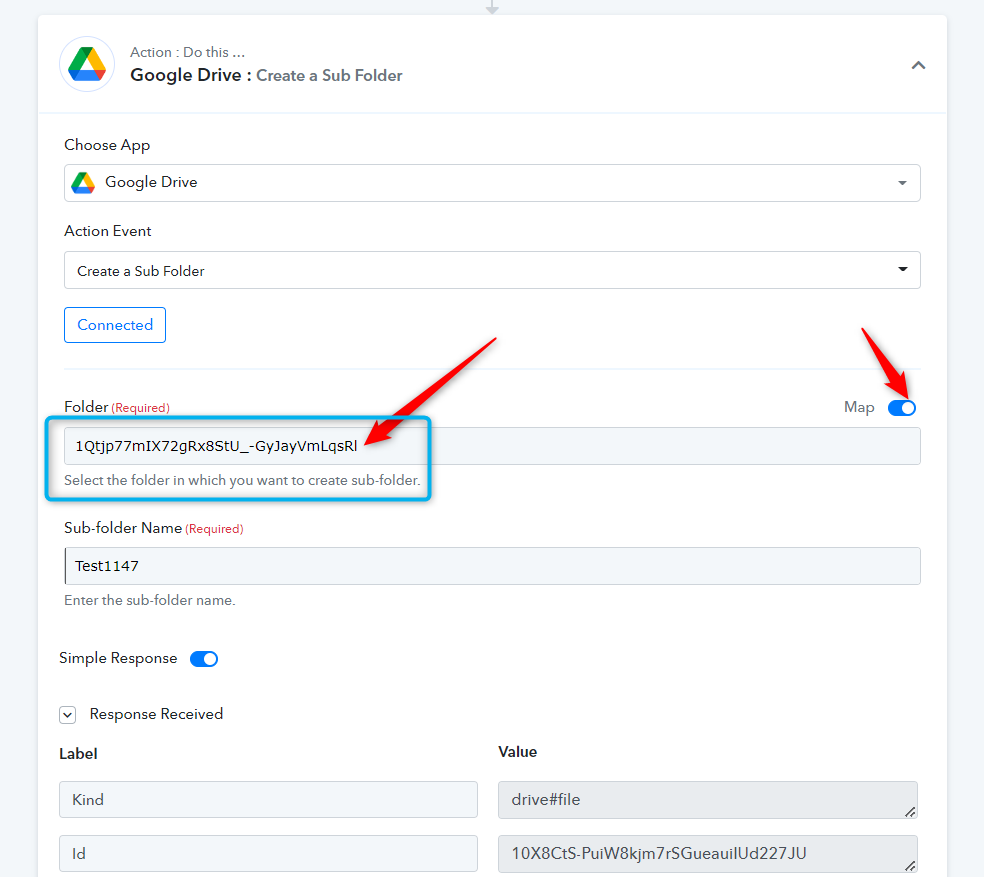
You can create a subfolder in the nested folder or in the main open folder.
Pelase refers to the following screenshot for the same.
Hi guys
I have once again tried to add the "seach folder" step before creating the subfolder - but it still does not work outside testing?
Can you please check what I'm doing wrong?
TIA
Hey @Clairre
Do you want to create a folder in the main folder of Drive?
No... I want to create a subfolder (with the name of a new task in a specific list in the app Ora.pm) inside an existing folder already located in the main Google drive. Does my way of explaining it make sense?
Hey @Clairre
Then you can simply use the above-mentioned process to create the folder in the subfolder.
Let us know if you get stuck foin the same.
[IMG width="513px" alt="1662702327852.png"]https://forum.pabbly.com/attachments/1662702327852-png.15338/[/IMG][IMG width="535px" alt="2022-09-09_11h13_56.png"]https://forum.pabbly.com/attachments/2022-09-09_11h13_56-png.15340/[/IMG]
Hi again
ok, so I tried to map the new creation of subfolder - and now I see, that the connection to Ora (It did before, I don't know why it doesn't do it now) no longer gets the info af i.re. the title of the new crad in the "leads" folder I create. No response is received?
Also, it does not even create the folder in the subfolder either.
Can you please check my setup in some way?
Hey @Clairre
Could you please record a short video on the same?
As we have already shown you the way to create a subfolder.
You can create a subfolder in the nested folder or in the main open folder.Pelase refers to the following screenshot for the same.
[IMG width="513px" alt="1662702327852.png"]https://forum.pabbly.com/attachments/1662702327852-png.15338/[/IMG]
[IMG width="535px" alt="2022-09-09_11h13_56.png"]https://forum.pabbly.com/attachments/2022-09-09_11h13_56-png.15340/[/IMG]