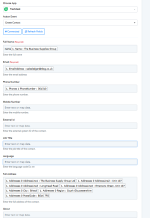
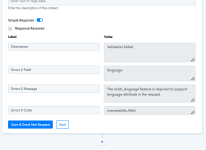
I have contacted Freshdesk support who have come back to me with the following:
After carefully examining the description and screenshots shared, it seems that Pabbly Connect is using an API call to create a new contact to Freshdesk. Upon further investigation, it has been found that when making an API call to Freshdesk in order to create a contact, certain parameters must be passed as outlined in the article. Additionally, if the language is not specified, it will default to English.
Article:
https://developers.freshdesk.com/api/#create_contact
Parameters
| ATTRIBUTE | TYPE | DESCRIPTION |
| nameMANDATORY | string | Name of the contact |
| email *UNIQUE | string | Primary email address of the contact. If you want to associate additional email(s) with this contact, use the other_emails attribute. |
| phone * | string | Telephone number of the contact |
| mobile * | string | Mobile number of the contact |
| twitter_id *UNIQUE | string | Twitter handle of the contact |
| unique_external_id *UNIQUE | string | External ID of the contact |
| other_emails | array of strings | Additional emails associated with the contact |
| company_id | number | ID of the primary company to which this contact belongs |
| view_all_tickets | boolean | Set to true if the contact can see all the tickets that are associated with the company to which he belong |
| other_companies | array of hashes | Additional companies associated with the contact. This attribute can only be set if the Multiple Companies feature is enabled (Estate plan and above) |
| address | string | Address of the contact. |
| avatar | object | Avatar image of the contact The maximum file size is 5MB and the supported file types are .jpg, .jpeg, .jpe, and .png |
| custom_fields | dictionary | Key value pairs containing the name and value of the custom field. Only dates in the format YYYY-MM-DD are accepted as input for custom date fields. Read more here |
| description | string | A small description of the contact |
| job_title | string | Job title of the contact |
| language | string | Language of the contact. Default language is "en". This attribute can only be set if the Multiple Language feature is enabled |
| tags | array of strings | Tags associated with this contact |
| time_zone | string | Time zone of the contact. Default value is the time zone of the domain. This attribute can only be set if the Multiple Time Zone feature is enabled (Garden plan and above) |
| lookup_parameter | string | This attribute for contacts can only be set if the Custom Objects feature is enabled. The value can either be in the form of the display_id (record id) or primary_field_value (user defined record value). The default value is display_id. |
| *One of these four attributes is mandatory | | |
Based on the screenshot provided, it seems that you are encountering a validation error. This typically occurs when the payload is not being passed correctly from the Pabbly Connect side.
Error Handling:
https://developers.freshdesk.com/api/#error
We request you ensure the accurate input of these values and attempt to create a contact again from the Pabbly Connect platform. If you continue to encounter difficulties, we recommend trying to create a contact using the Postman application, which allows you to make an API call for contact creation. If the contact creation is successful using Postman but not with Pabbly Connect, we advise reaching out to the Pabbly Connect support team to investigate the issue and understand why the contact is not being created.
This suggests the issue is to do with how Pabbly is passing the values to Freshdesk.
I have tried the same flow in Zapier and it works fine.