Date Mistake (Elementor form to Google Sheets)
Status: Closed · Asked by jpn on · 0 views
I did this workflow five times, even copying and pasting the "layouts". But in some of them, there is a mistake. When the client fill a form in Elementor, marking a DATE, for example: "2019-11-05", later in the google sheet column apeears "44374", Why this mistake? Some idea to avoid this problem? Because in the other workflows, it works fine. Thanks in advance :) Javi
I did this workflow five times, even copying and pasting the "layouts". But in some of them, there is a mistake. When the client fill a form in Elementor, marking a DATE, for example: "2019-11-05", later in the google sheet column apeears "44374", Why this mistake Some idea to avoid this problem Because in the other workflows, it works fine. Thanks in advance :) Javi
Try defining date format of column in Gsheet -
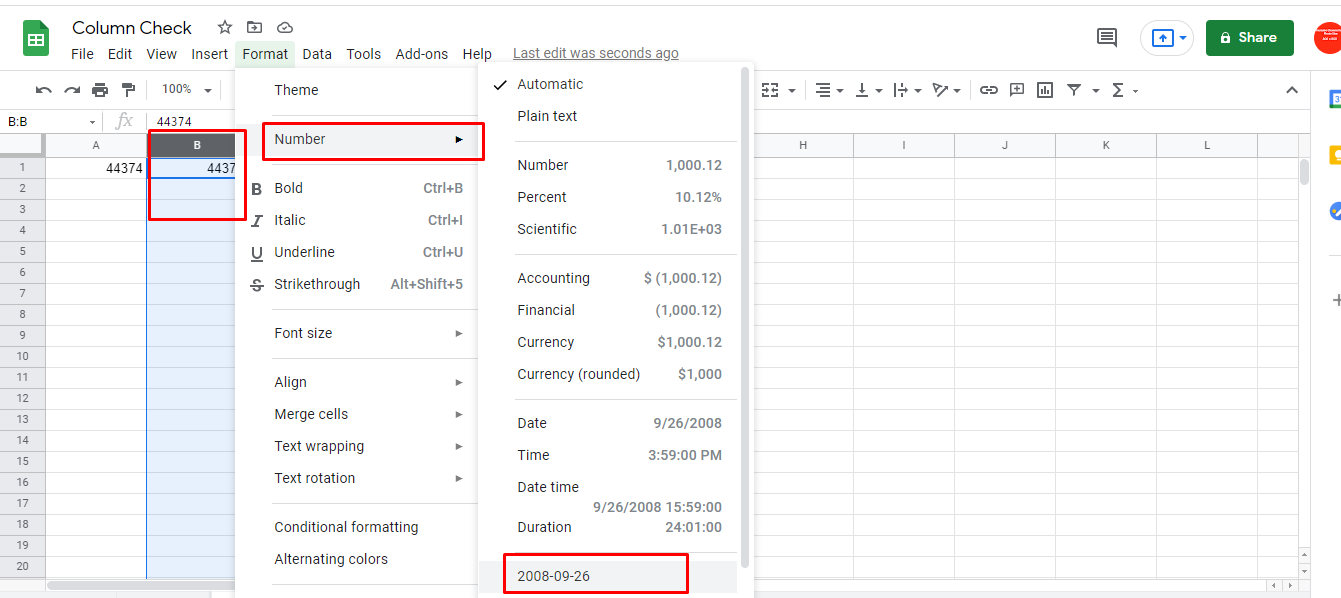
oooooooh @Fagun Shah thanks very much ¡ now it works ! Warm hugs :)