Date/Time Formatter missing format
Status: Closed · Asked by searchdusoleil on · 0 views
I need to convert this - 2021-09-28T08:52:17.436Z - which is pulled in from Google My Business, to this - 28/09/2021 08:52:17 - before importing into Google sheets. This format is missing from the Date/Time Formatter - it only has "DD/MM/YYYY hh:mm:ss A" and I do not want the AM/PM adding, as this isn't recognised by default in my sheet (that has existing dates in it).
Is there a reason why this format is missing, and how can I convert to the required format?
Thanks in advance.
Hey @searchdusoleil
You can use the Date/Time Formatter's Format Date with TimeZone to convert into your desired format.
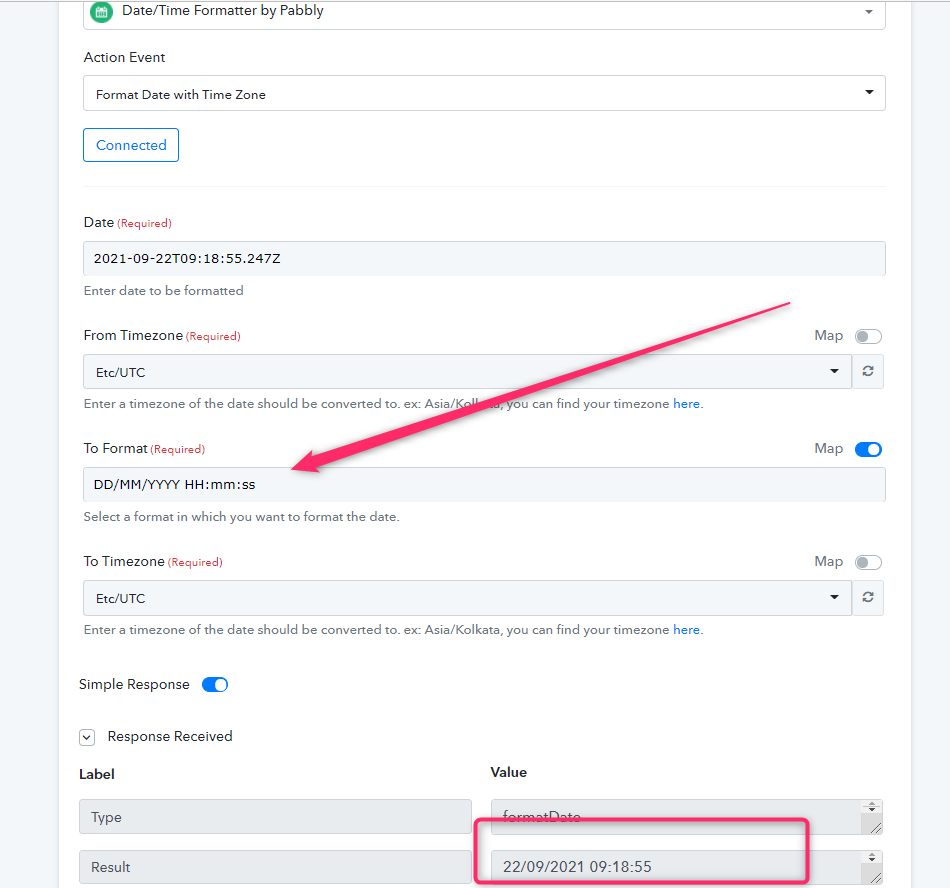
Thanks - it was the "map" toggle on the right that allows the format to be edited. I didn't see that anywhere in the tutorial.