

Delay after Iterator

tboy123

Member
Your Workflow URL
IjU3NjcwNTZjMDYzNDA0Mzc1MjZhNTUzMDUxMzIi_pc
Your Task History ID
IjU3NjUwNTY1MDYzZjA0MzA1MjY4NTUzNjUxMzM1MTY1NTQzOTBmMzMi_pc
Consent to Access & Modify
I authorize Pabbly Support to log in to my account and make changes to the specified workflow for troubleshooting.
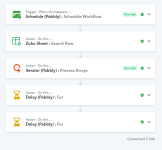
Am I not understanding out iterators and delay works together? I want it to delay for 1 min before starting the next iterator set, but it looks like it is delaying them both at the same time.
 

Attachments

  • Capture.PNG
    Capture.PNG
    57.8 KB · Views: 4

ArshilAhmad

Well-known member
Staff member
Hi @tboy123,

It appears that you have deleted the Delay step from your workflow, which is why we’re unable to determine the exact cause of the issue you’re encountering.

Based on your current workflow setup, it seems you are using multiple nested routers and Iterators. This could be causing the issue you’re experiencing.

We would recommend you establish routers as required but use a data forwarder inside the routes and transfer data to another workflow using the "Forward Custom Data" action event.

To learn more about the "Forward Custom Data" action event inside Data Forwarder please refer to this tutorial -
Thanks & Regards,
Arshil Ahmad
Customer Support Associate
🌐 Pabbly.com
👉Rate your support
 

tboy123

Member
IjU3NjYwNTZhMDYzMDA0MzE1MjY4NTUzNjUxM2Ii_pc
I tried the same with this workflow, and it did the same thing. It didn't delay each set of the iterator, it basically waited one minute and then did all the steps.
 

Hrishabh.pabbly

Member
Staff member
Hi @tboy123,

This behavior is expected when using Delay For with Iterators. The Delay For step pauses all iterator items together, waits for 1 minute, and then continues them at the same time.

To add a 1-minute delay between each iterator set, please use Delay After Queue instead.

1769661548662.png


This ensures each iterator item runs sequentially with the required delay.

Let us know if you need any help updating the workflow.
 
Top