Delay
Status: Closed · Asked by Rudolf Adlmanninger on · 0 views
Hi,
is there a possibility to delay not just x days, instead dely x business days?
I.e. I d like to make an offer on Monday and follow up on Thursday. But when I make the offer on Friday, I would like to follow up on Wednesday, not on Monday.
Many thanks!
Best regards,
Rudi
Hey @rudi
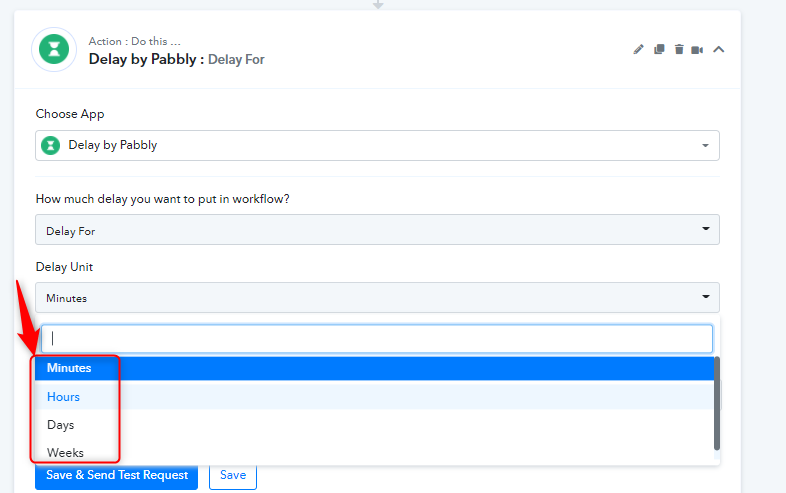
Please use "Delay" Action for your task. Do check the below screenshots to choose delay options as per your requirement.
Hope this works for you.
Hi Sheta, many thanks! I know "Delay Action", but my problem is, that I need to exclude weekends. I.e. I want to send an offer, and than wait 3 business days to follow up. It does not make sense to follow up on Monday, when sent the offer on Friday. Monday would be 3 days later, but because of the weekend it is the next working day. Especially for business clients using their business email it could happen, that they see the offer and the follow up the same day...
Hey @rudi
We understood your concern. Please give us sometime, we will update you soon on that.
Hi
Hey @rudiWe understood your concern. Please give us sometime, we will update you soon on that.
Hi Shweta,
just wanted to drop a line, so that you do not forget me. :-)
HiHi Shweta,
just wanted to drop a line, so that you do not forget me. :)
This workflow is somewhat similar to what you are trying to achieve, specially the router part will solve what you want to do -
https://connect.pabbly.com/workflow/share/D0dTYVcQAWNWHAlNAEsGZwAUUVIHTQRSXTpSQA##
Hey @rudi
We have designed the action steps according to your use case, which will perform delay in business days. Pelase check out the following screenshot.
Designed Workflow - https://connect.pabbly.com/workflow/share/DERRYwdMCGoDSgVBVjsGLAEVADkHTQlfVTIFFw##
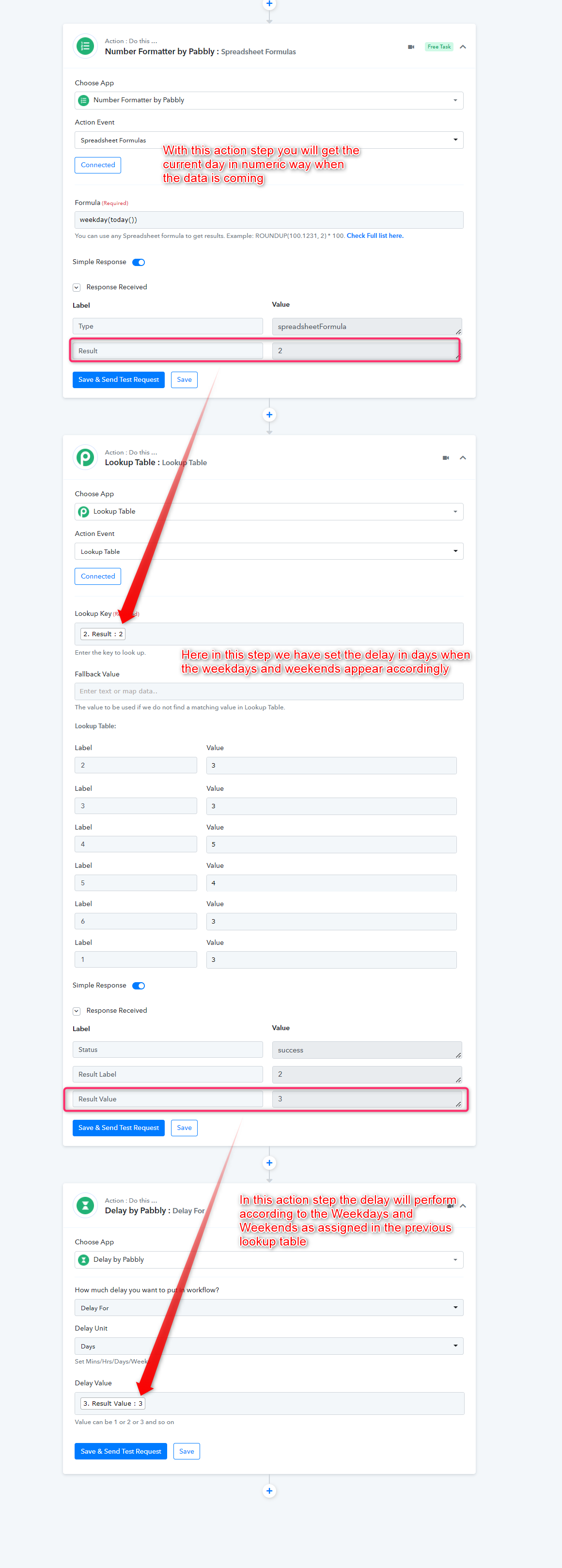
Hey @rudiWe have designed the action steps according to your use case, which will perform delay in business days. Pelase check out the following screenshot.
Designed Workflow - https://connect.pabbly.com/workflow/share/DERRYwdMCGoDSgVBVjsGLAEVADkHTQlfVTIFFw##
Hey @Supreme ,
many thanks for this!
I think I understand how it works. :)
I have some questions:
1) In the Lookup Table the label is the day of the week, isn´t it? Does it start with 1 = Sunday? Why do You only have 6 labels?
if I want to wait 3 business days (Monday to Friday, i.e. skip Saturday and Sunday)
Monday label 2 value 3 --> delays until Thursday
Tuesday label 3 value 3 --> delays until Friday
Wednesday label 4 value 5 --> delays until Monday
Thursday label 5 value 5 --> delays until Tuesday
Friday label 6 value 5 --> delays until Wednesday
Saturday label 7 value 4 --> delays until Wednesday
Sunday label 1 value 3 --> delays until Wednesday
This is just for me to understand, maybe I have to think for the right value. :)
2) Do I have to take care about the time zone? I.e. I suppose the timer is in UTC, but this could change the day ...
3) Is there a possibility to trigger the next step on a certain time on the wanted day? I.e. if I start on Monday, I would do the next step on Thursday at 09:00 AM UTC
As mentioned above I want to send out an offer and follow up after 3 business days. Or invite client to schedule an appointment and send a reminder if he did not book the appointment. So maybe it would be good to waitu ntil it is 09 AM and than add 2 business day. :)
Thanks again,
Rudi
Hey @rudi
I have some questions:
1) In the Lookup Table the label is the day of the week, isn´t it? Does it start with 1 = Sunday? Why do You only have 6 labels?
if I want to wait 3 business days (Monday to Friday, i.e. skip Saturday and Sunday)Monday label 2 value 3 --> delays until Thursday
Tuesday label 3 value 3 --> delays until Friday
Wednesday label 4 value 5 --> delays until Monday
Thursday label 5 value 5 --> delays until Tuesday
Friday label 6 value 5 --> delays until Wednesday
Saturday label 7 value 4 --> delays until Wednesday
Sunday label 1 value 3 --> delays until Wednesday
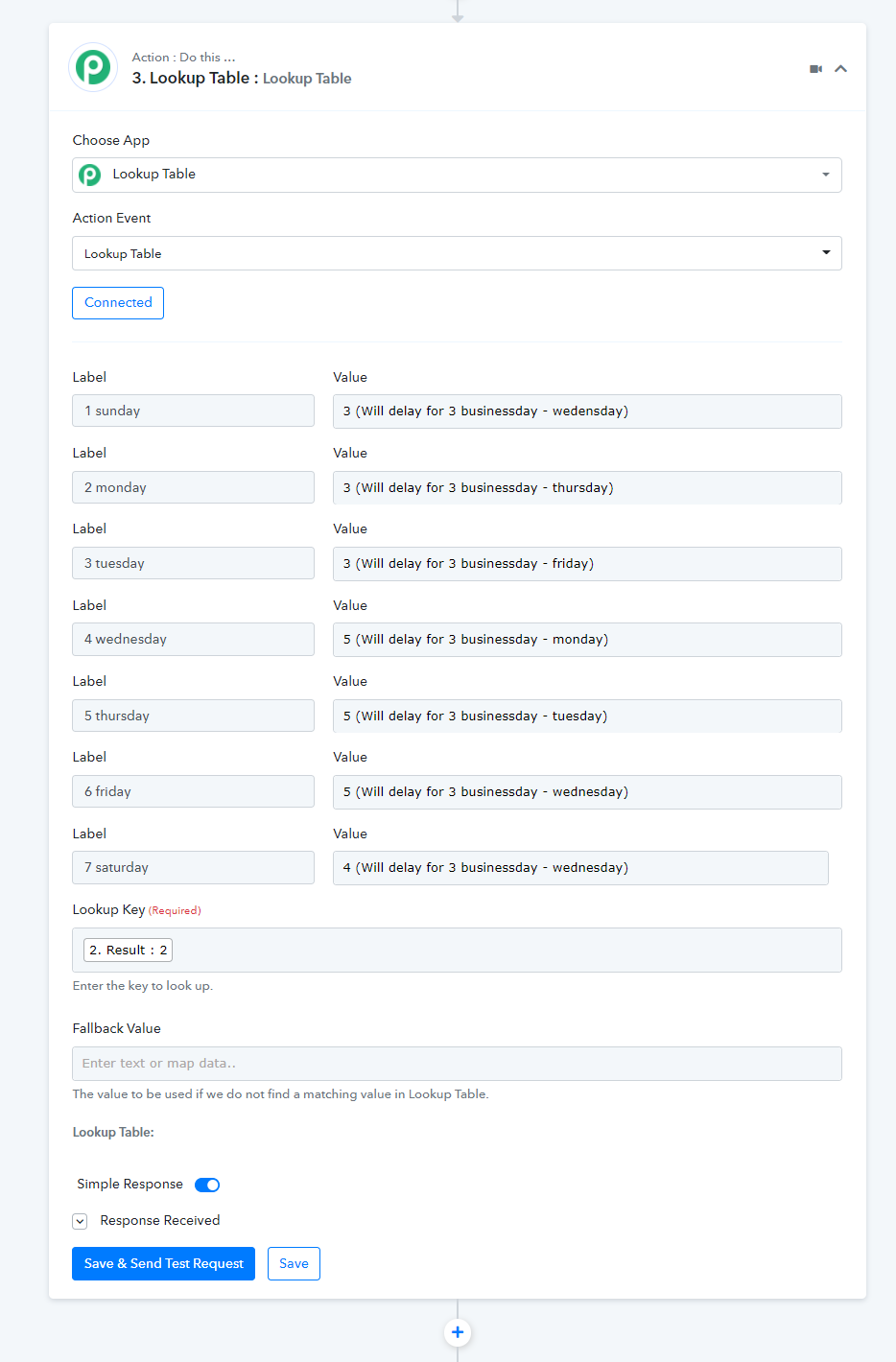
Yes, please check out the updated screenshot for all 7 days and yes we have skipped the Saturdays and Sundays from them.
2) Do I have to take care about the time zone? I.e. I suppose the timer is in UTC, but this could change the day ...
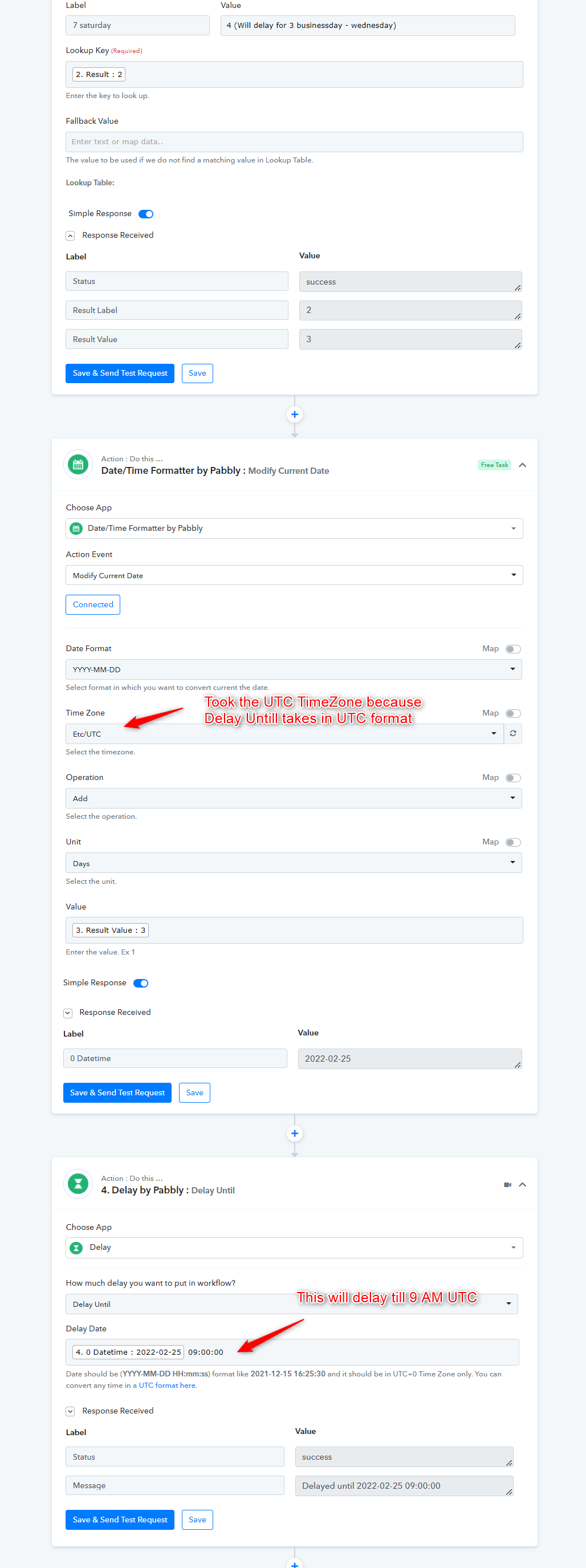
No, you do not worry about the timezone because the delay will simply delay from the current time for 3/4/5 days accordingly.
3) Is there a possibility to trigger the next step on a certain time on the wanted day? I.e. if I start on Monday, I would do the next step on Thursday at 09:00 AM UTCAs mentioned above I want to send out an offer and follow up after 3 business days. Or invite client to schedule an appointment and send a reminder if he did not book the appointment. So maybe it would be good to waitu ntil it is 09 AM and than add 2 business day. :)
Regarding your concern, we have tried something. Please check that out and let us know if that works for you.