Elementor Forms to Excel - some fields stay empty
Status: Closed · Asked by Marcel Münch on · 0 views
Dear Pabbly Team,
I have an Elementor form which is sending data to my Excel sheet via Pabbly Connect. The task is to create a new row in Excel, which is working. So far so good, the webhook is working and if I send the test data, everything is fine.
Sometimes though, if someone fills in the form on the website and it is not the test data which is send via the Pabbly backend, two columns stay empty in my excel row (marked in yellow on the screenshot). Pabbly does not transfer the data to these specific cells and I cannot find out why. I tried to send the value and also the raw value (where is the difference anyway?) but both did not work out.
Some more information: One of the cells should transfer a number (1, 2 or 3) and the other should transfer a word. Both original input types are dropdown selects in the element or form.
Is this a known issue?
Kind regards
Marcel
Attachments

Hey @Marcel2210
Could you please provide the workflow URL and specify the column number where you intend to add the data?
Hey, sure!
The Columns that are causing problems sometimes are G and O
We couldn't locate your workflow associated with your registered email address. Could you please provide us with any alternative email addresses you might be using for this workflow?
From one of your task executions, it's evident that the mapped data label did not appear in Elementor. Consequently, you are experiencing a lack of values in the Excel sheet in certain executions.
So, kindly check the same from the Elementor form.
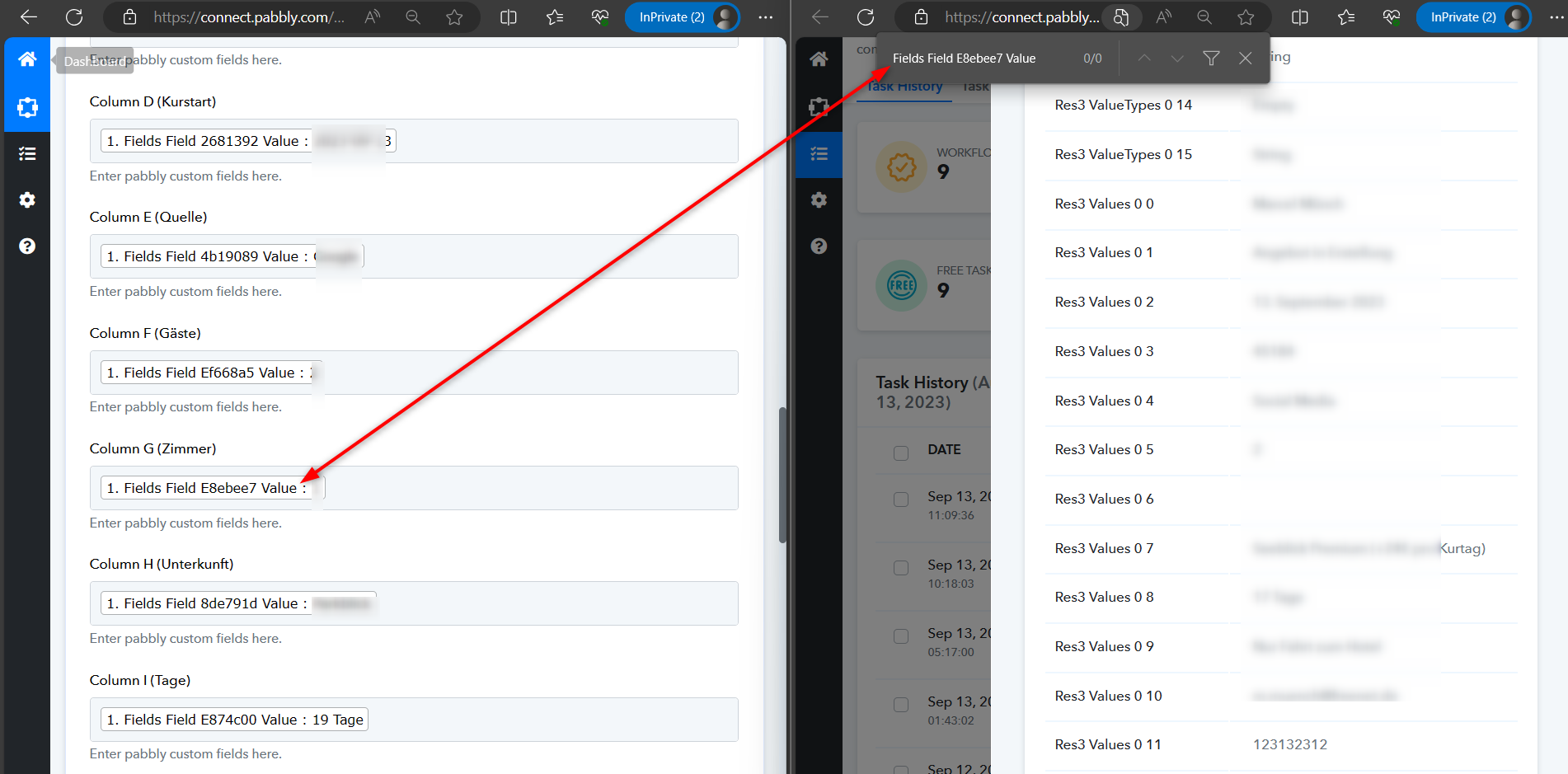
From one of your task executions, it's evident that the mapped data label did not appear in Elementor. Consequently, you are experiencing a lack of values in the Excel sheet in certain executions.So, kindly check the same from the Elementor form.
Thank you, it seems to work now! Please close the thread :)
I am sorry to say, but now there is another issue:
The file says
Success: The response received from the Microsoft Excel app is shown below:
then there is the correct list with the data, but in the end it says:
[TABLE]
[TR]
[TD]Res3 Error Code[/TD]
[TD]InvalidArgument[/TD]
[/TR]
[TR]
[TD]Res3 Error Message[/TD]
[TD]The number of rows or columns in the input array doesn't match the size or dimensions of the range.[/TD]
[/TR]
[TR]
[TD]Res3 Error InnerError Code[/TD]
[TD]invalidArgument[/TD]
[/TR]
[TR]
[TD]Res3 Error InnerError Message[/TD]
[TD]The number of rows or columns in the input array doesn't match the size or dimensions of the range.[/TD]
[/TR]
[TR]
[TD]Res3 Error InnerError Date[/TD]
[TD]2023-09-13T15:47:54[/TD]
[/TR]
[TR]
[TD]Res3 Error InnerError Request-id[/TD]
[TD]2687b877-9566-4fbc-86f3-930e50ebdb90[/TD]
[/TR]
[TR]
[TD]Res3 Error InnerError Client-request-id[/TD]
[TD]2687b877-9566-4fbc-86f3-930e50ebdb90[/TD]
[/TR]
[/TABLE]
Again, if I am using the pabbly webhook test, everything works fine
I am sorry to say, but now there is another issue:
The file saysSuccess: The response received from the Microsoft Excel app is shown below:
then there is the correct list with the data, but in the end it says:
[TABLE]
[TR]
[TD]Res3 Error Code[/TD]
[TD]InvalidArgument[/TD]
[/TR]
[TR]
[TD]Res3 Error Message[/TD]
[TD]The number of rows or columns in the input array doesn't match the size or dimensions of the range.[/TD]
[/TR]
[TR]
[TD]Res3 Error InnerError Code[/TD]
[TD]invalidArgument[/TD]
[/TR]
[TR]
[TD]Res3 Error InnerError Message[/TD]
[TD]The number of rows or columns in the input array doesn't match the size or dimensions of the range.[/TD]
[/TR]
[TR]
[TD]Res3 Error InnerError Date[/TD]
[TD]2023-09-13T15:47:54[/TD]
[/TR]
[TR]
[TD]Res3 Error InnerError Request-id[/TD]
[TD]2687b877-9566-4fbc-86f3-930e50ebdb90[/TD]
[/TR]
[TR]
[TD]Res3 Error InnerError Client-request-id[/TD]
[TD]2687b877-9566-4fbc-86f3-930e50ebdb90[/TD]
[/TR]
[/TABLE]Again, if I am using the pabbly webhook test, everything works fine
I found out that this error occures if someone leaves blank a not required field in the form. How can I tell the script to skip the cell if the field in the form is left empty by the user?
Again, if I am using the pabbly webhook test, everything works fine
Can you share the task history ID in which you have noticed this?
Can you share the task history ID in which you have noticed this?
yes, for example this one: IjU3NjEwNTY4MDYzNzA0MzY1MjY5NTUzNDUxM2E1MTY3NTQzOCI_3D_pc
I found out that this error occures if someone leaves blank a not required field in the form. How can I tell the script to skip the cell if the field in the form is left empty by the user?
Can you please reconnect the action step once and then try again?
I did that twice now. The result is still the same.
The only way to solve the error is to give a fixed value in advance of the field value, like I did with the value "Nachricht:" in front of the value. The other way would be of course to mark the fields in the form as required.
Otherwise, always if a user does not fill a non required field, you will get the error.
Otherwise, always if a user does not fill a non required field, you will get the error.
In that case, we recommend you use the Default Value action step which will pass a predefined value when some fields are not filled by the user.