Elementor (Webhook) to Sevdesk
Status: Closed · Asked by Alex Sevdesk on · 0 views
Hello,
The connection between Elementor (webhook) and Sevdesk works thanks for that.
I'm just missing a certain function, I want to enter a customer, but a few fields are still missing.
If I want to add company I only have the name but what is missing are the following fields:
1. First name 2. Last name 3. Zip code 4. City 5. Street 6. Telephone 7. Email.
Then it would be perfect and would help a lot of users.
Can you still program them?
Best regards Alex
Hey @Alex Sevdesk
Since the Elemnetor trigger event is a descriptive-based webhook trigger it will only capture the webhook response whcih was sent by Elementor itself.
So, if you have made any changes in the Elemtor form then kindly re-capture the webhook response, since you previously capture the webhook response that might not contain those details.
Many thanks for the quick response.
It also works fine but if I want to add a company then I don't just need the name (organization)
First name, last name, zip code, city, street, phone, email, website.
Can't you add that?
greeting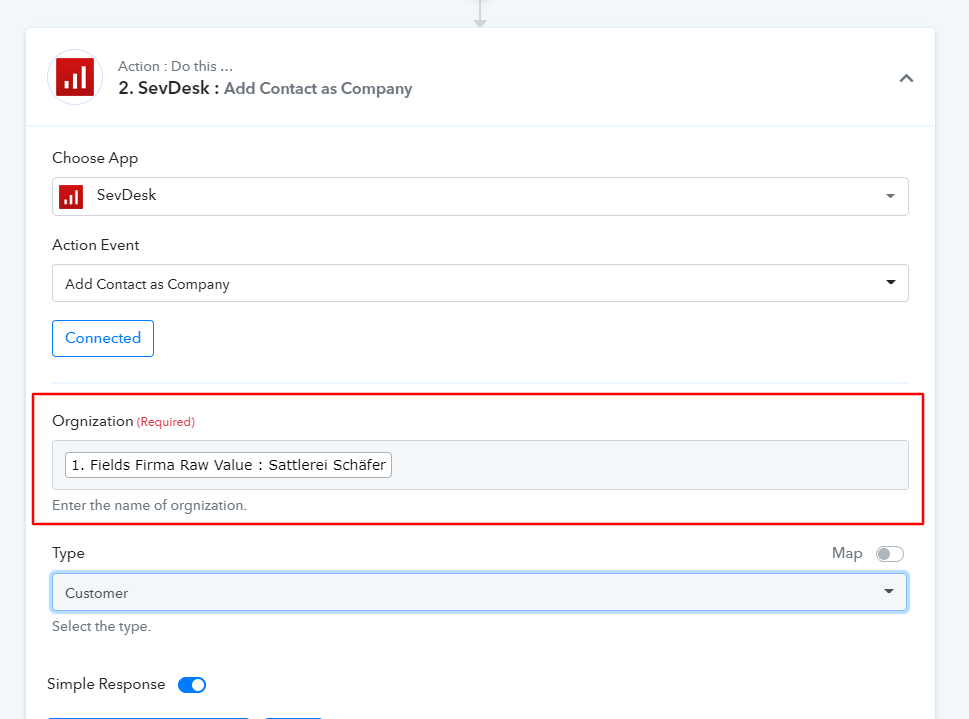
Hey @Alex Sevdesk
We are currently looking into it, so kindly allow us some time. We shall notify you of an update soon.
Thanks.
Create a new contact
Creates a new contact.
For adding addresses and communication ways, you will need to use the ContactAddress and CommunicationWay endpoints.
AUTHORIZATIONS:
api_key
REQUEST BODY SCHEMA: json
Creation data
[TABLE]
[TR]
[TD]name[/TD]
[TD]string or null
The organization name.
Be aware that the type of contact will depend on this attribute.
If it holds a value, the contact will be regarded as an organization.[/TD]
[/TR]
[TR]
[TD]customerNumber[/TD]
[TD]string or null
The customer number[/TD]
[/TR]
[TR]
[TD]parent[/TD]
[TD]object or null
Default: null
The parent contact to which this contact belongs. Must be an organization.[/TD]
[/TR]
[TR]
[TD]surename[/TD]
[TD]string or null
Default: null
The first name of the contact.
Yeah... not quite right in literally every way. We know.
Not to be used for organizations.[/TD]
[/TR]
[TR]
[TD]familyname[/TD]
[TD]string or null
Default: null
The last name of the contact.
Not to be used for organizations.[/TD]
[/TR]
[TR]
[TD]titel[/TD]
[TD]string or null
Default: null
A non-academic title for the contact. Not to be used for organizations.[/TD]
[/TR]
[TR]
[TD]category
required[/TD]
[TD]object
Category of the contact.
For more information, see here.[/TD]
[/TR]
[TR]
[TD]description[/TD]
[TD]string or null
Default: null
A description for the contact.[/TD]
[/TR]
[TR]
[TD]academicTitle[/TD]
[TD]string or null
A academic title for the contact. Not to be used for organizations.[/TD]
[/TR]
[TR]
[TD]gender[/TD]
[TD]string or null
Gender of the contact.
Not to be used for organizations.[/TD]
[/TR]
[TR]
[TD]name2[/TD]
[TD]string or null
Default: null
Second name of the contact.
Not to be used for organizations.[/TD]
[/TR]
[TR]
[TD]birthday[/TD]
[TD]string or null
Default: null
Birthday of the contact.
Not to be used for organizations.[/TD]
[/TR]
[TR]
[TD]vatNumber[/TD]
[TD]string or null
Default: null
Vat number of the contact.[/TD]
[/TR]
[TR]
[TD]bankAccount[/TD]
[TD]string or null
Default: null
Bank account number (IBAN) of the contact.[/TD]
[/TR]
[TR]
[TD]bankNumber[/TD]
[TD]string or null
Default: null
Bank number of the bank used by the contact.[/TD]
[/TR]
[TR]
[TD]defaultCashbackTime[/TD]
[TD]integer or null
Default: null
Absolute time in days which the contact has to pay his invoices and subsequently get a cashback.[/TD]
[/TR]
[TR]
[TD]defaultCashbackPercent[/TD]
[TD]number or null
Default: null
Percentage of the invoice sum the contact gets back if he payed invoices in time.[/TD]
[/TR]
[TR]
[TD]defaultTimeToPay[/TD]
[TD]integer or null
Default: null
The payment goal in days which is set for every invoice of the contact.[/TD]
[/TR]
[TR]
[TD]taxNumber[/TD]
[TD]string or null
Default: null
The tax number of the contact.[/TD]
[/TR]
[TR]
[TD]exemptVat[/TD]
[TD]boolean or null
Default: null
Defines if the contact is freed from paying vat.[/TD]
[/TR]
[TR]
[TD]taxType[/TD]
[TD]string or null
Default: null
Enum: "default" "eu" "noteu" "custom"
Defines which tax regulation the contact is using.[/TD]
[/TR]
[TR]
[TD]taxSet[/TD]
[TD]object or null
Default: null
Tax set which is used in every invoice of the contact.[/TD]
[/TR]
[TR]
[TD]defaultDiscountAmount[/TD]
[TD]number or null
Default: null
The default discount the contact gets for every invoice.
Depending on defaultDiscountPercentage attribute, in percent or absolute value.[/TD]
[/TR]
[TR]
[TD]defaultDiscountPercentage[/TD]
[TD]boolean or null
Default: null
Defines if the discount is a percentage (true) or an absolute value (false).[/TD]
[/TR]
[/TABLE]
Create a new contact address
Creates a new contact address.
AUTHORIZATIONS:
api_key
REQUEST BODY SCHEMA: json
Creation data
[TABLE]
[TR]
[TD]contact
required[/TD]
[TD]object
The contact to which this contact address belongs.[/TD]
[/TR]
[TR]
[TD]street[/TD]
[TD]string or null
Default: null
Street name[/TD]
[/TR]
[TR]
[TD]zip[/TD]
[TD]string or null
Default: null
Zib code[/TD]
[/TR]
[TR]
[TD]city[/TD]
[TD]string or null
City name[/TD]
[/TR]
[TR]
[TD]country
required[/TD]
[TD]object
Country of the contact address.
For all countries, send a GET to /StaticCountry[/TD]
[/TR]
[TR]
[TD]category[/TD]
[TD]object or null
Default: null
Category of the contact address.
For all categories, send a GET to /Category?objectType=ContactAddress.[/TD]
[/TR]
[TR]
[TD]name[/TD]
[TD]string or null
Default: null
Name in address[/TD]
[/TR]
[TR]
[TD]name2[/TD]
[TD]string
Default: null
Second name in address[/TD]
[/TR]
[TR]
[TD]name3[/TD]
[TD]string or null
Default: null
Third name in address[/TD]
[/TR]
[TR]
[TD]name4[/TD]
[TD]string or null
Default: null
Fourth name in address[/TD]
[/TR]
[/TABLE]
this together in one is perfect.
thanks
Hey @Alex Sevdesk
Our team is currently looking into it and we will let you know with an update soon.
Hey @Alex Sevdesk
We have updated the action step as per the API documentation, kindy try now and let us know if that works for you.
Hello,
thanks for the fast respond.
Under
Add Contact as Company
Add Contact as Person
I need the following fields.
Organization Name (Required)
Contact Category (Required)
surename
family name
description
gender
phone
e-mail
site
contact
street
zip
City
Surname
name2
name3
name4
Then it's perfect and all in one task.
Then I can advertise for you in the forum.
Thanks
Hey @Alex Sevdesk
As per the API documentation, the fields which you have requested to add can only be added in their respected action events.
So kindly check out the following section events and let us know if that works for you.
Add Contact as Person
Add Address of Contact
Add Contact Details
Hello and thank you for taking care of things so quickly. What others don't.
In order to cover my request it needs 2 tasks... is that correct? I can not do it in one ?
Add Company
Add contact details
with the other one I still have 3 fields more
E-mail address
phone
site
in "Add Company Task"
I'll show you a picture.
http://pack-sol.eu/wp-content/uploads/2022/07/screencapture.png
Greets. Alex
So I just tried to create the few lines automatically at SevDesk via "Add Company" and that works too.
But now it comes when I "Add Address Contact" I can't automatically access Organization Name (Required) like above so he enters the addresses there.
What option do you have there? Can you tell me how this should work?
Greets Alex
Hey @Alex Sevdesk
We have made the action steps of the SevDesk action step according to their API documentation. As they haven't mentioned anything on how the user can pass the E-mail address, phone, or site so we have created the "Add Address Contact " action step which can update only one attribute at a time.
So to update all the particular attributes you have to use Add Address Contact action step that times.
But now it comes when I "Add Address Contact" I can't automatically access Organization Name (Required) like above so he enters the addresses there.
You can also pass the contact id in the Organization field.
Thank you for dealing with it so intensively and it also worked after several tests, unfortunately I have to do the whole step 6 tasks, which is of course a real shame.
Super support from you I just have to say.
thanks