EMAILS ARE NOT SENT - RESULT OF TEST Remaining email Quota is 0
Status: Closed · Asked by Maxpres on · 0 views
How many Emails are sent by Pabbly Connection
Is this quota per day or per 1 workflow
When this quota is lifted i.e. after 24 hours from reaching the quota or is it on the day cycle?
What is the solution, if you want to send 500 emails
Is there a way to include 2/3/4/5 files as attachment to one email to reduce the quota
Hey @Maxpres
Could you please share the error message which you are getting along with the task history ID, so that we can look into it and can guide you accordingly?
@Supreme
Last Email went out at Wed, Sep 7, 7:09 AM (19 hours ago) Toronto Canadian Time
This particular time I sent only 52 messages and it stopped sending messages
I tried now and it is not sending any messages
What is your cycle start and ends for 24 hours for 100 messages.
Gmail is fine as I am able to send messages without any difficulty
Last message I received from you at Wed, Sep 7, 6:07 AM (20 hours ago)
[JUSTIFY]Hello Maxim DMello,
This email is to notify you that for the workflow "MAC MONTHI FEST 2022" , a recent task was not executed due to following error -[/JUSTIFY]
Task History ID: IjU3NjYwNTY5MDYzNDA0Mzc1MjZjNTUzMzUxMzY1MTY2NTQzNiI_3D_pc
Step Name: Google Drive > Upload a File
Task Error Detail:
{
"status": "error",
"message": "Required field URL missing. Learn more: https://forum.pabbly.com/threads/how-to-fix-required-field-is-missing-errors-in-pabbly-connect.7488/"
}
When it is stopped sending email, I have only observed from Gmail sent folder as I am not receiving messages.
it did not give any error message and I did not receive any email from you.
Even now I did not see my sent message in my sent folder, I am surprised to see there was no message
When I click Save and Send Test Request I am getting the following test result (NOW)
Remaining Email quota is Zero
On Tue, Sep 6, 4:32 PM (2 days ago) I only issued 15 or 16 transactions.
Even if I add both numbers it is not coming 100 transactions
I am lost, Pabbly connect counter is not working properly, please look into the situation and open up my counter to send messages.
Maxim
HEy @Maxpres
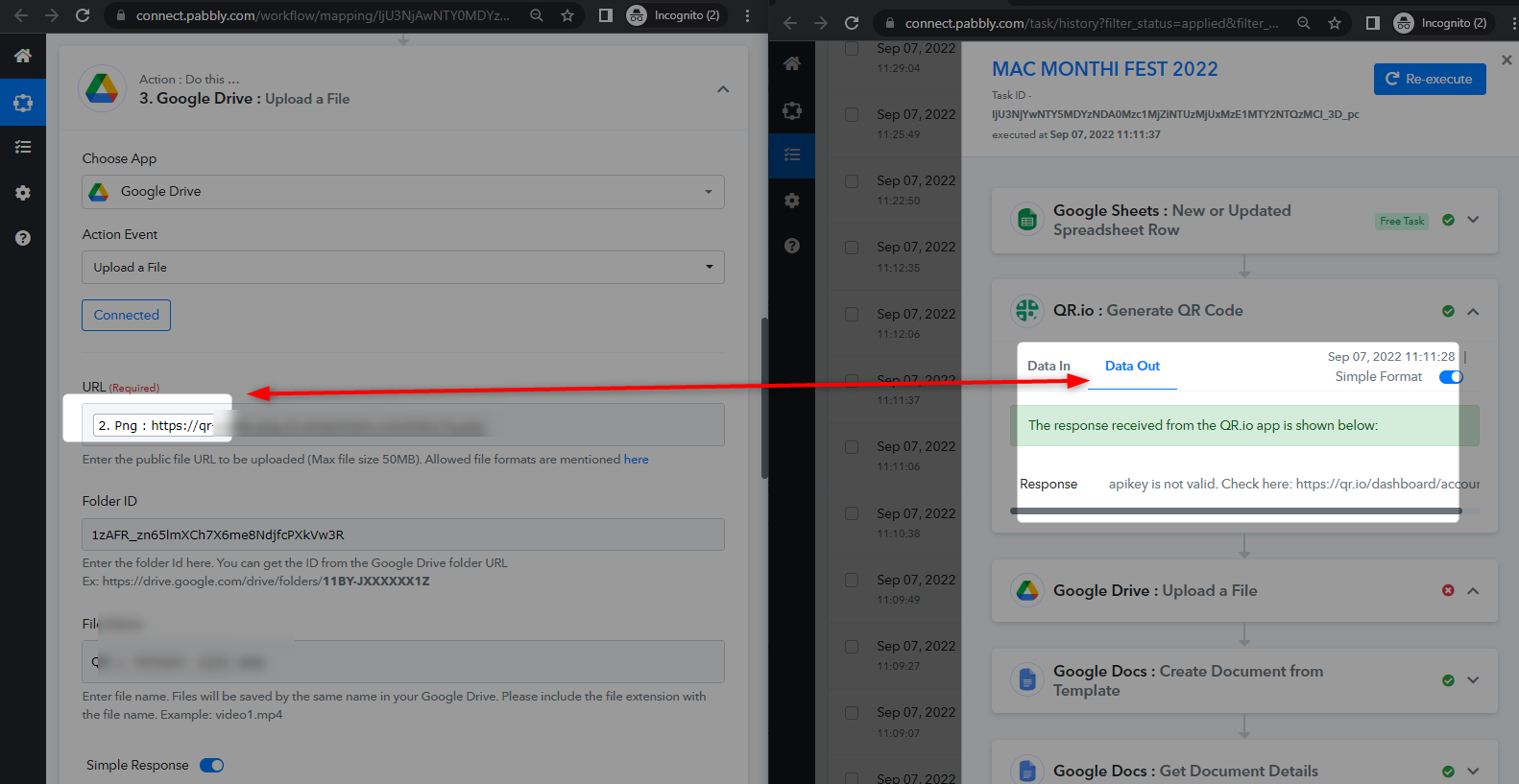
As we can see from your task history Id since your" QR.io : Generate QR Code" action step didn't produce the image file URL because of that the "Google Drive: Upload a File" action step didn't work which was required to upload the file.
@Supreme
The same happens many times and we need to send duplicate message or attachment that is not sent although the email is sent. In fact, if the file is not received, then the process should stop and the email should not go. This I am handling manually outside pabbly connect
What was the reason why Emails quota is coming to ZERO when 100 emails are not sent and why you are restricting sending for 24 hours from the date it is stopped? The process should have a proper 24 hours cycle from midnight to midnight so that the counter is set to 100 as there is an API restriction for mass email sending.
@Supreme
I only sent 50 emails from Pabbly connect and it stopped sending messages, I do not understand
why it is showing Remaining Email quota is Zero (0)
What is the limitation and how it works?
Hey @Maxpres
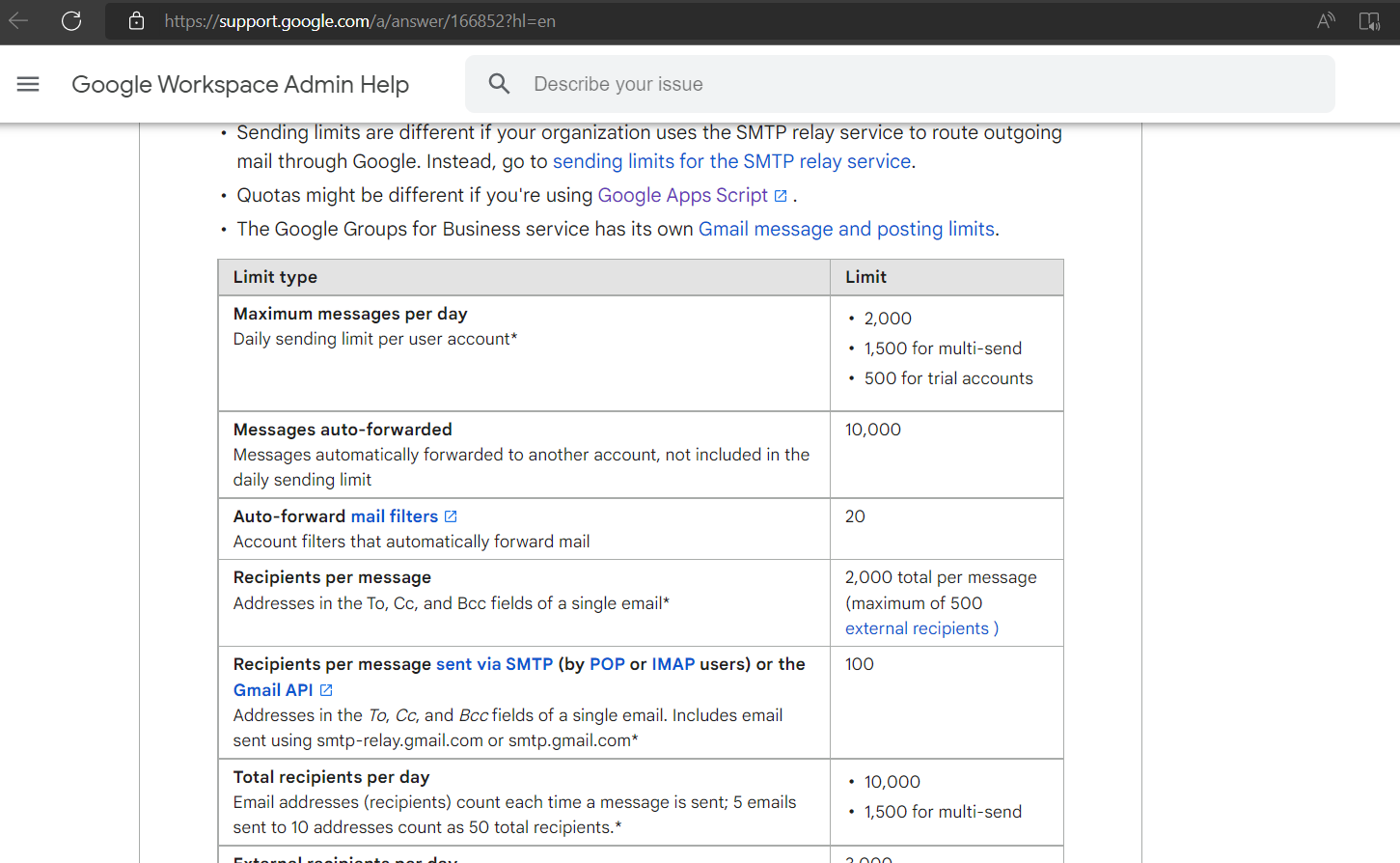
The limit of sending the emails from the Gmail is defined and if you exceed the limit then the Gmail API doesn't allow you to send the emails.
Though you can check the Gmail documentation, for the quota on how much you can send emails in a day.
https://support.google.com/a/answer/166852?hl=en