Error sending email with Office 365: The value of the parameter 'Message' is empty.
Status: Closed · Asked by Jan on · 0 views
Hello,
I just tried to create an email to multiple users (for testing just one is given) using the Office 365 in Pabbly.
All required fields are filled and choose HTML as format (with a message in HTML format).
The result is:
Error Code: ErrorInvalidParameter
Error Message: The value of the parameter 'Message' is empty.
The message is just a partial HTML starting and ending with a paragraph like this:
Hallo ticketFirstName0">1. TicketFirstName0 : Umlauttest
[...]
Gesendet by: [...]
Maybe this is the isse because I have to provide a full HTML code starting with ?
Is there a documentation what the minimal requirements are? (I didn't finde one.)
Thanks!
Jan
Short update:
I added the following start/end to the HTML code which did not solve the issue. :-(
     E-Mail Beispiel
Hallo ticketFirstName0">1. TicketFirstName0 : Umlauttest
[...]Sent by: ...
Hey @Jan
Try passing the email address in the curly brackets separated by a comma. Kindly try again first in the "Plain Text" Content Type.
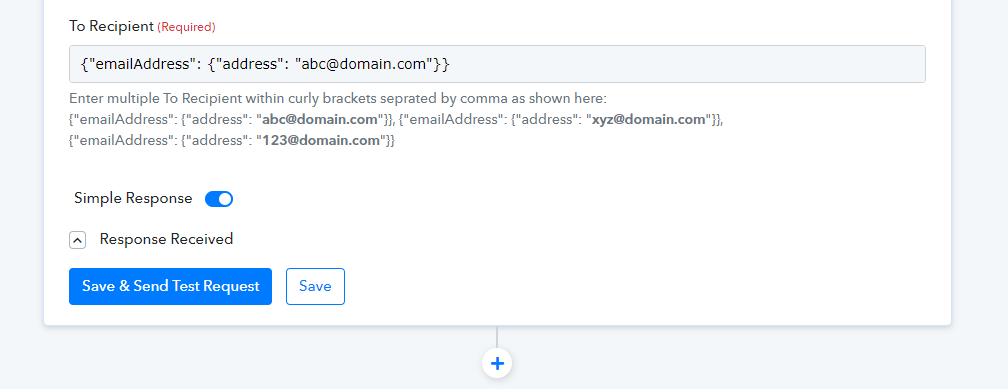
Both changes had no effect on the error message.
But the first two test emails arrived about an hour later. But this is a delay which we can not accept and the workflow would stop instead of going on to the next step. :-(
Hey @Jan
We are currently looking into your concern kindly allow us some time.
Regards
Hello @Supreme
I got a bunch of tickets in your system for all teh emails which should have been sent. But I don't see any solution yet. Is that right? We need this process (or a workaround) functional Monday morning. Do you think that will be solved until then?
Jan
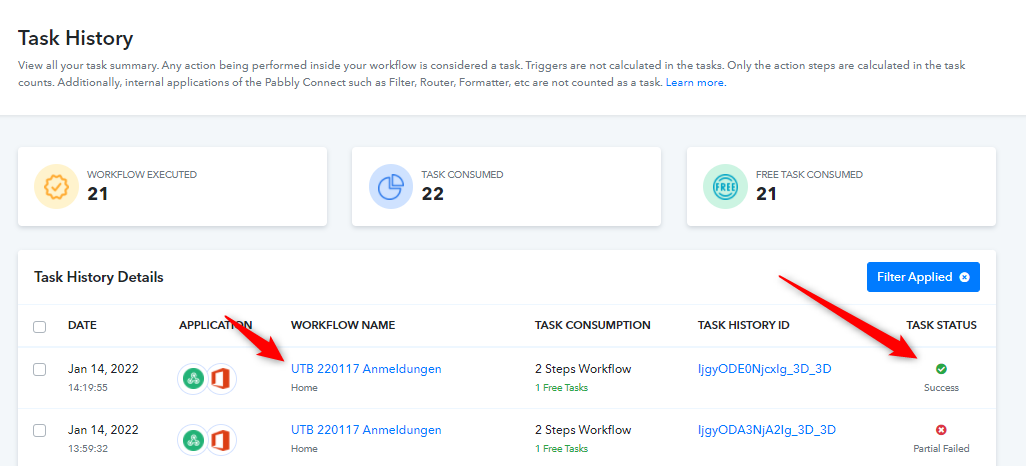
We have checked your workflow and found that, you were using Plain Text as a message content type and passing HTML in the Body Content. We have checked the same by changing the content type to HTML and replace all the double quotes from your Body Content HTML with single quotes.
That worked perfectly fine.

Hello @Naveen!
I choosed plain/text because @Supreme asked me to do so:
"Kindly try again first in the "Plain Text" Content Type."
But right now it is working so we can assue that this was some strange server issue?
Jan
Hey @Jan
But right now it is working so we can assue that this was some strange server issue?
That might not be the reason for your concern but we would recommend you to not use double quotes in the content and if you want to use kindly replace use double single quotes in place of double quotes.