Experiencing an Error When Connected Google Forms with Blogger
Status: Closed · Asked by Hasnat786 on · 0 views
Your Workflow URL: https://connect.pabbly.com/workflow/share/DkZRYwRTUDNRGwZsDl1TdAsfAAQCW1IwUElVR1ZZB38BW1Q_AkMOZAhEBScDVAloUhtTOVUJUWwOGlZSCF5TIAMaAz9UV1IoWhcDMAFIDT4OUFF5BGU#
Task History ID: IjU3NjAwNTY1MDYzMzA0MzA1MjY4NTUzNTUxMzI1MTYzNTQzMSI_3D_p
I got this error after submit test :Error Message
Error Message:
Invalid JSON payload received. Unknown name "": Root element must be a message.
[{"message":"Invalid JSON payload received. Unknown name \"\": Root element must be a message.","reason":"invalid"}]
INVALID_ARGUMENT
[{"@type":"type.googleapis.com\/google.rpc.BadRequest","fieldViolations":[{"description":"Invalid JSON payload received. Unknown name \"\": Root element must be a message."}]}]
I HAVE NOT PRESSED ANY ENTER KEY IN CONTENT
Hey @Hasnat786
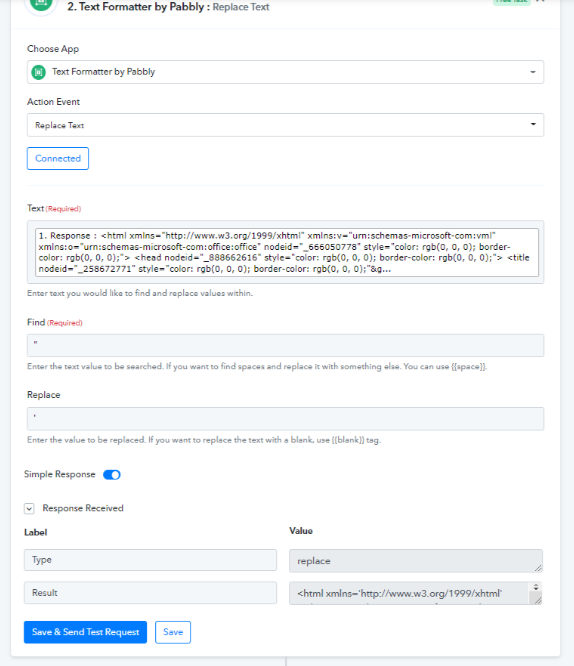
As we can see from your workflow you have included double quotes in the content, so we would recommend you pass the single quotes in place of double quotes from the content.
So, as a solution, we would recommend you replace the double quotes with single quotes.
Please check the following screenshot for the same -