Extract multiple fields
Status: Closed · Asked by airelle on · 0 views
Hello,
I'm discovering Pabbly's Text Formatter and I have a content with MUCH fields to extract (maybe 30).
I can of course add 30 "Text Formatter by Pabbly" (as serial) in my workflow but I'm wondering if there is an easier way like using Zapier... because it's a huge work to add all of them....
Can you advise me ?
Thanks,
R.
Hey @airelle
Could you please explain your usecase once on how you want to use the Text Formatter action step and want to process the automation clearly?
So that we can look into it and can guide you accordingly.
Thanks !
I send an email to the "Email Parser by Pabbly", which is generated by a (big) form on a website.
So it looks like that, it has about 30 fields and I want to use all of them in next steps (to create a Google doc from template but I know how to do that). Zapier allows to highlight easily the fields I want to extract, done in 5 minutes, so I imagine that you have an easy way too :)
Name : |Bernard Paul|Address :
|street, number, city|VAT number
||Phone
|0123456789|
|[email hidden]|Something else
||... and so on
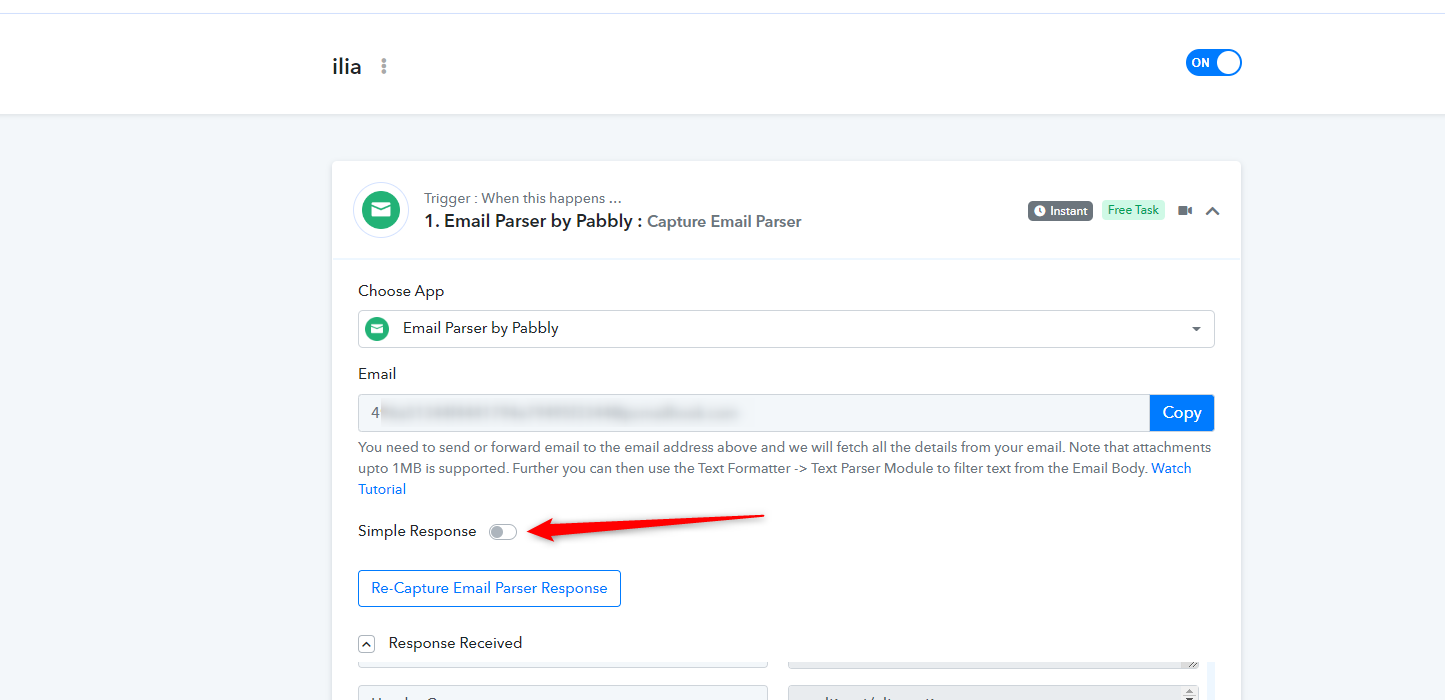
Please enable the simple response and then capture the email parser response. That will show you the response in simpler format as required by you -