Facebook Custom Audiences
Status: Closed · Asked by digitalrunner on · 0 views
Hi, i menage several BM accounts. Each of them has some connected adv account. When i try to add a user into a custom audience i am not able to see ALL the BM and adv account i own... so it is impossible to continue. I tried to logout and login on fb more times, but nothing changed. Any idea?
Thank you
I tried the same operation using Zap*** and it's gone successfully ☹️
Hey @digitalrunner
You can also pass the Business Account Id and Ad Account Id manually from your Facebook account which will even work the same for you in your automation.
Kindly try this at your end and let us know if that works for you.
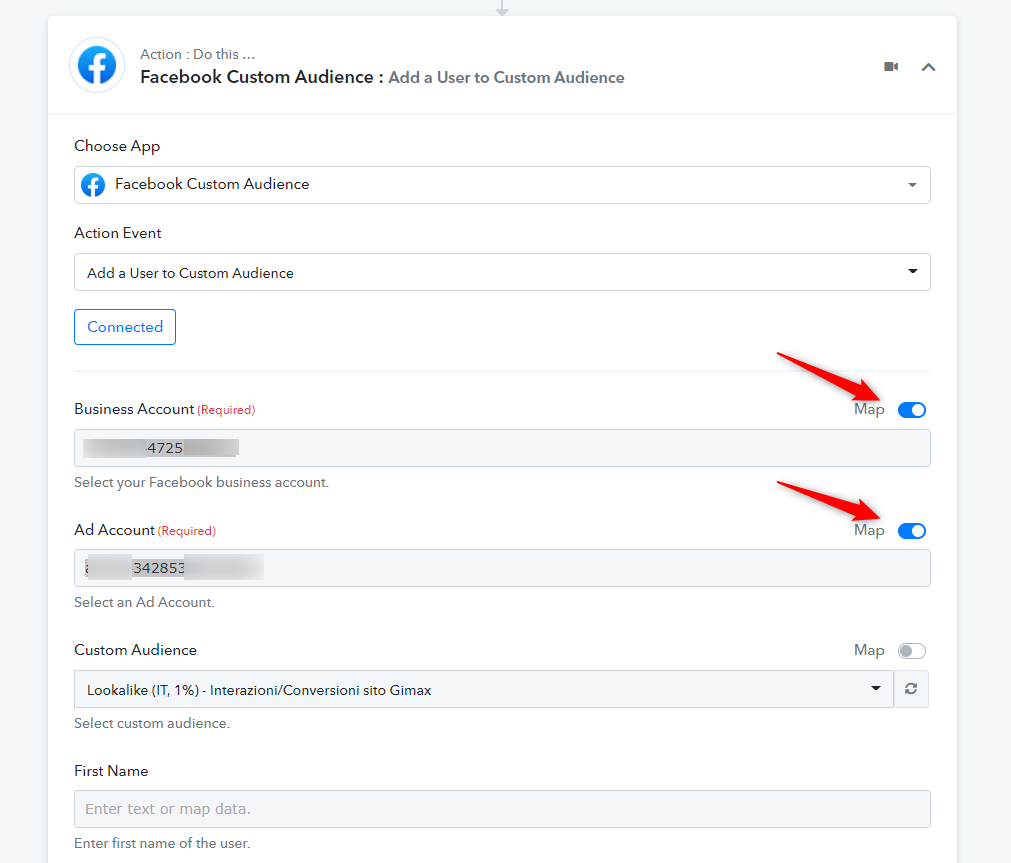
Hey @digitalrunnerYou can also pass the Business Account Id and Ad Account Id manually from your Facebook account which will even work the same for you in your automation.
Kindly try this at your end and let us know if that works for you.
Hi, I also have the same problem where no Ad Account is appearing.
I have tried the ID, and got this error 'Unsupported post request. Object with ID 'Exclusion list (fake leads)' does not exist, cannot be loaded due to missing permissions, or does not support this operation. Please read the Graph API documentation at https://developers.facebook.com/docs/graph-api'
This object exists, I'm using it in my ads. I also have full access to this account.
Hey @benjaminshuu
also have the same problem where no Ad Account is appearing.
I have tried the ID, and got this error 'Unsupported post request. Object with ID 'Exclusion list (fake leads)' does not exist, cannot be loaded due to missing permissions, or does not support this operation. Please read the Graph API documentation at https://developers.facebook.com/docs/graph-api'This object exists, I'm using it in my ads. I also have full access to this account.
Kindly reconnect your Facebook account again and make sure you have permitted all the access to the respected ad accounts.
Hey @benjaminshuuKindly reconnect your Facebook account again and make sure you have permitted all the access to the respected ad accounts.
I have reconnected, it still doesn't work.
I have full admin access to all the accounts
Hey@benjaminshuu
Could you please share the name of the workflow in which you are having such an issue so that we can look into it and can assist you accordingly?
Hey@benjaminshuuCould you please share the name of the workflow in which you are having such an issue so that we can look into it and can assist you accordingly?
Financial Clients Exclusion List > FB
IjQ1ODEwMyI_3D
The last 'Action' is the one that's having a problem
Hey @benjaminshuu
Please check out the following short recorded video for your above concern and the wrong ids whcih you have mapped in your action step.
https://www.screenpresso.com/=ZoG7g