Facebook page to Instagram Business
Status: Closed · Asked by shimrannn on · 0 views
Hi ,
I tried to integrate FB page with instagram but Pabbly is giving me the error that PHOTO / IMAGE format is not supportable , so how to fix this problem .
Hey @shimrannn
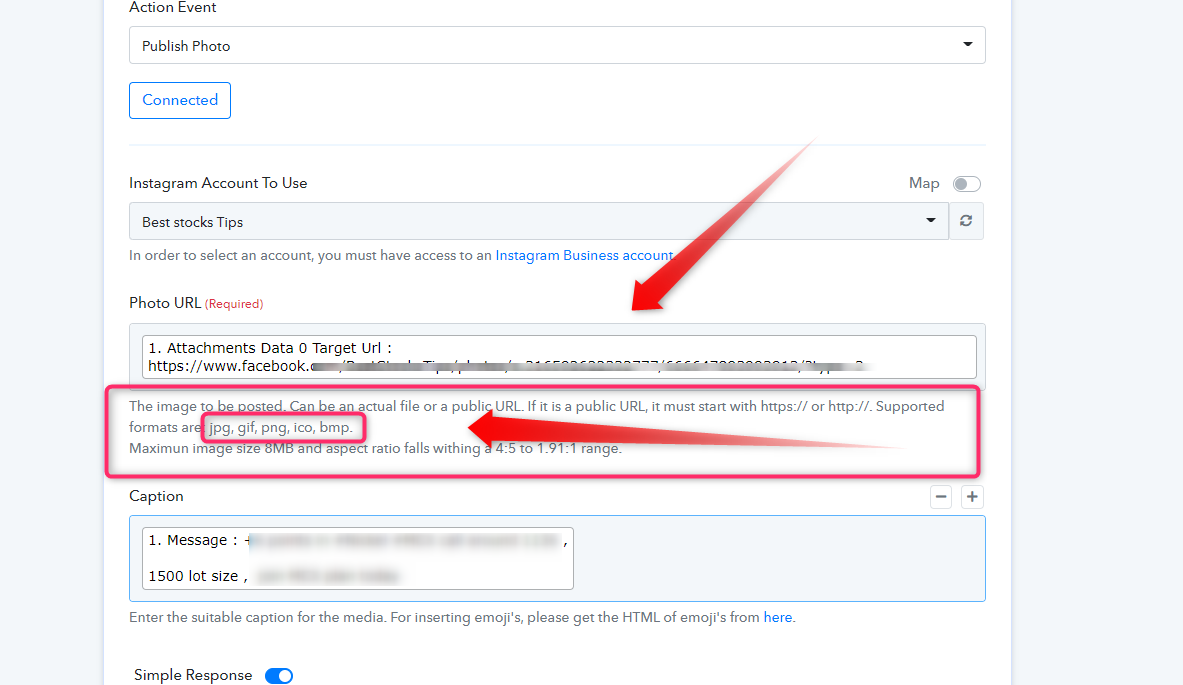
It seems like you might have passed the inappropriate file type in the "Photo URL" field. Since that one takes the file which is public in nature and has image type extension. Kindly check out the following help text of the field for better understanding.
Hi , Thanks for your update ,
I have checked it but what will be the solution for that , How can we make it in supported format .
Hey @shimrannn
I understand your concern but the Instagram API only accepts these formats only jpg, gif, png, ico, bmp. But if you pass the post's pictures on FB in the given format then you might get the picture URL in the FB' New Posts trigger response and pass it further to Instagram.
Thanks and I hope you would understand.
I tried ZAPIER and there it is working fine without any problem, but please forward this request to developers so that pabbly can also do the same .
Pabbly is awesome and I am sure this feature will also be here soon .
I tried ZAPIER and there it is working fine without any problem, but please forward this request to developers so that pabbly can also do the same .Pabbly is awesome and I am sure this feature will also be here soon .
Sure. We have forwarded your feedback to the team. Hopefully they should be able to look over it, when they update the current integration. You will be notified when we start supporting the way Zapier currently does.
We have checked your workflow and made some changes to the same, please check.
Also, we've noticed your new post doesn't contains the Instagram eligible image dimension.
Please check the attached screenshot:
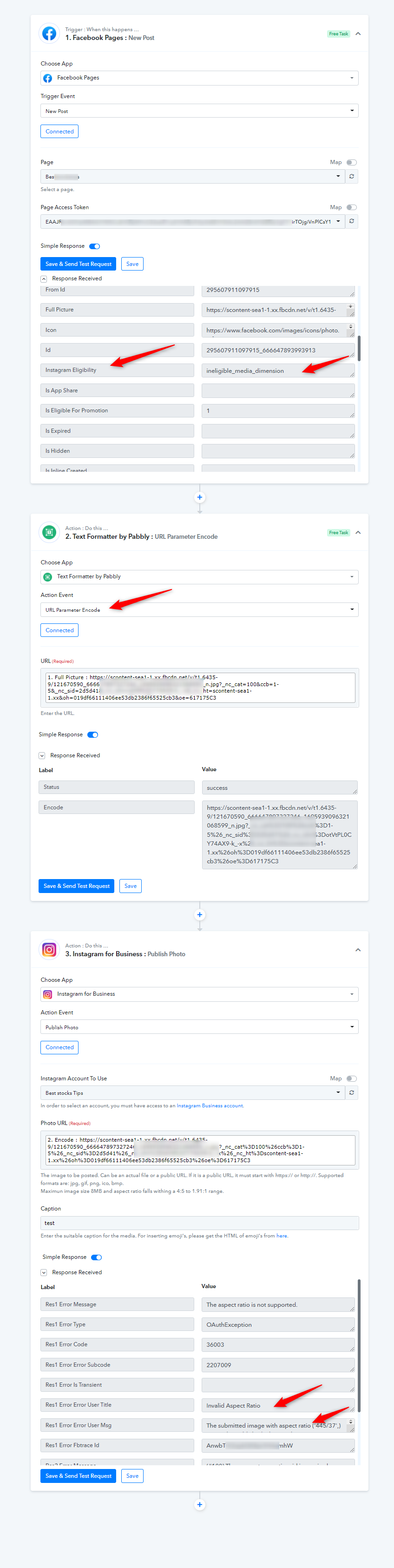
To post the media on Instagram, you must pass the image with aspect ratio falls within a 4:5 to 1.91:1 range. So ensure the facebook page post contains the Instagram eligible content and your workflow must use the "Text Formatter by Pabbly : URL Parameter Encode" step just below the "Facebook: New Post trigger".
So how can we achieve our goal to publish the same photo in Instagram because I am currently using ZAPIER and it is perfectly working without any extra step , (not even optimizing any link or image size or image format etc ) .
So I request you to forward it to your development team , so that they can fix this asap.
So how can we achieve our goal to publish the same photo in Instagram because I am currently using ZAPIER and it is perfectly working without any extra step , (not even optimizing any link or image size or image format etc ) .So I request you to forward it to your development team , so that they can fix this asap.
As I have replied you above https://forum.pabbly.com/threads/facebook-page-to-instagram-business.2092/#post-10061
To post the media on Instagram, you must pass the image with aspect ratio falls within a 4:5 to 1.91:1 range. So ensure the Facebook page post contains the Instagram eligible content and your workflow must use the "Text Formatter by Pabbly : URL Parameter Encode" step just below the "Facebook: New Post trigger".
You can achieve the same.
Further the text formatter does not consume any tasks.