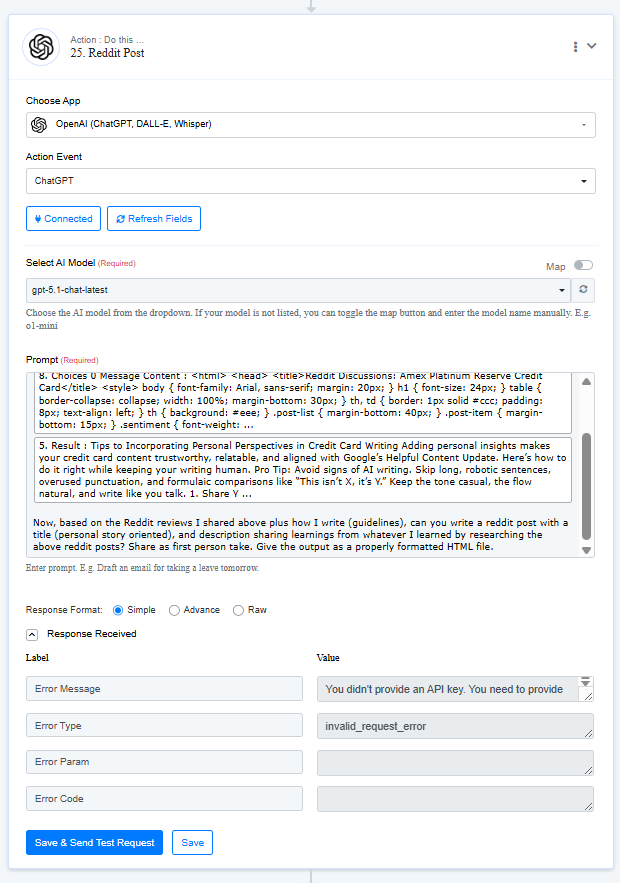
Facing issues with OpenAI connections
Status: Open · Asked by arsachdeva on · 0 views
Hi
I am facing some issue with openAI and other API connections on my account.
Here's my workflow: https://connect.pabbly.com/workflow/mapping/IjU3NjcwNTZjMDYzMTA0MzU1MjY4NTUzNzUxMzEi_pc
The issue is: I have already connected my API key and tested it multiple times. During testing (Save & Send Test Request) all works well. but when it is in production (automated), it doesn't work (Brings an error: you didn't provide an API key). Done it multiple times, also cleared cache, and basic troubleshooting. But seems to come at the same error, again and again.
Attachments

Hey @arsachdeva,
It seems that the same issue persists on click of Save and Send Test Request button as well. We recommend creating a new connection and check if it resolves the issue.