failed payments
Status: Open · Asked by Himanshu Huria on · 0 views
Do I need to create 2 seperate workflow for razorpay:
1) Payment captured
2) payment failed.
The webhook will remain same or different.
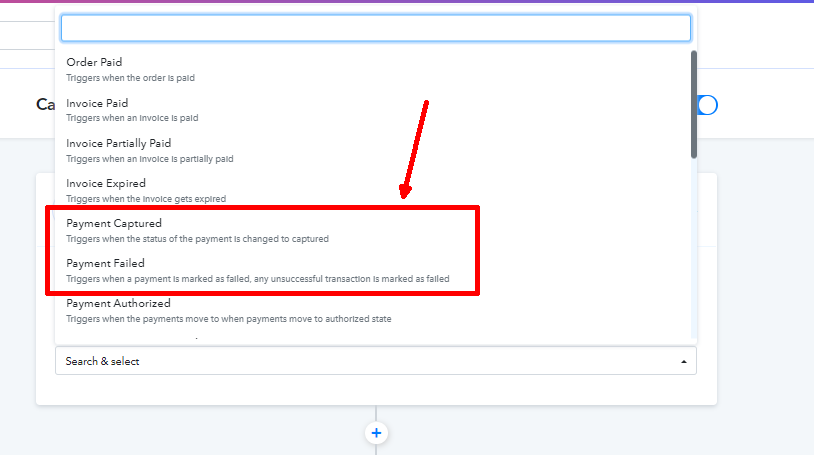
The webhook will remain same or different.
Hi, a webhook is different from other webhooks because it has its own unique URL. This means that to have two webhook URLs, you need to create two separate workflows in Pabbly. Basically, you need two workflows in Pabbly. In each of these workflows, you will have a different webhook URL. Then, you can use these two URLs and assign them to two different URLs in Razorpay.
I hope this explanation is helpful.
Hey @Himanshu Huria
Creating separate workflows is preferable; however, you also have the option to reserve events while integrating webhooks in Razorpay and incorporating routing in Pabbly Connect workflows based on specific conditions. The filtering condition will depend on the event name for which we've received the response.
I have created 2 different webhooks and 2 different workflows but still the details are not being captured from Razorpay test mode transaction
I'd really appreciate it if you could create a detailed video showcasing how you set up the webhook URL within your Razorpay account and attempted to capture the webhook response.
Exactly as explained in video shared by you. 2 seperate webhooks one for each, capture and failed. Tested the failed in test mode of Razorpay but details not captured.
I have done everything as told by you
Tested the failed in test mode of Razorpay but details not captured.
Can you please try that in the live mode and can you please record a short clip on how you are trying to capture the response?
Give some time
no success. no real failed payments getting captured. already have lost so much money.
can you come online and help me rectify this issue on priority. I am losing payments.
Please allow us some time. We will get back to you shortly.