Fetch Attchment
Status: Closed · Asked by VAMO on · 0 views
I am creating a workflow using the email parser and need to fetch and parse the email attachment. Is that possible?
Second question, can the attachment (pdf, doc or docx) be sent as a file to LeadConnect. We have a custom field set up in GHL that allows for uploads and would like the attchment sent there is possible. Please let me know.
Thank you in advance for your assistance
Hey @VAMO
Yes, you can receive the attachment in the trigger response of Email Parser which can you can pass in the attachment field of Lead Connector or GHL.
You can refer to the first part of the video tutorial for processing the attachment -
Thank you for your quick reply, but I am still having trouble.
I followed the video and instructions, but the file is not getting uploaded into GHL
Take a look https://somup.com/c0VwY5x4bY
I also tried the URL from "Data Tasks 0 Result Files 0 Url" as shown in the YouTube training video, but got the same result. Please advise
Hey @VAMO
You need to use the Iterator or JSON Extractor action step to extract the image URL from the JSON as you have already collected the webhook response in Advance format by clicking the "Simple Response" button. Following that, you will receive the file URL that should be passing the file attachment field.
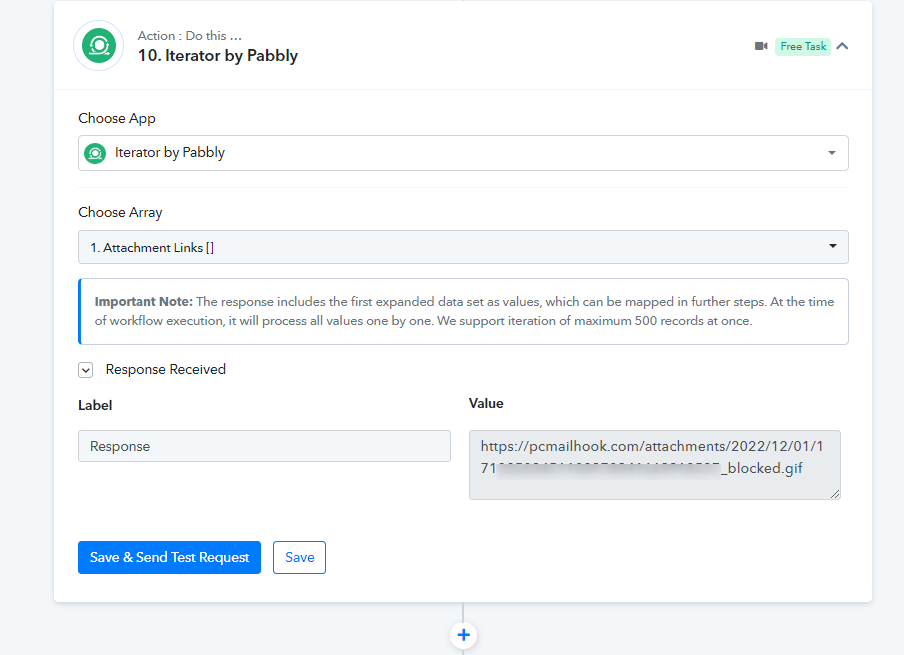
the only problem is nothing comes up in the Choose array drop down https://somup.com/c0nV0yxzOi
Hey @VAMO
In which field of the LeadConnector action step you are trying to put the file link because we cannot find it in your action step?
It's the Resume Field
Here is a walk through showing everything in Pabbly with LeadConnector and the field in GHL https://somup.com/c0nnqYxBhH
Hey @VAMO
I'm sorry that as of now, Pabbly Connect does not support the attachment field for application uploads of soft files.
ok Thanks