Filter is not working
Status: Closed · Asked by itsvijeesh on · 0 views
Your Workflow URL: https://connect.pabbly.com/workflow/mapping/IjU3NjUwNTZmMDYzNDA0MzM1MjZlNTUzNTUxMzUi_pc
Task History ID: IjU3NjEwNTY5MDYzMzA0MzI1MjZmNTUzMDUxMzA1MTYwNTQzOSI_3D_pc
Hi,
I have applied a filter. But next blocks are working even after the filter is giving false output.
More details are available in this video -
youtube.com/watch?v=5GNUX9Vsbpo
This is the link to workflow - https://connect.pabbly.com/workflow/mapping/IjU3NjUwNTZmMDYzNDA0MzM1MjZlNTUzNTUxMzUi_pc
Filters in our other workflows are also not working, so please check this issue. Thank you!
Hi @itsvijeesh,
During your workflow setup, the next steps will always be executed when you click 'Save & Send Test Request,' regardless of whether you have a filter in your workflow or not. The filter is functioning correctly in automation, as evidenced by your Task History.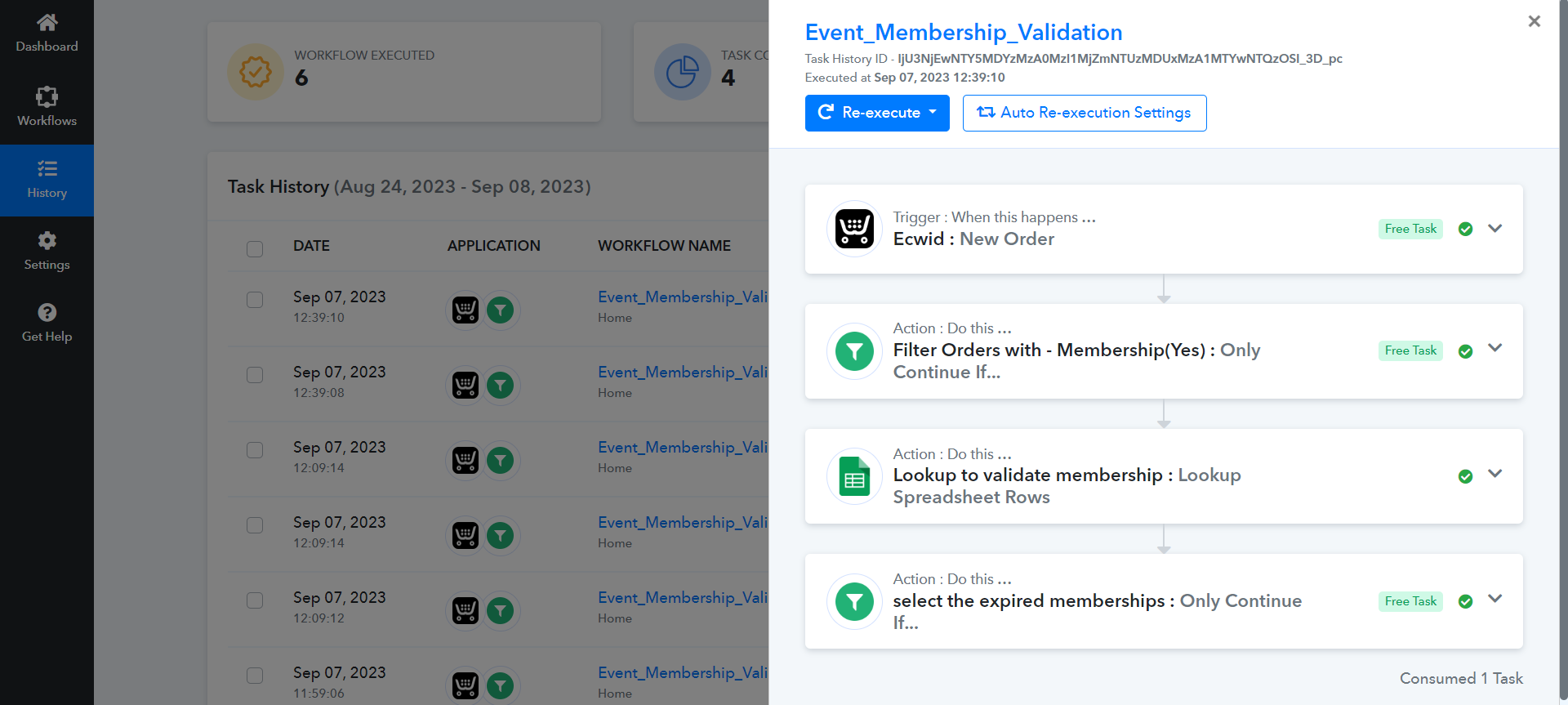
Yes, it's working fine now.
Thank you!