[FIXED] Move Folders within a Google's Shared Drive
Status: Closed · Asked by Pietro Scala on · 0 views
Updated module: Google Drive : Move a Folder
We're happy to inform you that you can now move folders within a Google's Shared Drive using the Pabbly module. With this new feature, you can easily move folders between locations, saving you time and effort.
To move a folder using Pabbly, simply choose the folder you want to move, or map his ID, insert the old parent ID in the dedicated field and choose or map the folder you want to move it to.
Pabbly will then automate the process of moving the folder to its new location.
As you may be aware, Google Shared drives allow a folder to have only one parent. Therefore, when using the Pabbly module to move a folder into another folder, it is crucial to insert the old parent ID in the dedicated field.
By using Pabbly to move folders within a Shared Drive, you can streamline your workflow and reduce the risk of errors.
ISSUE FIXED 20230622
Hi all,
I need your help.
Premises:
I have all the required premission and roles to move files and folders in the targer Shared Drive and across drives.
Issue:
Now, the problem is that when I try to use the Google Drive : Move a folder module, it can't find the target folder.
You can see here that the folder exists, although you can't access it, but I can.
I've been googling but all I could find is an old answer from 2018: https://stackoverflow.com/questions/49670353/file-movement-between-google-shared-drive-team-drive-folders-using-apps-script
We make heavy usage of shared drives, so to move everything to a user drive isn't really an option.
Thank you guys for your great work!
Hey @BusinessOnSteroids
I kindly request you to use the following action event once to locate a folder or a file. Please check if you are able to locate the folder using the provided action event.
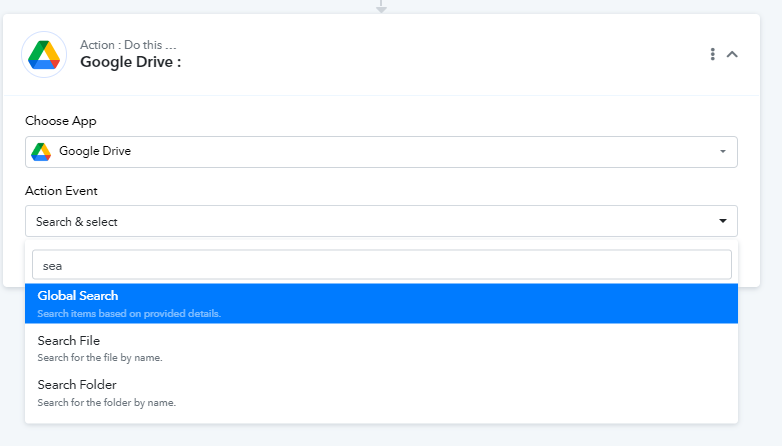
Once done, please let me know.
Thank you for the kind answer, here's the response.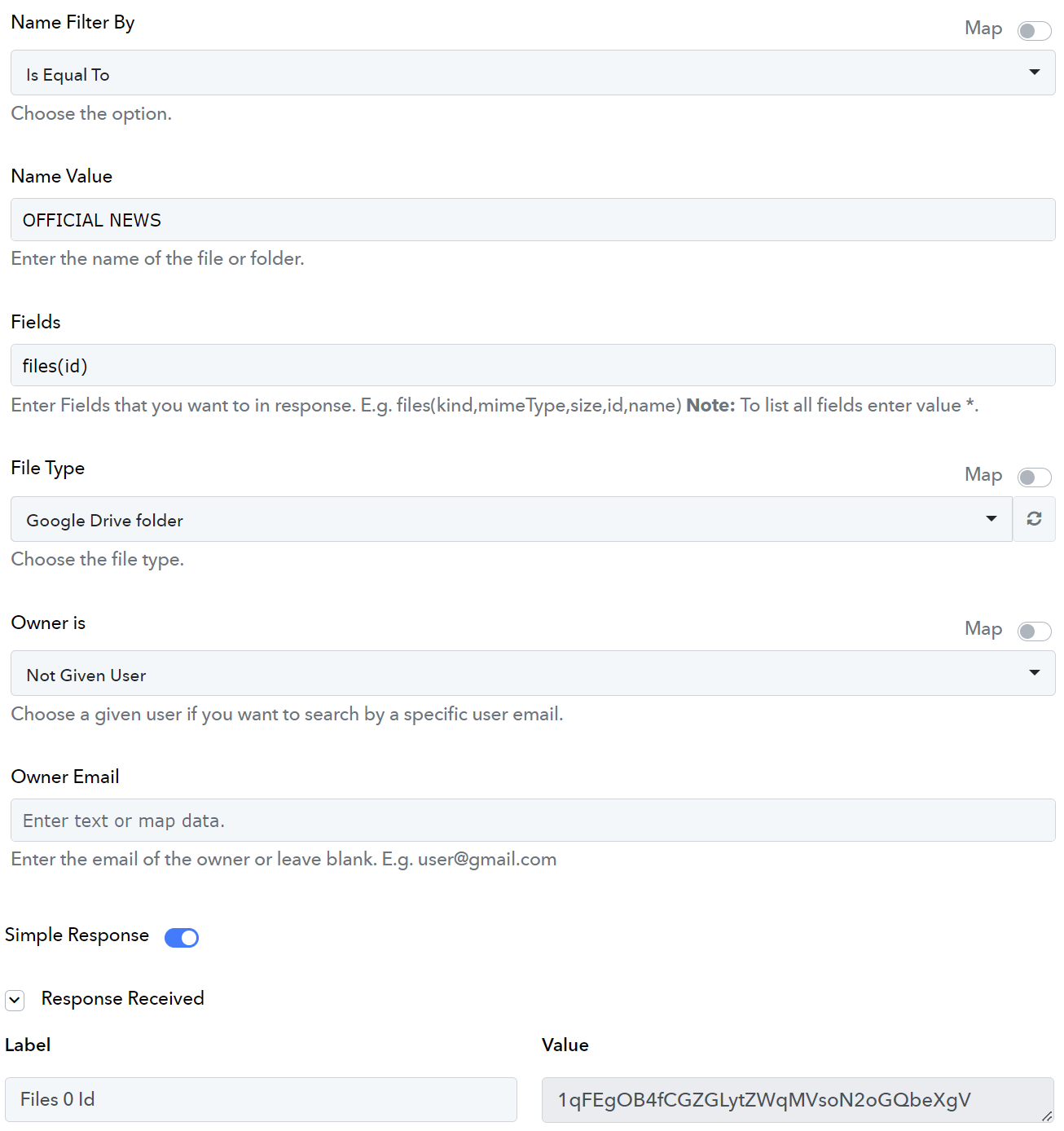
Hey @BusinessOnSteroids
Please allow us some time to check your concern with our technical team. We will get back to you soon.
Hey @BusinessOnSteroids
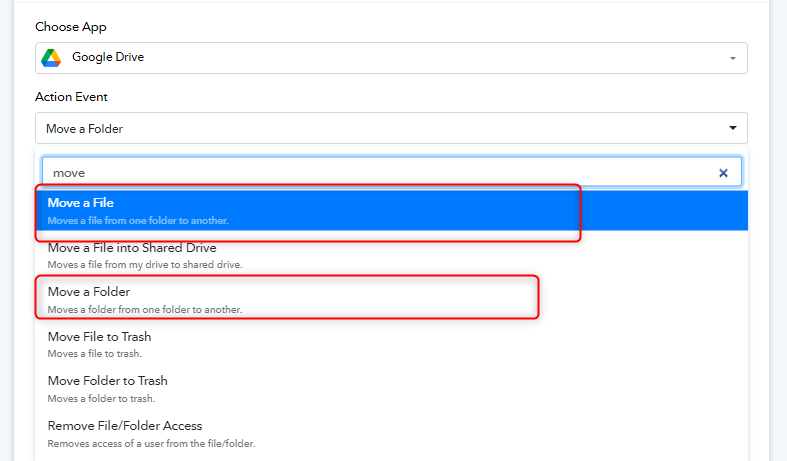
As I can check from your workflow, it appears that you are using the incorrect action event to move a file to a folder.
Instead of selecting the "Move a Folder" action event, you should choose the "Move a File" action event. This will allow you to move a specific file into the desired folder.
If your intention is to move a folder into another folder, please use the "Search a Folder" action event first to locate the folder you wish to move, and then continue with mapping the appropriate folder.
Please make the necessary changes in your workflow, and if you face any further issues please let me know.
My intention is to move a folder into another folder. So I used the "Search a Folder" action event first to locate the folder that I wish to move, and then I continue with mapping the appropriate folder.
You can see here that the folder exists, although you can't access it, but I can.
The problem is that it doesn't find the destination folder.
"File not found: 1qFEgOB4fCGZGLytZWqMVsoN2oGQbeXgV."
Here's the proof that it exists and can be accessed:
https://forum.pabbly.com/threads/move-folders-within-a-googles-shared-drive.14571/post-68577
Thank you for dedicating your time to this matter.
Hey @BusinessOnSteroids
Could you please provide me with the exact name of the folder so that I can conduct a search from my end and assist you?
Yes, It was in the workflow earlier today.
Anyway, here are the names:
Destination folder: "OFFICIAL NEWS"
Folder I want to move: "FOLDER_TO_BE_MOVED"
Thank you very much.
Please allow us some time to check your concern with our technical team. We will get back to you soon.
Hey @BusinessOnSteroids
I apologize for the inconvenience caused.
In order to assist you better, could you please record a video where you navigate through both folders that it is existing in Google drive?
Hey @BusinessOnSteroids
We have escalated your concern to our technical team for further investigation.
Although we tested from our end and it was successfully moving the folder.
Our technical team is currently working on resolving this matter. We will get back to you soon with an update.
Hey @BusinessOnSteroids
I request you to please try with this link : https://developers.google.com/drive/api/reference/rest/v3/files/update?apix_params=%7B%22fileId%22%3A%221qFEgOB4fCGZGLytZWqMVsoN2oGQbeXgV%22%2C%22addParents%22%3A%221PDEb7kNTnRAbE3CZO6GsebmcBi7s9Gt3%22%2C%22resource%22%3A%7B%7D%7D
Please let me know if you are still facing the same issue.
Thank you.
First of all: fileId and parentId were swapped.
'FOLDER_TO_BE_MOVED' must go INTO 'OFFICIAL NEWS' and not the other way. I thought It was clear enough.
I swapped them back anyway.
Let's continue with your debug.
Here's what you requested:
Request:
fileId = "1PDEb7kNTnRAbE3CZO6GsebmcBi7s9Gt3";
addParents="1qFEgOB4fCGZGLytZWqMVsoN2oGQbeXgV";
Answer:
{
  "error": {
    "code": 404,
    "message": "File not found: 1qFEgOB4fCGZGLytZWqMVsoN2oGQbeXgV.",
    "errors": [
      {
        "message": "File not found: 1qFEgOB4fCGZGLytZWqMVsoN2oGQbeXgV.",
        "domain": "global",
        "reason": "notFound",
        "location": "fileId",
        "locationType": "parameter"
      }
    ]
  }
}
Which is wrong for two reasons:
- Shared drives are not supported without supportsAllDrives=true;
- Shared drives allow only one parent for each file;
So I switched supportsAllDrives=true:
Request:
fileId = "1PDEb7kNTnRAbE3CZO6GsebmcBi7s9Gt3";
addParents="1qFEgOB4fCGZGLytZWqMVsoN2oGQbeXgV";
supportsAllDrives=true;
And here is the error:
Answer:
{
  "error": {
    "code": 403,
    "message": "A shared drive item must have exactly one parent.",
    "errors": [
      {
        "message": "A shared drive item must have exactly one parent.",
        "domain": "global",
        "reason": "teamDrivesParentLimit"
      }
    ]
  }
}
Then I've finally added the parameter removeParents="0AE0b5ELRwvKVUk9PVA"
It returns 200 and IT WORKS for me, which means that the folder was indeed moved.
Request:
fileId = "1PDEb7kNTnRAbE3CZO6GsebmcBi7s9Gt3";
addParents="1qFEgOB4fCGZGLytZWqMVsoN2oGQbeXgV";
supportsAllDrives=true;
removeParents="0AE0b5ELRwvKVUk9PVA"
Answer:
{
  "kind": "drive#file",
  "id": "1PDEb7kNTnRAbE3CZO6GsebmcBi7s9Gt3",
  "name": "FOLDER_TO_BE_MOVED",
  "mimeType": "application/vnd.google-apps.folder",
  "teamDriveId": "0AE0b5ELRwvKVUk9PVA",
  "driveId": "0AE0b5ELRwvKVUk9PVA"
}
URL: https://developers.google.com/drive/...%22resource%22%3A%7B%7D%7D
I really apologize for the inconvenience caused to you.
I request you to please try again as I have corrected it and please let me know if you are still facing the same issue.
Hi @Arshita,
I'm thrilled to share the news with you! Your fix worked like a charm, and I'm now able to continue my work smoothly.
Thank you so much for resolving the issue, which turned out to be way more challenging than initially anticipated!
On that note, I have an exciting idea. Since the updates to Google Drive's module have proven to be a game-changer, would it be possible for me to create a post explaining the updates and how the new version functions? I believe it would be beneficial for other users to learn about these enhancements.
Once again, I can't express enough how grateful I am for your intervention and for getting everything back on track. Your support is greatly appreciated.
I'm absolutely delighted to hear that the issue is fixed now.
Could you please let me know where you wish to create a post explaining the updates and how the new version functions?
I think that the most appropriate section of the forum to post would be "All Application Help and Troubleshooting". What do you think of it?
I apologize for the inconvenience, but you do not have admin access to create a post on the forum. Unfortunately, we are unable to provide you with admin access at this time.
However, if you would like to share your content with us, we would be happy to assist you by posting it on the forum on your behalf.
I apologize for the inconvenience, but you do not have admin access to create a post on the forum. Unfortunately, we are unable to provide you with admin access at this time.However, if you would like to share your content with us, we would be happy to assist you by posting it on the forum on your behalf.
I'll certainly share It with you when It's ready. Thank you
@BusinessOnSteroids Hey,
Am facing the same issue and understood that I had to remove the existing parent ID and add new parent ID ( the new folder to which it has to be moved)
Wondering how were you able to pull this off?
Could you please help me out ?
Hi @Iohit,
you can get the parent's ID from the "Parents 0" field in the response of "Get file or folder by ID".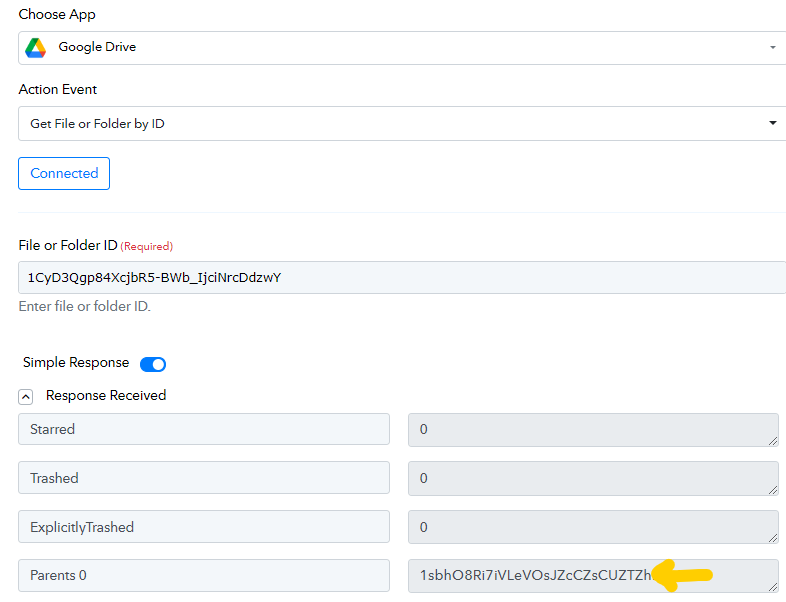
Please like the post if I answered your question or feel free to ask more.
Hey @BusinessOnSteroidsI request you to please try with this link : https://developers.google.com/drive/api/reference/rest/v3/files/update?apix_params={"fileId":"1qFEgOB4fCGZGLytZWqMVsoN2oGQbeXgV","addParents":"1PDEb7kNTnRAbE3CZO6GsebmcBi7s9Gt3","resource":{}}
Please let me know if you are still facing the same issue.
I tried using this developer link and as per your instructions is subsequent reply by adding the new parent id in add parent and adding the existing parent id in remove parent field and it worked like a charm in that developers environment. Wondering how did you implement this in pabbly workflow ?
Hello @lohith
I'm glad to hear that you were able to successfully implement the solution in the developer's environment using the provided link and instructions.
Regarding the implementation in the Pabbly workflow, we follow a similar approach. In Pabbly, you can use the relevant actions and fields to add and remove parent IDs as needed.
@Arshita can you be more specific which actions to be used?
@Iohit,
I apologize if i misunderstood your request. You can use the following module in pabbly connect to move the desired folder into another: Google Drive - Move a Folder.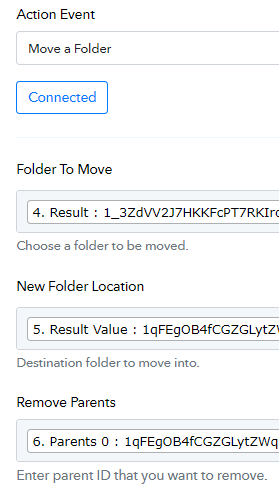
Hey @lohith
You can use the Action event:- Move a folder of Google Drive and remove the parent ID.