for some reason messages are not sent to whatsapp from a formidable way
Status: Closed · Asked by pablol44 on · 0 views
I did all the steps but at the time of testing the message I don't get anything
Hey @pablol44
We looked at your workflow and it seems like you have deleted the app from your Cloud API account and because of that, the action step is not processing your messages.
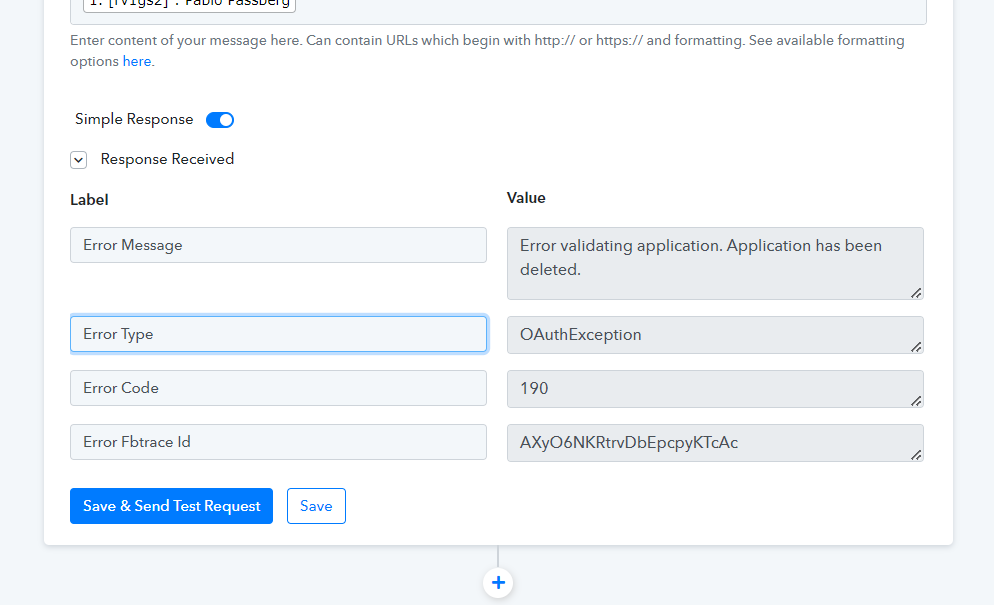
Check the following video tutorial for your better understanding.
I have an idea of the error, (I deleted it after it didn't work), I entered a number to the whatsapp cloud api account, then in pabbly I misplaced the keys and that's why it wasn't sent but I made the mistake of deleting the app, then create another app in whatsapp try to enter the same number but it told me that I already had a whatsapp account, so I tried to enter whatsapp with this number (I did not have any whatsapp account before) and whatsapp tells me that I have to wait 1 hour so I can't delete whatsapp account.
do you know of a tutorial that connects formidable forms with whatsapp?
Hey @pablol44
do you know of a tutorial that connects formidable forms with whatsapp?
There is no direct integration video regarding your use case. But you can refer to the following video tutorial on sending messages via Cloud API.
(Watch the second part of the video)
repair all of the above but....
the "text message" doesn't work but when I put the "template message" it works, but I don't know how to put the information of formidable forms in the template message in facebook developer.
Hey @pablol44
To use the "WhatsApp Cloud API: Send Text Message" action step you have to first initiate manual chatting on Whatsapp.
Then kindly try again.