Formula Parse Error Mobile Phone Number from Calendly to Google Sheet
Status: Closed · Asked by asavage on · 0 views
I am getting a formula parse error when I try and take the phone number that is entered on a Calendly signup and sending the number to Google Sheets.
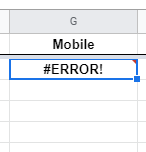
I am getting a formula parse error when I try and take the phone number that is entered on a Calendly signup and sending the number to Google Sheets.
Share the format in which you get Mobile number from calendly.

Just add ' before mobile number in Mobile field for Gsheet in pabbly connect, it will tell gsheet to not consider it as an formula.
So I put the ' before the mobile number in the Gsheet and it looks good. 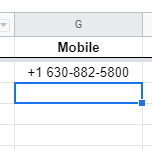
But how do I get Pabbly to do this automatically? I don't see where I can control this formating
So I put the ' before the mobile number in the Gsheet and it looks good.But how do I get Pabbly to do this automatically I don't see where I can control this formating
Do that in pabbly not in gsheet, do that the same field of which you send me screenshot of. Mobile field. Just add ' before you map mobile value. So it wi automatically add ' to all mobile numbers going to gsheet.
Like this - 
Got it. Thanks! :)