[FRD Response ID] DO NOT REMOVE
Status: Closed · Asked by virsingh77 on · 0 views
Hi,
I'm using google forms to capture information into google sheets and use it in my workflow 'sheets to calendar'
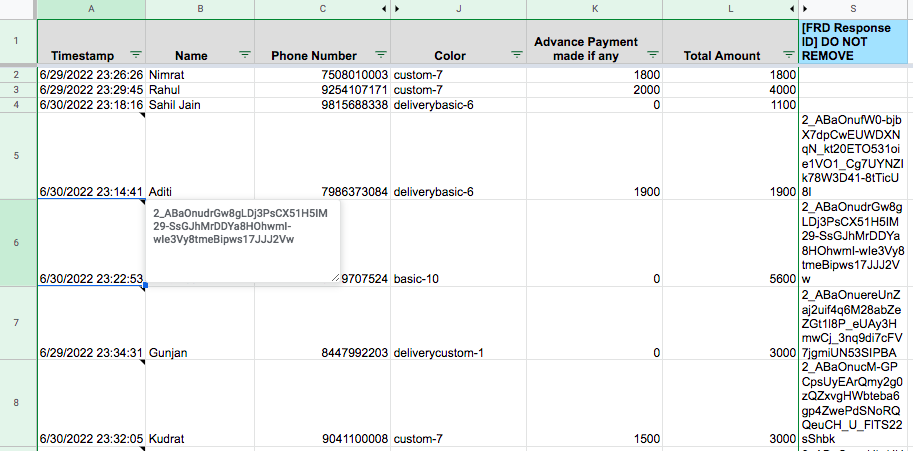
I've noticed that a column is created towards the end of the linked worksheet with the heading '[FRD Response ID] DO NOT REMOVE'. This contains some data that is used as a comment for the cells of the first column of the worksheet. While this doesn't interfere with the working can anyone let me know why this column has been created and how to get rid off it?
Hey @virsingh77
Could you please show the reference of your concern in your workflow or your task history Id with the help of a screenshot or short video, since it does not begin clear from your above query?
Pls refer to the attached screenshot, the column highlighted in blue is what I'm referring to. I have no idea how this column got created. The data under this column is being used for creating comments for the corresponding first cell of the same rowExample: the data in cell S5 is used as comments for cell A5
Hey @virsingh77
We cross-check your individual workflows and their history logs where we do not find anything which can create the column and pass the data into it.
Kindly check the columns entry and your Google Sheets from your end, since we do not have added any data or manipulated any kind of data from our end.
Hello, I could trace how this column got created. Can anyone pls suggest how to identify this?
Hey @virsingh77
You have to identify the column from your Google Sheet at your end and also, check all your workflow at your end for the same.