Getting triple entries from workflow
Status: Closed · Asked by paradisianway on · 0 views
So i created workflows for Groovesell to Leadconnector to create a new contact once a purchase is made. I have one workflow for each plan. I tested with one plan and it created 3 identical contacts at once within leadconnector. So every automation after that got tripled.
What is the problem here? I only have one webhook within that plan in Groove.
Here's a screenshot as well.
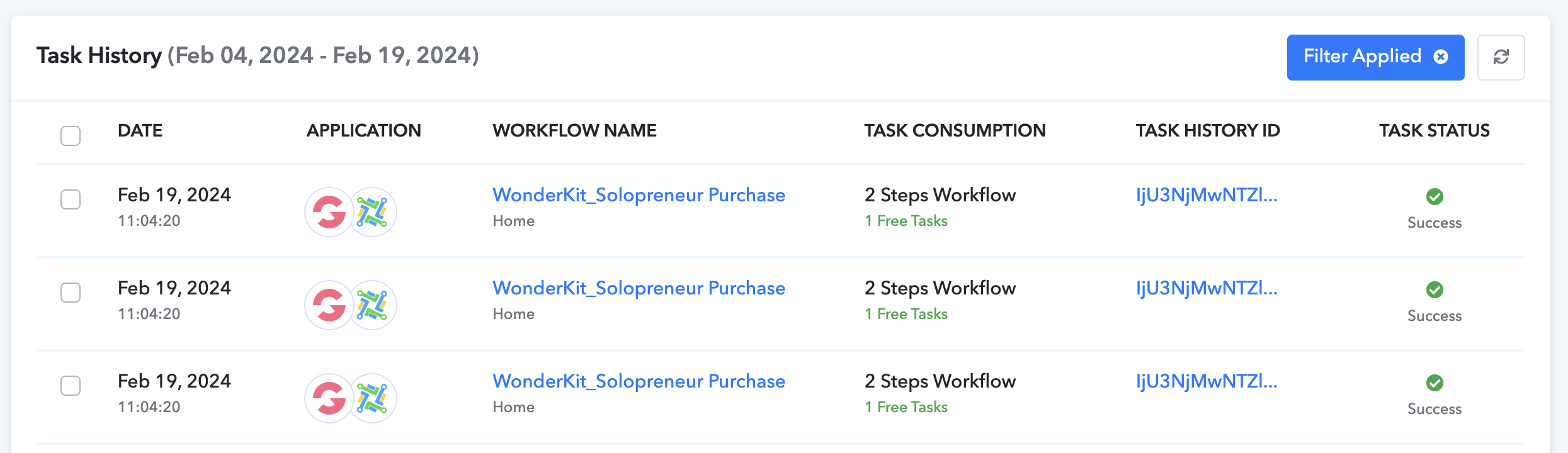
I tried duplicating the workflow and saving it again. But still the same result.
Hey @paradisianway
Can you please check from your GrooveSell account once if you have configured your webhook URL in your account multiple times.
Kindly check it through a webbooks testing site called webhook.site.
You can copy the webhook URL provided by Webhook.site inside your application and do the test event inside the application to see if the webhook is being worked inside Webhook.site. This will double-confirm the issue.
Here is a sample video that you can follow to track the webhook issue:
https://webhook.site/#!/296c8add-efd8-4849-b03e-654fa108793c
Hey @paradisianwayCan you please check from your GrooveSell account once if you have configured your webhook URL in your account multiple times.
Kindly check it through a webbooks testing site called webhook.site.
You can copy the webhook URL provided by Webhook.site inside your application and do the test event inside the application to see if the webhook is being worked inside Webhook.site. This will double-confirm the issue.
Here is a sample video that you can follow to track the webhook issue:
https://webhook.site/#!/296c8add-efd8-4849-b03e-654fa108793c
okey, so i'm getting 3 responses in there as well. What does that mean and how do i solve it?
Please verify it using a webhooks testing platform named webhook.site. You can paste the webhook URL generated by Webhook.site into your application and perform a test event within the application to ascertain if the webhook is functioning properly within Webhook.site. This will serve as an additional confirmation of the issue.
Please verify it using a webhooks testing platform named webhook.site. You can paste the webhook URL generated by Webhook.site into your application and perform a test event within the application to ascertain if the webhook is functioning properly within Webhook.site. This will serve as an additional confirmation of the issue.
Yes, i know - you already told me that. I tried it, and got three responses in there as well. Now what?
Hey @paradisianway
Please reach out to GrooveSell support if you encounter multiple incoming webhook responses from their server. GrooveSell's trigger event operates on a webhook-based mechanism, capturing responses only when they are sent by the application.